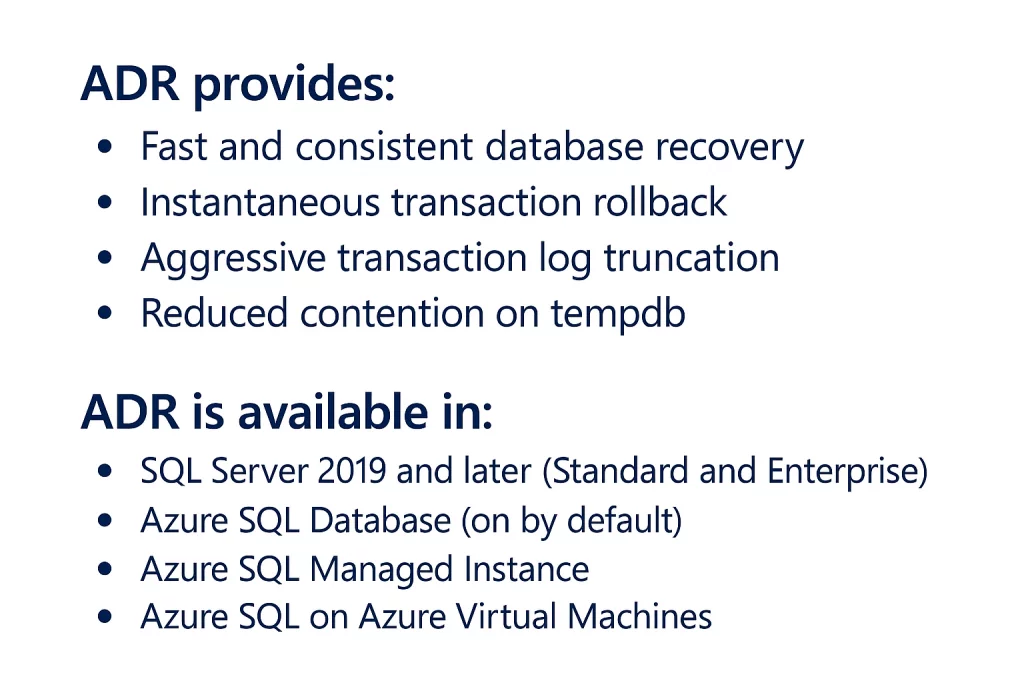
Accelerated Database Recovery (ADR) is one of the most impactful engine changes introduced with SQL Server 2019. The goal of ADR is to dramatically reduce database recovery and rollback time, even in the presence of long‑running transactions.
What Is Database Recovery?
In a previous post, I discussed the SQL Server Restore and Recovery process. The database recovery phase is the process SQL Server uses to bring each database online in a transactionally consistent state.
Recovery occurs:
- After a SQL Server restart
- After restoring a database
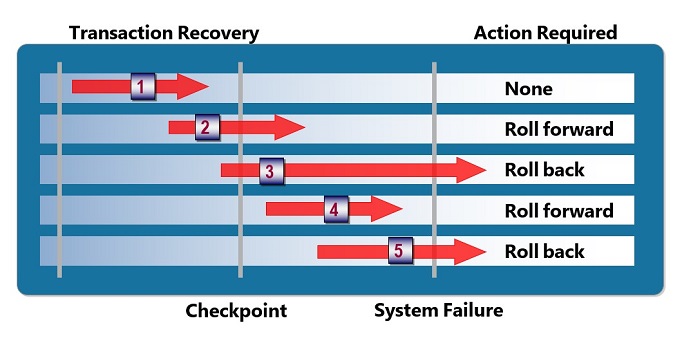
SQL Server uses the transaction log to:
- Roll forward committed transactions
- Roll back uncommitted transactions
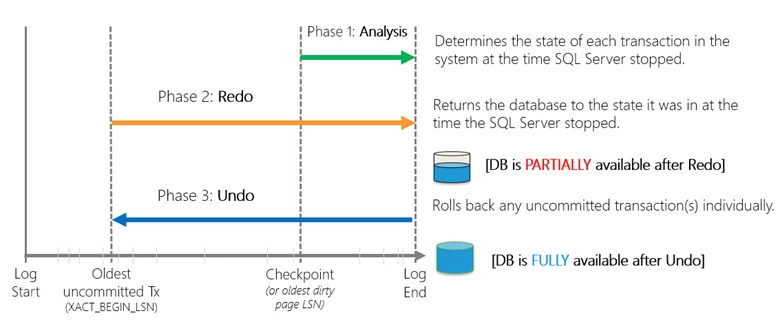
Traditional recovery is based on three phases:
- Analysis – Determines which transactions were active and which pages were dirty
- Redo – Reapplies logged operations
- Undo – Rolls back incomplete transactions
Why Traditional Recovery Is a Problem (ARIES)
SQL Server’s classic recovery model (ARIES – Algorithms for Recovery and Isolation Exploiting Semantics) works well, but it has a major downside. Recovery time is proportional to the longest running transaction. Common issues include:
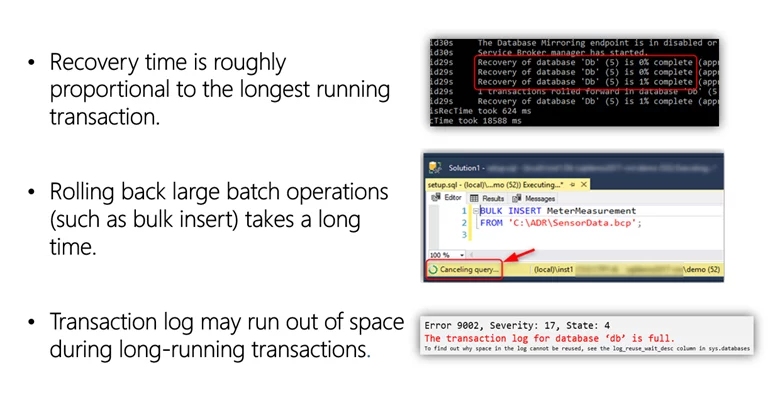
These issues often show up during:
- Bulk loads
- Index rebuilds
- Long‑running ETL processes
Enter Accelerated Database Recovery (ADR)
Accelerated Database Recovery (ADR) is a SQL Server 2019 database engine feature that greatly improves database availability, especially in the presence of long running transactions.
How to Enable ADR
ALTER DATABASE <db_name> SET ACCELERATED_DATABASE_RECOVERY = ON
(PERSISTENT_VERSION_STORE_FILEGROUP = [VersionStoreFG])
Core Components of ADR
ADR works by introducing several new engine components.

Persisted Version Store (PVS)
- Stores row versions inside the user database, not tempdb
- Enables fast, version‑based undo
- Improves isolation and secondary readability
Logical Revert
- Asynchronous, row‑level undo mechanism
- Uses PVS instead of scanning the transaction log
- Releases locks immediately when a transaction is aborted
sLog (Secondary Log Stream)
- In‑memory log for non‑versioned operations (locks, metadata changes, bulk ops)
- Serialized during checkpoints
- Truncated aggressively as transactions commit
Cleaner
- Background process that removes unneeded row versions
The Accelerated Database Recovery Process
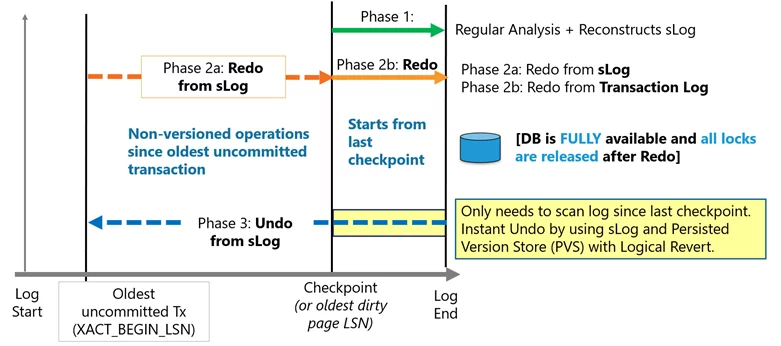
ADR fundamentally changes recovery behavior to address issues with traditional recovery process. This is done by completely redesigning the SQL Server database engine recovery process. By making recovery instantaneous the server avoids having to scan the log from the beginning of the oldest active transaction.
With ADR, the transaction log is only processed from the last successful checkpoint (or oldest, dirty page Log Sequence Number (LSN)). As a result, recovery time is not impacted by long running transactions.
This minimizes the required transaction log space since there is no longer a need to process the log for the whole transaction. As a result, the transaction log can be truncated aggressively as checkpoints and backups occur.
At a high level, ADR achieves fast database recovery by versioning all physical database modifications and only undoing logical operations, which are limited and can be undone almost instantly. Any transaction that was active as of the time of a crash are marked as aborted and, therefore, any versions generated by these transactions can be ignored by concurrent user queries.
The Recovery Process with Accelerated Database Recovery
Analysis phase
The process remains the same as today with the addition of reconstructing sLog and copying log records for non-versioned operations.
The Redo phase broken into two steps
- Step 1: Redo from sLog (oldest uncommitted transaction up to last checkpoint). Redo is a fast operation as it only needs to process a few records from the sLog.
- Step 2: Redo from Transaction Log starts from last checkpoint (instead of oldest uncommitted transaction)
Undo phase
The Undo phase with ADR completes almost instantaneously by using sLog to undo non-versioned operations and Persisted Version Store (PVS) with Logical Revert to perform row level version-based Undo.
The following types of workloads benefit most from ADR:
- Workloads with long-running transactions.
- Workloads where active transactions are causing the transaction log to grow significantly.
- Workloads that have experienced long periods of database unavailability due to long running recovery (such as unexpected service restart or manual transaction rollback).
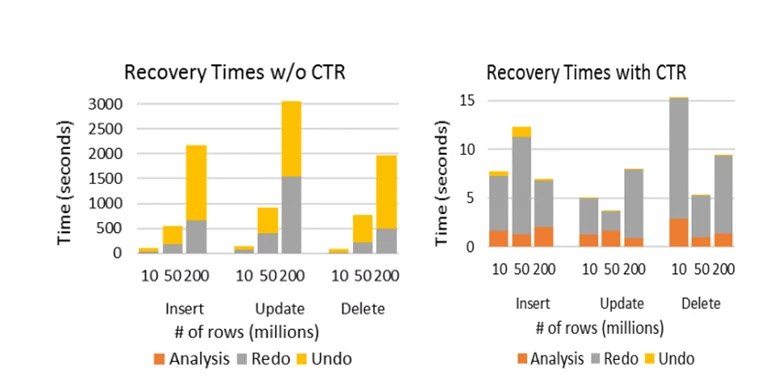
Recovery Time Comparison
Microsoft research shows recovery time with ADR remains nearly constant, regardless of transaction size. This is a major improvement over traditional recovery. You can read the white paper with the performance impacts on Constant Time Recovery in SQL Server.
Frequently Asked Questions
- Will my database be larger? Yes. Row versions will be persisted in the database. Monitoring is recommended. This is a tradeoff between the cost of storage vs the cost of downtime recovery.
- Will ADR affect performance? It depends. Write‑heavy OLTP workloads see the most impact, while many workloads see minimal overhead.
- How is PVS different from tempdb version store? PVS stores versions in the user database and supports snapshot isolation when ADR is enabled.
- How does ADR affect Availability Groups? ADR can significantly speed up failover and improve secondary readability because versions will be persisted.
When Should You Use ADR?
ADR is especially beneficial for:
- Systems with long‑running transactions
- Environments with frequent recovery or failover events
- Databases experiencing transaction log growth pressure
Final Thoughts
Accelerated Database Recovery is one of the most meaningful architectural changes to SQL Server recovery in decades. For many workloads, it turns recovery and rollback from a waiting game into a non‑event. If you’re running SQL Server 2019 or Azure SQL, ADR is absolutely worth understanding; and in most cases, enabling.
You can watch the video from the session I delivered for the Microsoft Data Platform Continuity Virtual Group here: Getting Started – Accelerated Database Recovery – March 2022



Be the first to comment on "Accelerated Database Recovery in SQL Server"