Row-Level Security (RLS) allows you to control which rows users can see or modify in a table without changing application logic. Instead of enforcing data access rules in the app layer, SQL Server evaluates them inside the database engine, making them consistent and difficult to bypass.
In this post, we’ll walk through a simple, self-contained Row-Level Security demo using SQL Server database users without logins. You can run this entire example locally to see exactly how RLS works.
Why Use Row-Level Security?
Row-Level Security is ideal when:
- Multiple users share the same tables
- Each user should only see their data
- Administrators or managers need full visibility
- You want to enforce security centrally in the database
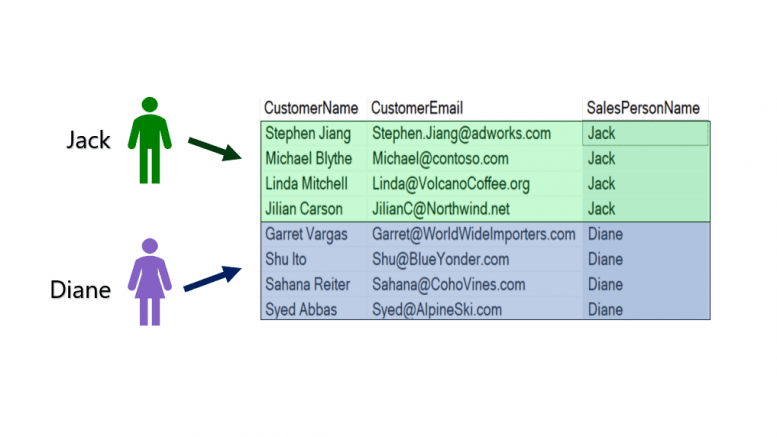
For example, in the picture above there are two salespeople that work for the Adventure Works Bicycle Company named Jack and Diane. Each salesperson has been assigned leads in the Customers table.
Without Row-Level Security, the salespeople would be able to see and modify information for all the customers in the table. We want to make sure that the two employees will only be able to SELECT or UPDATE the records that have been assigned to them.
Demonstration Overview
Our demo scenario looks like this:
- A Customer table holds sales data
- Each customer belongs to a SalesPerson
- Salespeople can see only their customers
- A Manager can see all customers
We’ll enforce this using:
- A table-valued function
- A security policy
- SQL Server’s EXECUTE AS USER for testing
Create the Demo Database
We start by creating a dedicated demonstration database name RLS_Demo.
--Prepare for the Demo
USE MASTER
GO
DROP DATABASE IF EXISTS RLS_DEMO
GO
CREATE DATABASE RLS_DEMO
GO
USE RLS_DEMO
GO
Create Users Without Logins
For this demonstration creating database users without server logins.
--CREATE Self-contained Database Users without Logins
CREATE USER Jack WITHOUT LOGIN
CREATE USER Diane WITHOUT LOGIN
CREATE USER Manager WITHOUT LOGIN
GO
Each user will represent a different role accessing the same table.
Create and Populate the Customer Table
Next, we create a table that includes a column we’ll use for filtering:
--Create Customer Table
CREATE TABLE dbo.Customer
(CustID tinyint IDENTITY,
 CustomerName varchar(30),
 CustomerEmail varchar(30),
 SalesPersonName varchar(5))
GO
Insert sample data owned by Jack and Diane:
--INSERT Data into Customer Table
INSERT INTO dbo.CUSTOMER VALUES
('Stephen Jiang', 'Stephen.Jiang@adworks.com', 'Jack'),
('Michael Blythe', 'Michael@contoso.com', 'Jack'),
('Linda Mitchell', 'Linda@VolcanoCoffee.org', 'Jack'),
('Jilian Carson', 'JilianC@Northwind.net', 'Jack'),
('Garret Vargas', 'Garret@WorldWideImporters.com', 'Diane'),
('Shu Ito', 'Shu@BlueYonder.com', 'Diane'),
('Sahana Reiter', 'Sahana@CohoVines.com', 'Diane'),
('Syed Abbas','Syed@AlpineSki.com', 'Diane')
GO
Grant permissions:
--Grant SELECT permissions
GRANT SELECT, UPDATE ON dbo.Customer
	to Jack, Diane, Manager
GO
Test Reading Records Before Row-Level Security
Before applying Row-Level Security, both users are able to read all the records.
--Test Row-Level Security: Execute as Manager, Jack, and Diane
--They should be able to read all the records
EXECUTE AS USER = 'Diane'
SELECT CustomerName, CustomerEmail, SalesPersonName
FROM dbo.Customer
REVERT
GO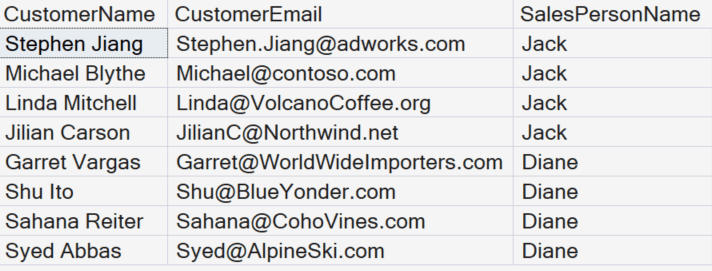
This is expected. Permissions are correct, but no filtering is enforced yet. Test this with the other accounts.
Test Updating Records Before Row-Level Security
Before applying Row-Level Security, notice that Jack can update the Salesperson’s name of a customer that has been assigned to Diane.
EXECUTE AS USER = 'Jack'
UPDATE dbo.CUSTOMER
SET SalesPersonName = 'Jack'
WHERE CustID = 8
SELECT CustID, CustomerEmail, SalesPersonName
FROM dbo.Customer
WHERE CustID = 8
REVERT
GO
Re-assign the Customer to the Correct Salesperson
We will assign customer #8 back to Diane.
EXECUTE AS USER = 'Jack'
UPDATE dbo.CUSTOMER
SET SalesPersonName = 'Diane'
WHERE CustID = 8
SELECT CustID, CustomerEmail, SalesPersonName
FROM dbo.Customer
WHERE CustID = 8
REVERT
GO
Create the Row-Level Security Function
Row-Level Security relies on an inline table-valued function that returns rows the user is allowed to see:
--Use a Function to Create the Row-Level Filter
CREATE FUNCTION fn_RowLevelSecurity
(@FilterName sysname)
RETURNS TABLE
WITH SCHEMABINDING
AS
RETURN SELECT 1 as fn_SecureCustomerData
WHERE @FilterName = user_name() or user_name() = 'Manager'
GO
What this function does:
- Compares the row’s SalesPersonName to the current database user
- Allows Manager to bypass filtering
- Returns no rows if the condition is false
Inline TVFs are required for Row-Level Security. Scalar functions are not supported.
Apply a Security Policy
Now we bind the function to the table using a security policy:
--Apply the Row-Level Filter with a Security Policy
CREATE SECURITY POLICY FilterCustomer
ADD FILTER PREDICATE dbo.fn_RowLevelSecurity(SalesPersonName)
ON dbo.Customer
WITH (State = ON)
GO
At this point, Row-Level Security is active.
Test Row-Level Security
Re-run the query as different users:
--Test Row-Level Security again
EXECUTE AS USER = 'Diane'
SELECT CustID, CustomerEmail, SalesPersonName
FROM dbo.Customer
REVERT
GO
Results:
- Diane sees only her customers
- Jack sees only his customers
- Manager still sees all rows
No query changes. No WHERE clause. The engine enforces it automatically.
Row-Level Security Also Applies to Updates
Row-Level Security affects UPDATE, DELETE, and MERGE operations as well.
Try updating another salesperson’s row:
--Test Row-Level Security for Updates
EXECUTE AS USER = 'Jack'
UPDATE dbo.CUSTOMER
SET SalesPersonName = 'Jack'
WHERE CustID = 8
SELECT CustID, CustomerEmail, SalesPersonName
FROM dbo.Customer
WHERE CustID = 8
REVERT
GO
This update affects zero rows, because Jack cannot even see Diane’s data.
Key Takeaways
- Row-Level Security is enforced inside SQL Server
- Applications don’t need conditional filtering logic
- Permissions alone are not enough—RLS adds row awareness
- Managers or service accounts can be explicitly exempted
- RLS works transparently with SELECT, UPDATE, and DELETE
Clean Up (Optional)
--Clean Up
DROP SECURITY POLICY FilterCustomer
DROP TABLE dbo.Customer;
GO


Be the first to comment on "Row-Level Security in SQL Server"