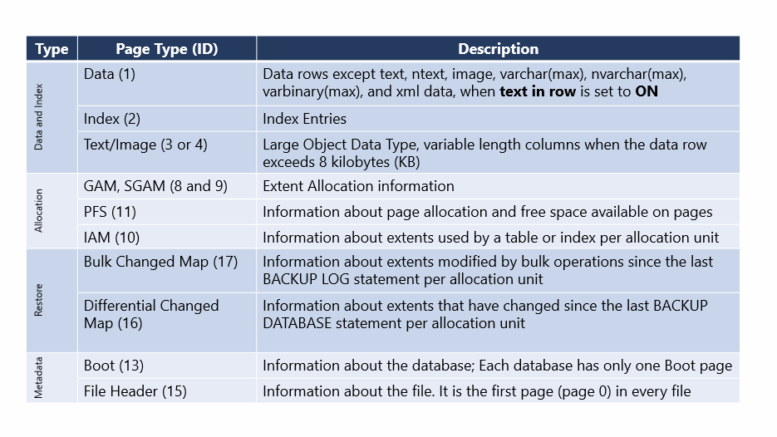
Pages serve as the smallest unit of input/output (I/O) in SQL Server, each measuring a fixed size of 8 KB. These pages form the foundation of storage, holding data such as rows, indexes, and metadata. SQL Server organizes its storage structure through several distinct page types, each performing a specific function within the database engine.
Database administrators and developers benefit greatly from understanding the different page types. This knowledge helps them optimize performance and troubleshoot issues. While also gaining deeper insight into SQL Server internals. SQL Server page types fall into the following main categories: Data and Index, Allocation, Restore, and Metadata pages.
Data and Index Pages
Data and Index pages form the core storage mechanism for information within SQL Server:
- Data Pages (1): These pages store the actual data rows of tables. However, they do not include large object (LOB) data types such as text, ntext, image, varchar(max), nvarchar(max), varbinary(max), and xml when the “text in row” option is enabled.
- Index Pages (2): Index pages contain entries that let SQL Server quickly locate data rows based on indexed columns, which supports efficient data retrieval.
- Text/Image Pages (3 or 4): These pages handle large object data types and variable-length columns when a data row exceeds 8 KB. They span multiple pages to accommodate large-scale data.
Allocation Pages
Allocation pages manage and track how the database allocates space within its files:
- GAM: Global Allocation Map (8) – Keeps track of the allocation of uniform extents.
- SGAM: Shared Global Allocation Map (9) – This page keeps track of mixed extents allocation.
- IAM: Index Allocation Map (10) – Keeps track of the pages used for data and indexes.
- PFS: Page Free Space (11) – This page records how much free space remains on each page and tracks each page’s allocation status.
Restore Pages
Restore pages play a vital role in backup and restore operations, enabling SQL Server to efficiently track changes for recovery:
- Bulk Changed Map (Type ID 17): This page tracks extents that bulk operations have modified since the last BACKUP LOG statement, per allocation unit.
- Differential Changed Map (Type ID 16): This page tracks extents that changed since the last BACKUP DATABASE statement, per allocation unit. It lets differential backups efficiently copy only changed extents.
Metadata Pages
Metadata pages store essential information about the database and its files:
- Boot Page (13): This page contains information about the database itself. Each database includes only one Boot page.
- File Header Page (15): This page provides information about individual files and always occupies the first page (page 0) in every file.
Conclusion
When you understand these SQL Server page types, you can see how the database engine manages data, tracks space allocations, and supports backup and recovery processes. Whether you tune performance, resolve issues, or design your storage architecture, knowing the role of each page type is a foundational skill for any SQL Server professional. For further reading, consult the Pages and Extents Architecture Guide.

Be the first to comment on "Understanding SQL Server Page Types"