Delivering effective workshops and technical training sessions requires more than deep technical expertise. Successful deliveries depend on preparation, clear communication, adaptability during delivery, and meaningful follow‑up. See my previous post: Ten Tips for Teaching Technical Topics
Be the Captain, but let Copilot help you fly
You’re still in charge of the delivery, the narrative, and the outcome, but Microsoft Copilot acts as a powerful delivery assistant alongside you. It helps trainers and technical presenters reduce administrative overhead while improving engagement before, during, and after a session. So, you can stay focused on guiding the audience, responding in the moment, and delivering real impact.
Effective Prompts: The Key to Better Copilot Results
The quality of Copilot’s output depends heavily on how well your prompt is scoped.
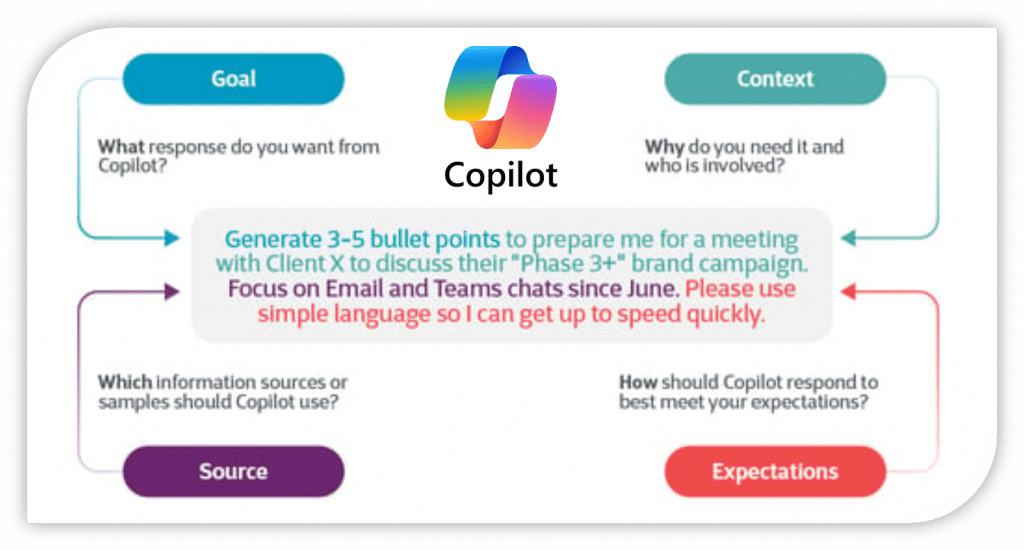
High‑impact prompts include:
- Clear goal
- Audience context
- Content source
- Desired format
Example prompt:
Generate 3–5 bullet points to prepare me for a training session with a healthcare customer discussing Azure SQL modernization. Focus on risks, benefits, and common objections. Keep it executive‑friendly.
Result: Well scoped prompts ensure Copilot delivers relevant, usable, and accurate output.
Using Copilot to Prepare for a Workshop
Copilot is especially valuable for workshop readiness, helping you refresh content and anticipate customer questions.
Practical Uses:
- Generate speaker notes or talking points
- Create FAQs based on common customer challenges
- Summarize key technical themes around
- Identify risks and misconceptions
Example prompt:
Create concise talking points for each module of an Azure SQL performance tuning workshop, focused on common customer pain points.
Using Copilot to Create Study and Reference Material
Copilot can turn raw content into structured learning assets for both trainers and attendees.
Practical Uses:
- Convert slide decks into study guides
- Generate glossaries or cheat sheets
- Create sample questions or quizzes
- Reformat content for different learning styles
Example prompt:
Turn this slide deck into a concise Azure SQL study guide with definitions and examples.
Result: Ideal for post‑workshop reinforcement and self‑paced learning.
Using Copilot to Organize and Reuse Content
Over time, trainers accumulate large amounts of material. Copilot helps bring order and reusability.
How Copilot Helps:
- Categorize content by topic or skill level
- Identify overlap across decks
- Create reusable session templates
- Map content to customer scenarios
Example prompt:
Analyze these workshop materials and group them into beginner, intermediate, and advanced Azure SQL topics.
Result: A scalable, reusable content library.
Using Copilot Before a Workshop or Training Session
Preparation sets the tone for a successful engagement. Copilot can eliminate repetitive pre‑work so you can focus on refining your message.
How Copilot Helps Before the Session:
- Draft invitation and reminder emails
- Create agendas, slide outlines, and handouts
- Generate pre‑training surveys or polls
- Summarize learning objectives
Example Prompts:
- Draft a Teams message inviting customers to an Azure SQL performance tuning workshop.
- Create a one‑page agenda for a 4‑hour Azure SQL performance tuning session.
- Generate a short pre‑training survey to assess attendee’s familiarity with Azure SQL.
- Summarize the key learning objectives for an Azure SQL Database session.
Result: Faster preparation, clearer expectations, and better‑aligned attendees.
Using Copilot During Live Deliveries
During a workshop or training session, Copilot becomes a real‑time assistant, helping you respond quickly without breaking flow.
How Copilot Helps During the Session:
- Explain complex technical concepts simply
- Create live quizzes or polls
- Summarize discussions and decisions
- Assist with demo or code troubleshooting
Example Prompts:
- Explain the difference between DTU and vCore for Azure SQL Databases in simple terms.
- Create a 3‑question quiz to validate understanding of Azure networking basics.
- Summarize the key points covered so far in this session.
- Help troubleshoot this error in my Azure Function demo.
Result: Higher engagement, clearer understanding, and smoother deliveries.
Using Copilot After the Training Session
Post‑session follow‑up is where long‑term value is created. Copilot makes it easy to close the loop professionally and consistently.
How Copilot Helps After the Session:
- Draft recap and thank‑you emails
- Summarize feedback and lessons learned
- Identify action items and next steps
- Recommend related learning resources
Example Prompts:
- Write a follow‑up email thanking attendees and sharing the slide deck and recording.
- Summarize key takeaways from our Azure governance workshop.
- Create a list of action items from our engagement with Contoso.
- Recommend Microsoft Learn modules related to Azure SQL performance tuning.
Result: Stronger customer relationships and clearer outcomes.
Final Thoughts
Microsoft Copilot is more than a productivity tool; it’s a delivery multiplier. When used with well‑scoped prompts, Copilot helps trainers spend less time on administrative work and more time delivering impactful, engaging, and high-quality technical sessions.



Be the first to comment on "Using Microsoft Copilot to Improve Deliveries "