I’ve taking over 100 Microsoft certification exams over the course of my professional career, and one thing I’ve learned is that knowing the technology and knowing how to take an exam are two different skills.
You can have years of hands-on experience with Azure, SQL Server, or Microsoft 365 and still find certification exams challenging. I’ve known talented technical professionals who understand their subject matter but struggle when faced with a timed exam.
Sometimes the challenge isn’t technical knowledge. It’s understanding how questions are structured, managing time, maintaining confidence, and overcoming exam anxiety. Microsoft certification exams have evolved considerably. Today’s exams frequently emphasize applying technical knowledge to real-world scenarios rather than simply recalling facts.
The good news is that test-taking is a skill you can develop. Whether you’re preparing for your first Microsoft Fundamentals exam or pursuing an advanced certification, here are ten practical tips to help you prepare, stay focused, and perform at your best.
1. Understand the Exam Before You Start Studying
One of the biggest mistakes candidates make is studying everything about a technology without first understanding what the exam actually measures. Microsoft certification exams focus on specific skills defined in the official exam study guide.
Start with the exam objectives, not the training material.
- Visit the official Microsoft certification exam page.
- Review the current exam study guide.
- Read the Skills Measured section.
- Identify topics you already understand.
- Identify areas requiring additional study or hands-on experience.
- Build your study plan around those gaps.
Pay attention to the percentage assigned to each skill area. These percentages help you prioritize your preparation. Microsoft periodically updates certification exams to reflect changes in technology, so always review the latest study guide.
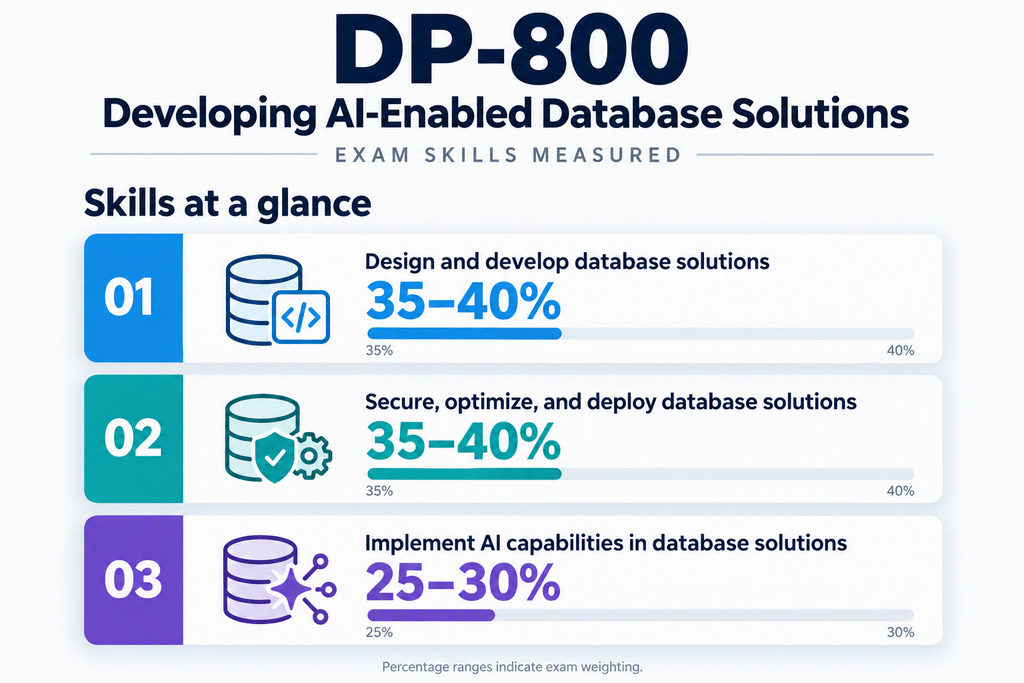
My advice: Treat the exam objectives like a checklist. If you can’t explain a topic or demonstrate the associated task, spend more time learning it. Resource: Prepare for an Exam
2. Study to Understand, Not Just Memorize
Memorization has its place, but understanding how technology works is far more valuable. Modern Microsoft certification exams frequently present scenarios that require you to evaluate requirements and select an appropriate solution. For example, if you’re studying Azure SQL Database, don’t simply memorize the available service tiers.
Focus on Understanding:
- When you would choose one tier over another.
- How performance requirements influence your decision.
- How availability and disaster recovery requirements affect architecture.
- What security capabilities are available.
- How cost and administrative overhead influence your choices.
Hands-on experience makes a tremendous difference.
Read it. Do it. Explain it.
- Study the technology using Microsoft Learn.
- Implement what you’ve learned in a lab environment.
- Explain the concept as though you were teaching someone else.
If you can explain a technology without relying on your notes, that’s a strong indication that you understand it.
My advice: Don’t just memorize technical facts. Understand why the things work. Resource: Getting Ready to Take a Microsoft Certification Exam
3. Practice Taking Exams, Not Just Studying for Them
Studying and taking an exam require different skills. When studying, you can pause, research a topic, and revisit material whenever necessary. During an exam, you must make decisions within a limited amount of time. That’s why practice assessments are so valuable.
Microsoft provides free Practice Assessments for many certification exams. These help you evaluate your knowledge and identify areas requiring additional preparation. Microsoft also provides an Exam Sandbox where you can become familiar with the testing interface.
Depending on the exam, you may encounter:
- Multiple-choice questions
- Multiple-select questions
- Drag-and-drop questions
- Build-list questions
- Case studies
- Questions requiring you to evaluate a proposed solution
Become comfortable navigating the interface, marking questions for review, and understanding when you can or cannot return to previous questions. Practice assessments aren’t necessarily representative of the exact difficulty of the real exam, but they are useful preparation tools.
My advice: Practice until the testing experience feels familiar. The fewer surprises you encounter on exam day, the easier it becomes to concentrate on the questions. Resource: What to Expect on Your Microsoft Exam
4. Learn How to Navigate Microsoft Learn During the Exam
One of the more significant improvements to Microsoft certification testing has been the introduction of Microsoft Learn access during eligible exams. This allows candidates to consult official Microsoft documentation while answering questions.
It’s a welcome change because it better reflects how IT professional’s work. In the real world, we don’t memorize every configuration option, PowerShell parameter, or service limitation. We understand the technology and will know how to find reliable information when needed. However, there are important limitations.
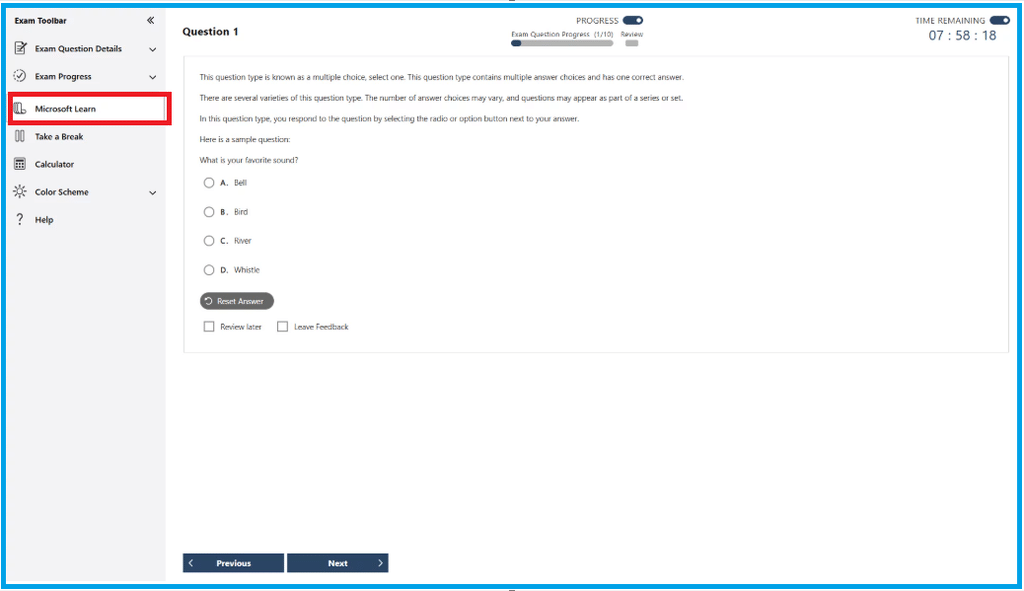
Microsoft Learn access is available for eligible role-based and specialty certification exams, but not every Microsoft certification exam. For eligible exams:
- Microsoft Learn opens within the testing interface.
- Access is restricted to supported Microsoft Learn content.
- External websites aren’t available.
- The exam timer continues while you’re browsing.
- Some Microsoft Learn features aren’t accessible.
Microsoft Learn is a reference tool, not a substitute for preparation.
- Searching for technical concepts.
- Finding product documentation.
- Locating configuration requirements.
- Identifying supported features and limitations.
- Finding specific answers without reading entire articles.
For example, you might understand which Azure service meets a customer’s requirements but want to verify a particular limitation. That’s an appropriate use of Microsoft Learn. Trying to learn the entire subject during the exam is not.
My advice: Know the technology first. Use Microsoft Learn to confirm details when necessary. Resources: Using Microsoft Learn in Exams and Exam Duration and Exam Experience
5. Read the Question That’s Actually Being Asked
This is one of the most important test-taking habits you can develop. Read the question that’s being asked, not the question you expect to see. Just like a customer who is asking for your expertise on solving an issue, Microsoft certification exams frequently present business scenarios containing more information than you need.
A question might describe an organization with multiple Azure subscriptions, geographic locations, security requirements, and performance concerns. But the actual question might ask which solution requires the least administrative effort. Those final words can completely change the correct answer. Pay particular attention to phrases such as:
- Most cost-effective
- Least administrative effort
- Highest availability
- Minimum downtime
- Most secure
These words often identify the requirement that matters most. A useful strategy is to read the final part of the question first or maybe read the answers first. Then review the scenario and identify the information needed for a correct response. Ask yourself:
- What problem needs to be solved?
- What is the primary requirement?
- What constraints have been provided?
- Which answer satisfies those requirements?
My advice: Slow down enough to understand the question. A few extra seconds reading carefully can prevent an unnecessary mistake. Remember that multiple answers may be technically possible, but only one may best satisfy the stated requirements.
6. Manage Your Time Before Time Manages You
Time management is essential during certification exams. Microsoft exam durations vary, so always verify the available time for your specific exam. Before starting, understand how much time you have and approximately how many questions you’ll need to answer. For example, if you have 100 minutes to answer 50 questions, that gives you an average of two minutes per question.
That doesn’t mean every question should take two minutes. Some questions may take only 20 seconds, while others require several minutes. The objective is to maintain a reasonable pace.
Don’t Get Stuck
Don’t sacrifice several easier questions that may be later in the exam because you’re determined to solve one difficult question. If you encounter a particularly difficult question:
- Eliminate obviously incorrect answers.
- Identify the most likely solution.
- Mark the question for review if permitted.
- If you don’t know the answer, provide a best guess, and move forward.
Leave Time for Review
Whenever possible, reserve time to revisit questions you’ve marked. However, avoid changing answers simply because you’re second-guessing yourself. In many cases, your initial instinct was pointing you toward the correct answer. Only change an answer when you recognize a specific mistake or discover something you overlooked.
Understand Exam Navigation
Some Microsoft exam sections restrict your ability to return to previous questions. Always read the instructions before proceeding.
My advice: Don’t let one difficult question consume your exam. Keep moving and manage your time deliberately. It’s better to miss one question than not having enough time to complete the last five. Resource: Exam Duration and Exam Experience
7. Learn to Eliminate Incorrect Answers
You won’t always recognize the correct answer immediately. Sometimes two or more choices appear reasonable. When that happens, use the process of elimination. Start by identifying answers that:
- Don’t satisfy the stated requirements.
- Use unsupported technology.
- Introduce unnecessary complexity.
- Violate security or compliance requirements.
- Solves a different problem.
- Conflict with constraints in the scenario.
Consider a question asking for a database solution that minimizes administrative overhead. Several technologies might support the workload, but one requires manually managing operating systems, patching, and backups. That option may be technically valid, but it probably isn’t the best answer when minimizing administration is the primary requirement. Understanding why an answer is incorrect is just as important as recognizing why another answer is correct.
My advice: When you’re unsure which answer is right, start by determining which answers are wrong. And remember, the most complicated answer isn’t necessarily the best answer.
8. Prepare Your Mind and Body for Exam Day
One of the worst preparation strategies is staying awake all night trying to memorize information. There comes a point where additional studying provides diminishing returns. If you don’t know the material the night before the exam, a lack of sleep will not improve your knowledge. The day before an exam should focus on being ready to perform.
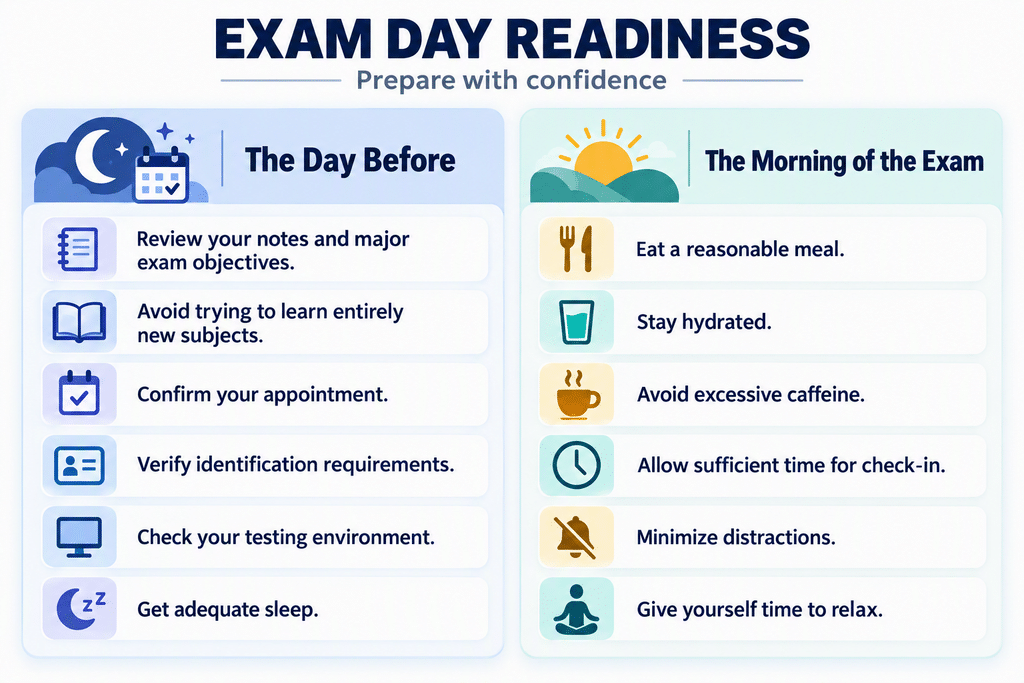
If you’re testing remotely, complete the required system checks in advance. Verify your webcam, microphone, internet connection, and testing software. Make sure your workspace meets the exam provider’s requirements.
My advice: Don’t spend the final hours trying to learn everything. Spend them preparing to demonstrate what you already know. Resource: The 20 Best Test-Taking Strategies Used by Top Students
9. Don’t Let the Exam Result Define You
This is an important lesson for anyone pursuing professional certification. A certification exam measures your performance against a defined set of skills at a particular point in time. It doesn’t measure your intelligence, professional value, or potential.
Failing an exam doesn’t mean you’re a failure.
I’ve worked with talented technical professionals who struggled with exams, and I’ve seen how practical experience and test-taking ability don’t always develop at the same pace. Certification is valuable, but it isn’t the complete measure of technical competence.
If you pass, congratulations! Take a moment to appreciate the accomplishment. Then think about how you’ll apply what you’ve learned. If you don’t pass, don’t allow disappointment to become discouragement. Don’t automatically assume you need to start studying everything again. You may only need to strengthen a few areas. Instead:
- Review your score report.
- Identify the skill areas requiring improvement.
- Return to the official exam objectives.
- Practice the topics where you struggled.
- Use hands-on labs to strengthen your understanding.
- Review Microsoft’s retake policy before scheduling another attempt.
My advice: Treat every exam as a learning experience, regardless of the result. A certification is an achievement. Your ability to continue learning is what sustains your career.
10. Recognize Exam Anxiety and Learn to Manage It
Let’s discuss something that doesn’t receive nearly enough attention in technical certification preparation.
Exam anxiety is real, and experience doesn’t make you immune to it.
Even experienced IT professionals can become nervous when facing a timed certification exam. As mentioned previously, I have taken a lot of certification exams. I have been nervous every single time and thought I was going to fail the exam. The pressure to pass, the cost of the exam, professional expectations, and fear of failure can all contribute to anxiety.
A little nervousness is normal. The Mayo Clinic notes that mild nervousness can sometimes improve alertness and focus. However, excessive anxiety can interfere with concentration, memory, and performance. One important thing to remember is that feeling anxious doesn’t necessarily mean you’re unprepared.
Six Ways to Manage Exam Anxiety
- Acknowledge the Anxiety: Don’t become frustrated because you’re nervous. Recognize the feeling without allowing it to define your performance. It’s okay to be nervous. Just remember to keep moving forward.
- Control Your Breathing: If you feel overwhelmed, pause briefly. Take a slow breath, exhale gently, and repeat a few times. Relax your shoulders and release unnecessary tension. Controlled breathing can help you regain focus. Once you are ready again, continue to move forward.
- Focus on One Question at a Time: Don’t worry about the entire exam. Don’t think about your final score or what happens if you fail. Concentrate on the question directly in front of you. Read it carefully, evaluate the options, and make your decision. Then move forward.
- Challenge Negative Self-Talk: Instead of thinking, I’m going to fail this exam. Try; I’ve prepared for this. I can work through one question at a time. Instead of thinking, I should know this immediately. Try; Let me identify the requirements and eliminate the incorrect answers. Think positive and keep moving forward.
- Accept That You Won’t Know Everything: You don’t need to answer every question correctly to pass. Encountering a difficult question doesn’t mean you’re failing. Don’t allow one unfamiliar topic to undermine your confidence. Provide your best guess, mark it for review, and then move forward.
- Accept That It’s Okay to Fail: Failure isn’t the end of the road. It’s another opportunity to learn, improve, and come back better prepared. If you don’t pass, you’ll have another opportunity to succeed. Take what you’ve learned, focus on the areas where you struggled, and try again. We are always learning and moving forward.
And remember, nobody is keeping score of your failures. Even if someone is watching, who cares? You’re doing this for yourself, not for them. Don’t let the fear of failing stop you from trying. The only way to guarantee you won’t pass is to never take the exam.
Final Thoughts: Experience, Preparation, and Confidence
After years of working with Microsoft technologies and certification programs, one lesson stands out.
Success isn’t about knowing every possible answer. It’s about preparation, understanding, and maintaining your composure when things become difficult.
Microsoft certification exams are challenging because the technologies themselves are challenging. That’s part of what makes earning a certification meaningful. But don’t make the experience harder than it needs to be.
- Understand the exam objectives.
- Study with purpose.
- Get hands-on experience.
- Practice answering questions.
- Learn how to navigate Microsoft Learn.
- Manage your time.
- And most importantly, learn how to manage your anxiety.
One of the biggest mistakes candidates make is believing that confidence comes from knowing everything. It doesn’t. Confidence comes from knowing you’ve prepared, trusting your knowledge, and accepting that you won’t have every answer.
Don’t let your fear of failing become more important than your desire to learn. Take the exam. Do your best. Learn from the experience. And keep moving forward.
Microsoft Certification Preparation
- Microsoft Courses, Learning Paths, and Modules
- Microsoft Technical Credentials and Certifications
- Prepare for an Microsoft Exam
- What to Expect on Your Microsoft Exam
- Practice Assessments for Microsoft Certifications
- Exam Duration and Exam Experience
- Using Microsoft Learn in your Microsoft Certification exams
- Getting Ready to Take a Microsoft Certification Exam
- How to Pass Microsoft Certification Exams



Be the first to comment on "Taking Microsoft Certification Exams"