Why do we need to create indexes that cover a query? And what does that actually mean? One of the most common performance problems in SQL Server is the Key Lookup (or its cousin, the RID Lookup). These operators often show up quietly in execution plans, but they can have an outsized impact on query performance as data volumes grow.
Understanding why lookups happen and how to eliminate them is a foundational skill for anyone tuning SQL Server workloads. Let’s walk through what lookups are, why they’re expensive, and how to design indexes that cover a query.
What Are Key and RID Lookups?
A lookup occurs when SQL Server uses a non-clustered index to locate rows, but that index does not contain all the columns needed to satisfy the query. Non- clustered indexes are excellent at supporting WHERE predicates and JOIN conditions.
However, they frequently do not include all columns referenced in the SELECT list. When that happens, SQL Server has to go back to the base table to retrieve the missing data. That extra step is the lookup.
Two Types of Lookups
Which lookup SQL Server performs depends on the table structure:
Key Lookup (Bookmark Lookup)
- Occurs when the table has a clustered index
- The nonclustered index stores the clustering key
- SQL Server uses that key to fetch missing columns from the clustered index
RID Lookup
- Occurs when the table is a heap (no clustered index)
- SQL Server uses the Row Identifier (RID) to locate the row
From a performance standpoint, both behave similarly. The difference is how SQL Server finds the row; not how expensive the operation can be.
Why Lookups Are Expensive
At first glance, a lookup may not seem like a big deal. After all, SQL Server is just retrieving a few extra columns, right? The problem is how often it has to do that work.
When SQL Server performs a lookup, it seeks (or scans) the non-clustered index for each qualifying row. Which means it needs to retrieve the clustering key or RID. Then perform an additional read against the base table to fetch the missing columns. That means one extra read per row.
For small result sets, this can be perfectly acceptable. But as the number of qualifying rows grows, the cost compounds rapidly. SQL Server may end up performing thousands, or millions of random reads. In many cases, this would be far more expensive than scanning data sequentially.
This is why you’ll often see SQL Server decide that an index seek plus many lookups costs more than a simple clustered index scan.
Covering the Query with an Index
The most effective way to deal with lookups is not to “optimize” them; but to eliminate them entirely.
That’s where covering indexes come in. A query is considered covered when all required columns—from the WHERE, JOIN, and SELECT clauses can be retrieved directly from the non-clustered index, without touching the base table.
When an index covers a query:
- Key or RID Lookups disappear from the execution plan
- Logical reads drop dramatically
- CPU and I/O usage decrease
Demonstration of Finding Alabama Addresses
Use the AdventureWorks database for this demonstration. We want to find the records in the Person.Address table for people who live in Alabama. The StateProvinceID for Alabama has a value of 3. Be sure to display the Actual Execution Plan to see the performance results
-- Turn on Actual Execution Plan (CTRL + M)
-- Show IX_Address_StateProvince Index
-- SELECT * will need to find all columns
SELECT *
FROM Person.Address
WHERE StateProvinceID = 3;
GO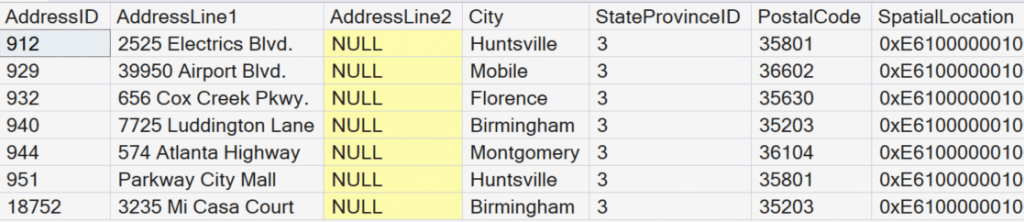
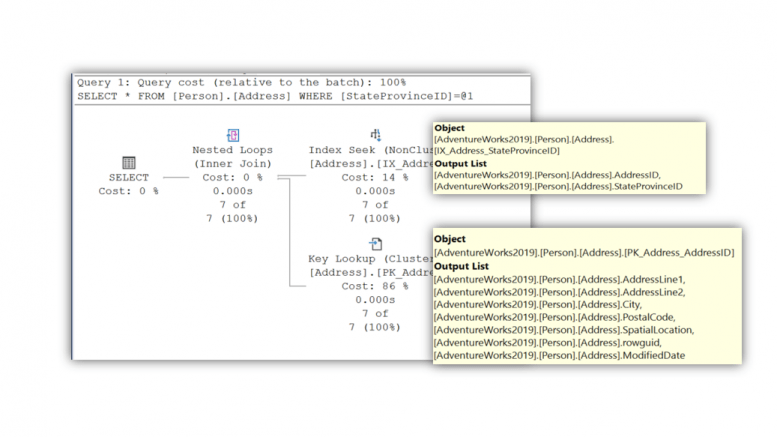
Notice that we returned seven records. We also returned 9 columns (The image only shows the first 7 columns. In the execution plan we see that a key lookup occurred. This is because we used a SELECT * to return all the columns.
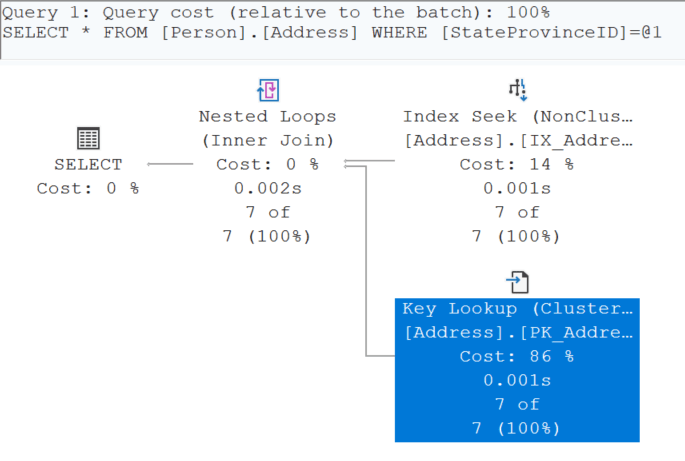
Look at the cost of using the SELECT * by hovering over the SELECT operator in the execution plan.
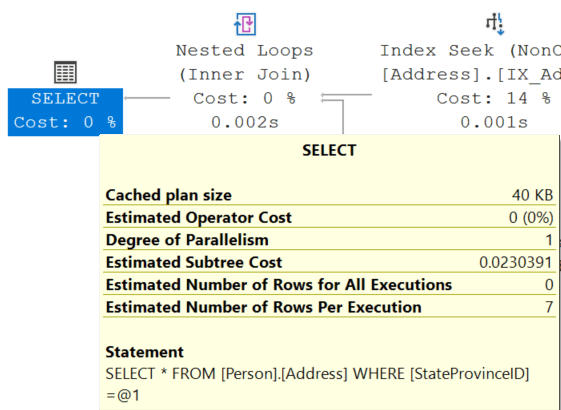
Notice it has a value 0.0230391. This doesn’t seem like much, but we are only returning seven records. If this were millions of records, those query coins would start adding up. This is one of many reasons that friends don’t let friends use SELECT * in our production code.
Select Only the Columns You Need!
Take a closer look at the key lookup. In the Output list of the non-clustered index, there are only two columns retrieved. The StateProvinceID column is the value for which the index was created. The AddressID is in the index as it is the pointer value to locate records in the base table.
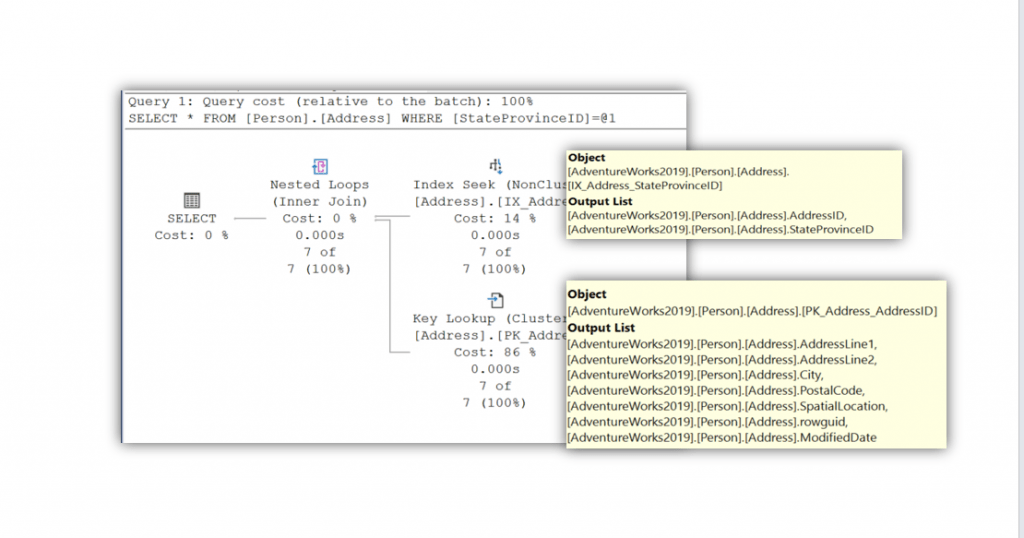
For all the other columns, we had to navigate to the base table to retrieve that information. For every single record. Again, this is only seven records, imagine if there were millions of records. Additionally, did we need to get the data for SpatialLocation, rowguid, and ModifiedDate? We can immediately improve performance by writing our query to only retrieve the columns that are part of the non-clustered index.
-- SELECT only columns in Index
-- This is an index that covers a query
SELECT AddressID, StateProvinceID
FROM Person.Address
WHERE StateProvinceID = 3;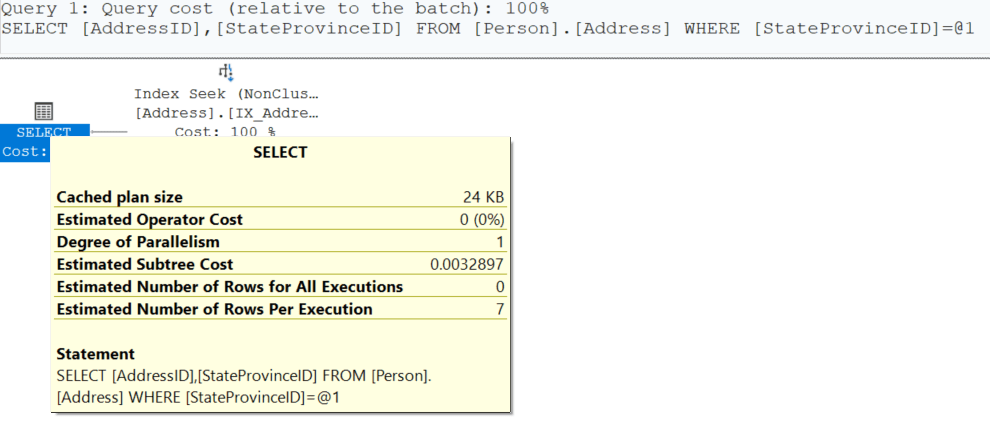
Notice that we eliminated the key lookup and only have the index seek operator. Additionally, the cost has gone from a value 0.0230391 to a value of 0.0032897. That is a savings of 0.0197494! Again, I know you are thinking, is that really making an improvement? Remember, we are only returning seven records. The improvement is exponential based on the number of records being returned.
What If We Needed Columns NOT in the Index?
This is where we put on our performance tuning hats to create an index that covers a query. I mean that was the title of this blog post after all. In our example, what if we also want the City column?
-- City is not covered in the Index
SELECT AddressID, StateProvinceID, City
FROM Person.Address
WHERE StateProvinceID = 3;
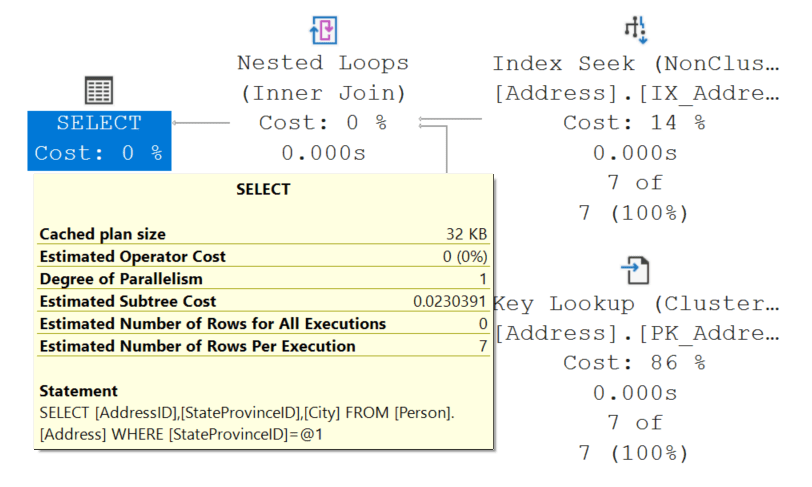
When we run this statement, we revert back to the key lookup as City is not a part of the index. Additionally, the cost of this query returns back to the value of 0.0230391.
Using INCLUDE Columns to Cover a Query
SQL Server offers an effective method for supporting queries while minimizing index key size through the use of INCLUDE columns. Here are some benefits of using an INCLUDE column over just adding a column to the index.
- Exist only at the leaf level of a nonclustered index
- Do not affect index ordering
- Do not participate in seeks or joins
- Are stored only to satisfy the SELECT list
By keeping only search and join columns in the index key and placing the rest in the INCLUDE list; you get a smaller, more efficient index that still fully covers the query. To test if this does indeed improve query performance, we are going to INCLUDE the City column to the IX_Address_StateProvinceID index.
CREATE NONCLUSTERED INDEX [IX_Address_StateProvinceID]
ON [Person].[Address] ([StateProvinceID] ASC)
INCLUDE ([City])
WITH (DROP_EXISTING = ON);
GO
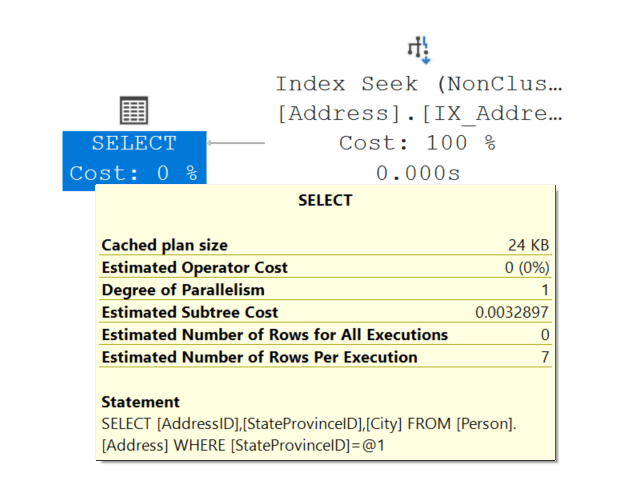
Now SQL Server can retrieve everything it needs directly from the non-clustered index. The lookup disappears, and performance improves immediately. The cost again has gone from a value 0.0230391 to a value of 0.0032897.
When INCLUDE Columns Shine (and When to Be Careful)
INCLUDE columns are incredibly effective, but they should be used deliberately.
Great use cases
- Frequently executed queries
- Moderate-to-large result sets
- Columns used only in SELECT (not filtering or sorting)
Be cautious when
- Including very wide columns unnecessarily
- Creating many overlapping covering indexes
- Supporting highly volatile OLTP tables with heavy writes
Indexes speed up reads, but every index adds write overhead. The goal is strategic coverage, not indexing every possible query.
Final Thoughts
Key and RID lookups aren’t inherently bad, but they are an Opportunity for Query Optimization. These operators tell you that SQL Server found a useful index, but that index just didn’t go far enough.
By understanding how lookups work and using INCLUDE columns to cover your most important queries, you can dramatically reduce I/O, stabilize execution plans, and make SQL Server do less work overall.



Be the first to comment on "Creating Indexes that Cover a Query"