Business continuity is a foundational requirement for database platforms. Azure SQL provides multiple layers of resiliency that protects your data, maintains availability, and enables recovery from both localized failures and large-scale regional outages.
Let’s break down how the concepts of Business Continuity and Disaster Recovery (BCDR) works in Azure SQ. We will explain the architectural differences between the service tiers and walk through the options available to design for high availability and disaster recovery. (Download Presentation from Data Saturday Chicago)
What Is Business Continuity?
Business continuity refers to the strategies, policies, and procedures that enable an organization to continue operating in the face of disruption. Those disruptions come in many forms:
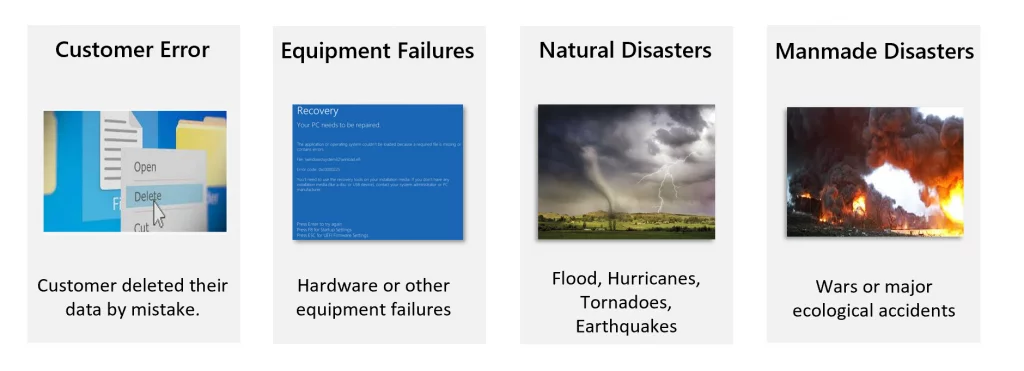
Azure SQL is designed to mitigate these risks by building resiliency into the platform.
Availability vs High Availability vs Disaster Recovery
These terms are often used interchangeably, but they represent different layers of protection.
Availability (What is built-in)
- Built into every Azure SQL database
- Architecture is built-in based on service tier
- Protects against software and hardware failures
- Financially backed 99.99% SLA
High Availability (What you can add)
- Provides continuous availability within a region
- Implemented by choosing zone redundancy
- Automatic failover from zonal failures
- Higher 99.995% SLA
Disaster Recovery (What you can configure)
- Customer-configured
- Uses database replicas or failover groups
- Enables recovery from regional outages
- Designed to meet RTO and RPO objectives
Understanding the difference is critical when selecting the correct service tier and configuration.
Service Tiers
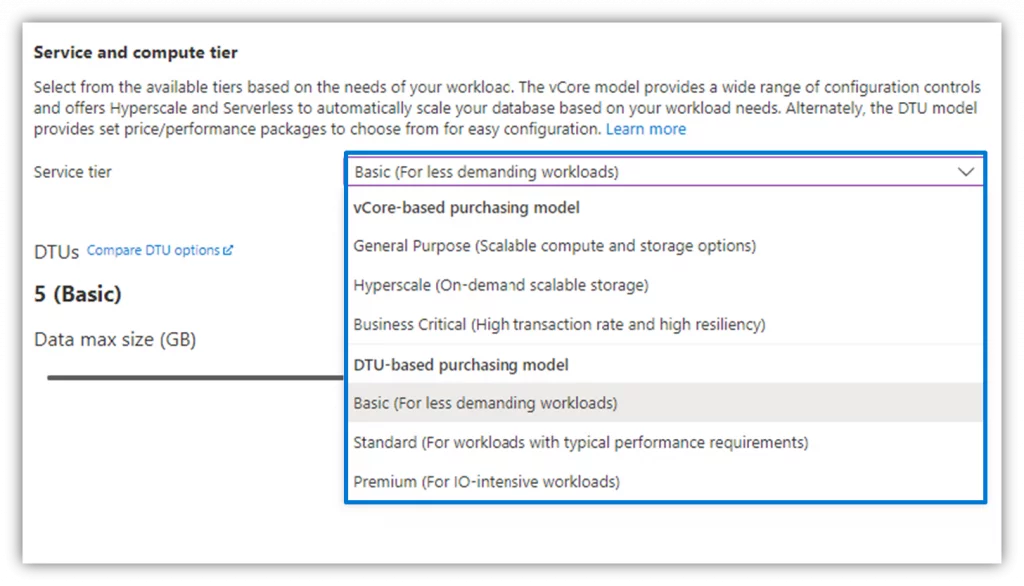
Azure SQL Databases offers two purchasing models (DTU and vCore), each with different availability characteristics. Azure SQL Managed Instances has similar availability behavior aligned to the vCore General Purpose and Business Critical service tiers. Hyperscale has its own architecture and will not be covered in this blog post.
DTU-Based
- Basic
- Standard
- Premium
vCore-Based
- General Purpose
- Business Critical
- Hyperscale
Availability Architecture (What is built-in)
The availability is implemented differently depending on the service tier.
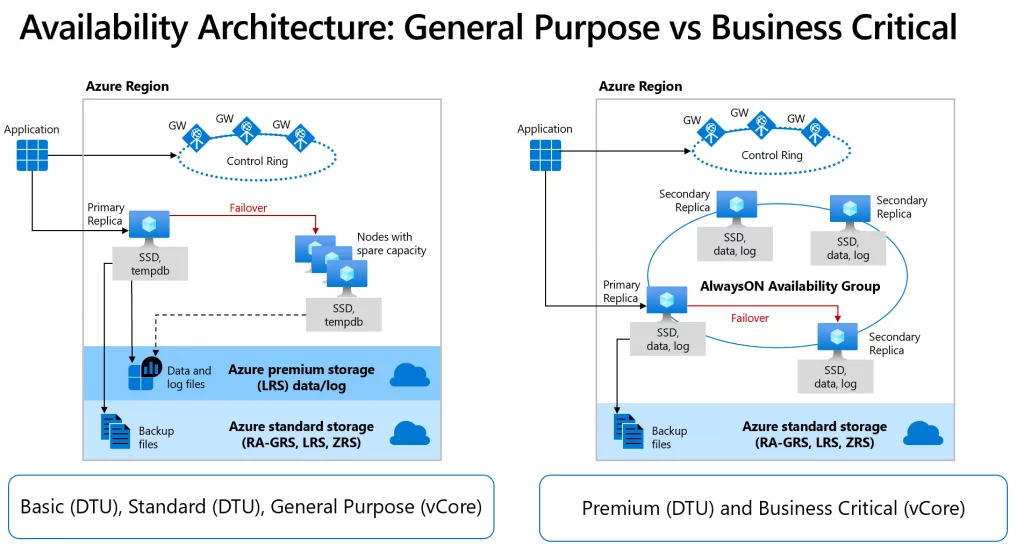
General Purpose (GP)
- Architecture behaves similarly to a Failover Cluster Instance
- Data and log files stored on remote Azure premium storage
- Failover requires moving compute to available nodes
- Recovery time depends on spare capacity
- Connectivity redirection is built in
This architecture prioritizes cost efficiency while maintaining strong resiliency and is configured by selecting either the Basic (DTU), Standard (DTU) or General Purpose (vCore) service tiers. The key factor here is that Compute and Storage are separated.
Remote storage availability relies on two layers. A stateless compute layer runs the database engine and holds only transient data, such as TempDB, model, and in‑memory caches. Azure Service Fabric manages these nodes, monitoring health and handling automatic failover.
A stateful data layer stores database files (.mdf and .ldf) in Azure Blob Storage, which provides built‑in redundancy and durability to ensure data is preserved even if the database engine process fails.
Business Critical (BC)
- Built on Always On Availability Groups
- Replicates both compute and storage
- One primary replica plus up to three secondary replicas
- Failover managed by Azure Service Fabric
- Includes Read Scale‑Out support
Business Critical delivers the lowest latency and fastest recovery times when you choose either the Premium (DTU) or Business Critical (vCore) service tiers. These tiers use a local storage availability model that colocates compute and storage on a single node. The database engine runs directly on locally attached SSDs to provide low‑latency I/O, while the platform ensures high availability by replicating both compute and storage across multiple nodes.
Database files (.mdf and .ldf) run on attached SSDs, and the platform maintains availability using a design similar to SQL Server Always On availability groups. A single primary replica handles read‑write workloads, while up to three secondary replicas maintain synchronized copies of the data. Azure Service Fabric monitors the cluster and automatically initiates failover if needed, transparently redirecting connections to a fully synchronized replica to maintain continuity.
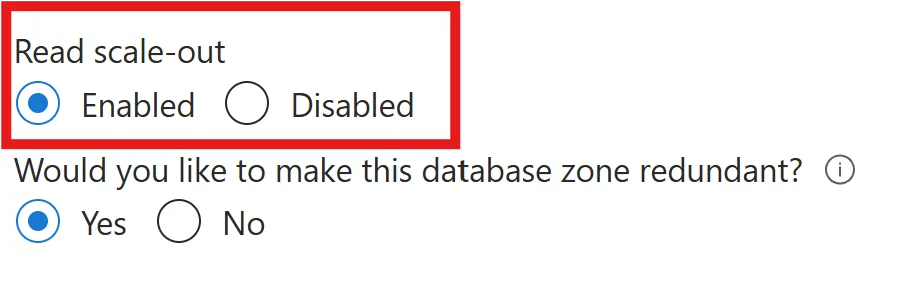
As an extra benefit, the local storage availability model includes the ability to redirect read-only Azure SQL connections to one of the secondary replicas. Read scale‑out provides up to 100% additional compute capacity at no extra cost by offloading read‑only workloads, such as analytics, from the primary replica. To route clients to the read‑only replicas, set ApplicationIntent=ReadOnly in the connection string.
Connection Policy
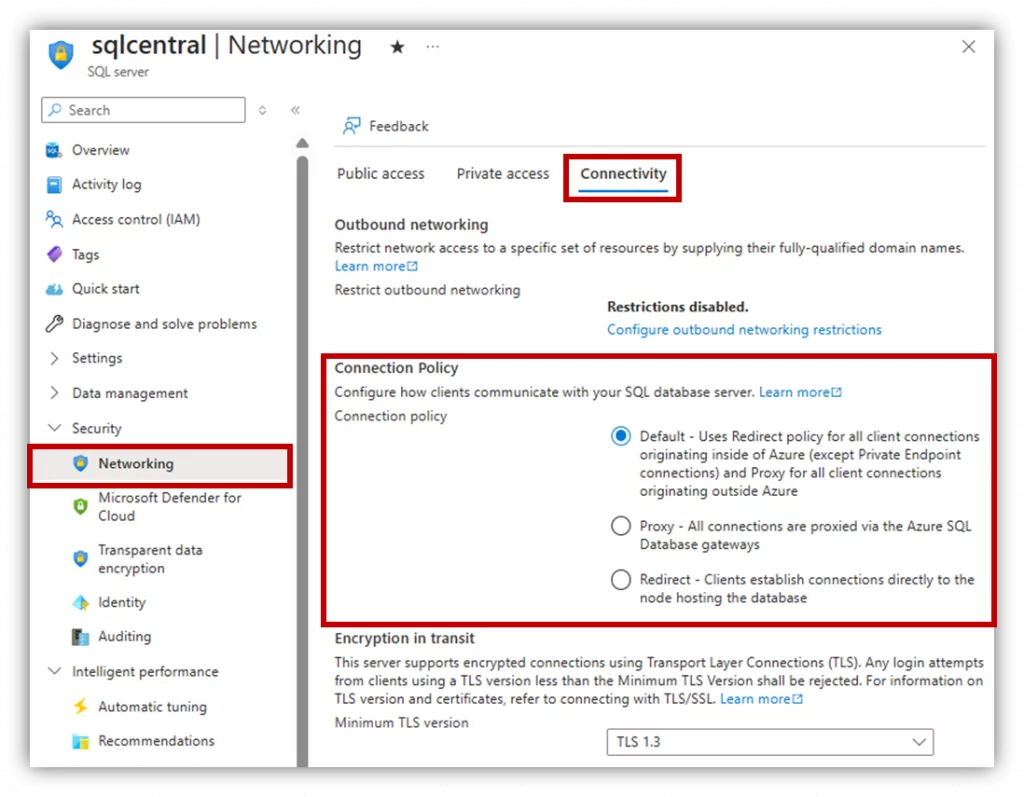
Azure SQL uses different connection routing models:
The connection process works as follows: clients connect to a gateway with a public IP address that listens on port 1433. Based on the effective connection policy, the gateway either redirects or proxies the traffic to the appropriate database cluster. Within the cluster, the gateway then routes the traffic to the target database. For performance-sensitive workloads, Redirect is almost always the right choice.
- Redirect (Recommended)
Clients connect directly to the database node for improved latency and throughput. - Proxy
All connections pass through the gateway, increasing latency, but faster failover. - Default
Redirect for Azure clients, Proxy for public endpoints.
Zone Redundancy (What you can add)
Zone redundancy distributes replicas across multiple availability zones within a region, ensuring the service continues to operate even if an entire datacenter experiences a failure.
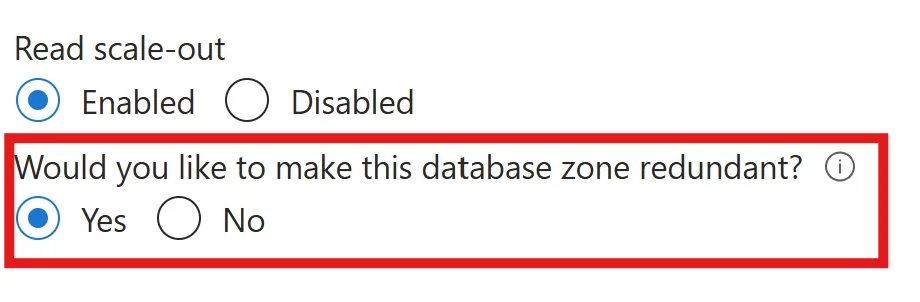
Business Critical / Premium
- Replicas distributed across zones
- Routing managed by Azure Traffic Manager
- Slight increase in latency due to distance
- Data replication across zones incurs at no additional cost.
General Purpose
- Generally available since December 2022
- Data stored in Zone Redundant Storage (ZRS)
- Synchronous replication across three zones
- Additional cost for spare capacity across zones
Disaster Recovery (What you can configure)
When a full region goes offline, disaster recovery mechanisms take over. At the database level you can configure Active Geo-Replication or at the logical server level by setting up Failover Groups.
Active Geo-Replication (Database Level )
- Up to 4 readable secondaries
- Asynchronous replication
- Available for most service tiers
- RTO < 1 hour, RPO < 5 minutes
- Manual failover
Best for read scaling and Disaster Recovery flexibility. If you use a secondary replica exclusively for disaster recovery and run no read or write workloads on it, you can reduce licensing costs by up to 40%. To achieve this savings, designate the database as a standby replica when you configure a new active geo‑replication relationship.
Auto-Failover Groups (Logical Server Level)
Failover groups extend geo‑replication across multiple regions:
- Server-level failover
- Automatic or manual failover
- DNS endpoint remains consistent
- Supported for Managed Instance
- Designed for multi-database applications
Geo-Replication vs Failover Groups
| Feature | Geo-Replication (Database) | Failover Groups (Server) |
| Automatic failover | No | Yes |
| Multi-database failover | No | Yes |
| Update connection string | Yes | No |
| Managed Instance support | No | Yes |
| Multiple replicas | Yes | No |
| Read scale support | Yes | Yes |
Putting It All Together
Azure SQL provides a layered approach to business continuity:
- Built-in resiliency for everyday failures
- High availability with zone redundancy
- Disaster recovery across regions
- Multiple cost and performance tradeoffs
When configured correctly, Azure SQL can withstand everything from hardware failures to regional outages; without requiring the operational complexity of traditional HA/DR solutions.

Be the first to comment on "Business Continuity and Disaster Recovery in Azure SQL "