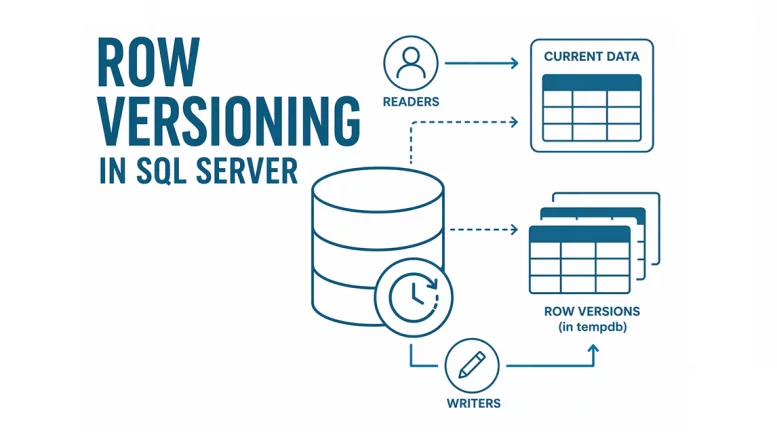
Row versioning fundamentally changes how SQL Server handles read operations during write transactions. Instead of blocking, SQL Server can serve a previous version of the row. We enable row versioning in SQL Server by turning on READ_COMMITTED_SNAPSHOT ISOLATION (RCSI). In this post we will demonstrate blocking without row versioning and then the reduction of blocking with row versioning.
Identify Blocking without Row Versioning
Make sure row versioning is off:
USE master;

ALTER DATABASE AdventureWorks2019
SET READ_COMMITTED_SNAPSHOT OFF
WITH ROLLBACK IMMEDIATE;
GO
Session 1 – Start a Transaction (Writer)
Open Session 1 and run your code. This is updating the name of John Wood to Jack Frost. This will start an active transaction and place an exclusive lock on the record for the BusinessEntityID of person 18. This will block any readers (People who want to select that same record).
USE AdventureWorks2019;
GO
BEGIN TRAN
UPDATE Person.Person
SET FirstName = 'Jack', LastName = 'Frost'
WHERE BusinessEntityID = 18
--Rollback
--Commit
Session 2 – Read Data
Open Session 2 and run your code. This is updating the name of John Wood to Jack Frost.
USE AdventureWorks2019;
GO
SELECT BusinessEntityID, FirstName, LastName
FROM Person.Person
WHERE BusinessEntityID = 18
--Commit
With Read-Committed Snapshot Isolation (RCSI) turned off, the second session is being blocked. Read More: on Waiting Tasks: Understanding SQL Server Wait Types.
Session 1 – Rollback Transaction
To reset your code to demonstrate row versioning, return to session 1. Highlight Rollback (do not select the two dashes) and then Execute. This will release the lock so that the second session will now return the record for BusinessEntityID for person 18, which should be John Wood.

Enable Row Versioning
Row versioning for read-committed queries is enabled using RCSI (Read Committed Snapshot Isolation).
USE master;

ALTER DATABASE AdventureWorks2019
SET READ_COMMITTED_SNAPSHOT ON
WITH ROLLBACK IMMEDIATE;
GO
This enables versioned reads without changing application code.
Session 1 – Start a Transaction (Writer)
Open Session 1 and run your update statement again:
USE AdventureWorks2019;
GO
BEGIN TRAN
UPDATE Person.Person
SET FirstName = 'Jack', LastName = 'Frost'
WHERE BusinessEntityID = 18
--Rollback
--Commit
Session 2 – Read Data
Open Session 2 and run your reader statement again.
USE AdventureWorks2019;
GO
SELECT BusinessEntityID, FirstName, LastName
FROM Person.Person
WHERE BusinessEntityID = 18
--Commit
Without Row Versioning (RCSI OFF), session 2 was being blocked with a wait type of LCK_M_S. The reader was waiting for a shared lock. With Row Versioning (RCSI ON), The query for session 2 returned immediately with no blocking. Data reflected the previous committed version (John Wood), not the uncommitted changes. This is row versioning in action
Key Takeaways
- Row versioning allows readers to avoid locks
- Readers get a consistent snapshot of committed data
- The version store in tempdb is the proof mechanism
- Unless you are using Accelerated Database Recovery.
- You can validate usage with:
- sys.dm_tran_version_store_space_usage
- sys.dm_tran_active_snapshot_database_transactions



Be the first to comment on "Row Versioning in SQL Server"