
We usually add indexes to speed things up, but every additional index adds a bit more overhead. It is in every INSERT, UPDATE, and DELETE operation where you actually pay the cost. While many DBAs focus on reading performance, fewer take the time to understand the operational cost of maintaining indexes during writes.
This walkthrough explores how index design choices affect DML activity, using two key Dynamic Management Views (DMVs):
| DMV | Best for answering |
| sys.dm_db_index_usage_stats | Is this index being used by queries? |
| sys.dm_db_index_operational_stats | How expensive is this index to maintain? |
You need both to make informed indexing decisions. The goal of this post is simple: visualize the hidden cost of maintaining indexes.
Walk-through Overview
- Start by building a heap with overlapping nonclustered indexes
- Observe what updates and deletes do to index maintenance.
- Add a clustered index to observe differences in index behavior.
- Compare index usage versus maintenance cost, including write overhead.
- Identify unused or costly indexes.
Create a Demo Database and Table
We will use data from the AdventureWorks2025 database to start. However, since index usage and operational statistics accumulate over time; we will create a new database dedicated to this post, so results are easy to observe and repeat.
USE master;
DROP DATABASE IF EXISTS IOP_Demo;
CREATE DATABASE IOP_Demo;
GO
Create the Demo Table as a Heap
The term for a table without a clustered index is a heap, and it behaves very differently from a clustered table when we add indexes or modify rows. Learn more about Table Structures in SQL Server.
USE IOP_DEMO;
GO

SELECT *
INTO dbo.IndexOppTest
FROM AdventureWorks2025.Sales.SalesOrderHeader;
GO
You should see 31465 rows affected. If not, make sure you are selecting from a version of the AdventureWorks database to populate our dbo.IndexOppTest table.
Create Multiple Overlapping Nonclustered Indexes
Next, we create multiple nonclustered indexes, many of which overlap on the same key columns:
- Several indexes on SalesOrderID
- Variations including OrderDate, DueDate, ShipDate, ModifiedDate
- Duplicate indexes on (SalesOrderID, ModifiedDate)
- An index using INCLUDE (ModifiedDate)
This is a common real‑world scenario; every time a query is slow, we just slap on another index. Reads might get a little better, but before long all those indexes create a ton of extra work every time data changes and writes really start to suffer.
CREATE NONCLUSTERED INDEX jd_OrderID_OrderDate_demo
ON dbo.IndexOppTest(SalesOrderID, OrderDate);

CREATE NONCLUSTERED INDEX jd_OrderID_DueDate_demo
ON dbo.IndexOppTest(SalesOrderID, DueDate);

CREATE NONCLUSTERED INDEX jd_OrderID_ShipDate_demo
ON dbo.IndexOppTest(SalesOrderID, ShipDate);

CREATE NONCLUSTERED INDEX jd_OrderID_SalesOrderNumber_demo
ON dbo.IndexOppTest(SalesOrderID, SalesOrderNumber);

CREATE NONCLUSTERED INDEX jd_ModifiedDate_demo
ON dbo.IndexOppTest(ModifiedDate);

CREATE NONCLUSTERED INDEX jd_DueDate_ModifiedDate_demo
ON dbo.IndexOppTest(DueDate, ModifiedDate);

CREATE NONCLUSTERED INDEX jd_OrderID_ModifiedDate_demo
ON dbo.IndexOppTest(SalesOrderID, ModifiedDate);

CREATE NONCLUSTERED INDEX ix_OrderID_ModifiedDate_demo
ON dbo.IndexOppTest(SalesOrderID, ModifiedDate);

CREATE NONCLUSTERED INDEX nc_OrderID_ModifiedDate_demo
ON dbo.IndexOppTest(SalesOrderID, ModifiedDate);

CREATE NONCLUSTERED INDEX nc_OrderID_Include_ModifiedDate
ON dbo.IndexOppTest(SalesOrderID) INCLUDE (ModifiedDate);
GO
Review Existing Indexes
We list all the indexes on the table to see how much overlap is present.
EXEC sp_helpindex 'dbo.IndexOppTest';
GO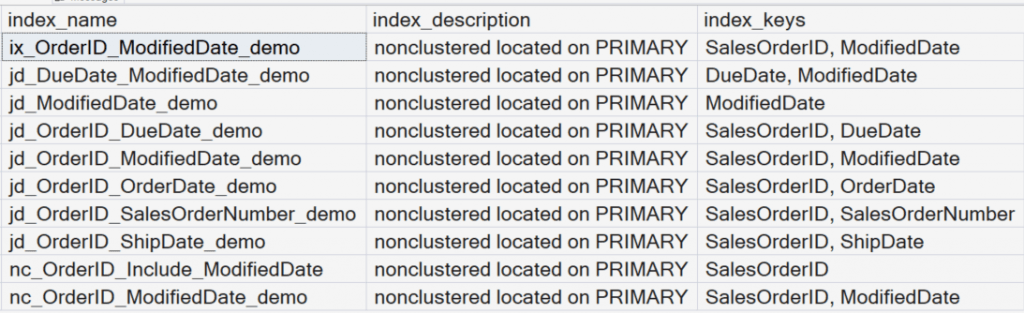
Three of the indexes are exactly the same, but with different names. They are indexing on both the OrderID and ModifiedDate column.
- jd_OrderID_ModifiedDate_demo
- ix_OrderID_ModifiedDate_demo
- nc_OrderID_ModifiedDate_demo
Also notice there is separate index named nc_OrderID_Include_ModifiedDate that we are using an INCLUDE for the ModifiedDate column instead of indexing on that column. Learn more about: Multi-Column Indexing and Creating Indexes That Cover a Query.
Baseline Index Operational Statistics
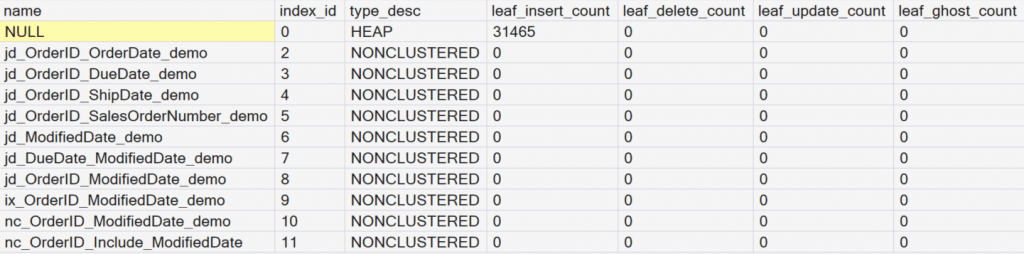
The sys.dm_db_index_operational_stats dynamic management view focuses on the work SQL Server does to maintain indexes, not on index usage. At this point, the counters are low or zero to establish a baseline so we can clearly see the impact of later DML operations. These counters accumulate since the last time SQL Server restarted.
SELECT database_id, i.name, o.index_id, i.type_desc, leaf_insert_count,
	leaf_delete_count, leaf_update_count, leaf_ghost_count
FROM sys.dm_db_index_operational_stats (DB_ID(), NULL, NULL, NULL) AS o
JOIN sys.indexes AS i
	ON i.object_id = o.object_id
	AND i.index_id = o.index_id
WHERE OBJECTPROPERTY(o.object_id,'IsUserTable') = 1;
GO
Here we can see the results of the dynamic management view. At this point, 31465 records have been inserted. We have not yet run any data manipulation language statements.
Key Columns in sys.dm_db_index_operational_stats.
| Column Name | What It Measures | Why It Matters |
| leaf_insert_count | Number of times a new row is inserted into the leaf level of the index (data pages for clustered indexes, leaf pages for nonclustered indexes). | High values indicate heavy INSERT activity and can contribute to page splits and fragmentation, especially with poor fill factor choices. |
| leaf_delete_count | Number of times a row is deleted from the leaf level of the index. | Reflects DELETE operations and some maintenance activity; often correlates with ghost records and space bloat. |
| leaf_update_count | Number of updates to indexed key values at the leaf level. | Highlights updates to indexed columns; high values may indicate volatile index keys or over-indexing. |
| leaf_ghost_count | Number of ghost records, rows logically deleted but not yet physically removed by the Ghost Cleanup process. | Persistent or growing values can signal heavy delete activity or delayed ghost cleanup, leading to wasted space and extra I/O. |
Perform Updates and Deletes (Heap Scenario)
Because the table is a heap, SQL Server must, update every nonclustered index, manage row forwarding and ghost records, and perform additional internal maintenance work
When we run DML statements, this is where the pain starts to show.
- What you are doing: You are modifying and deleting rows in a heap.
- What to observe: Every nonclustered index must be maintained, even if it is never used by queries.
UPDATE dbo.IndexOppTest
SET ModifiedDate = '2020-03-25'
WHERE SalesOrderID < 44658;

DELETE dbo.IndexOppTest
WHERE SalesOrderID BETWEEN 44658 AND 45158;
GO
Notice 999 rows were updated and 501 rows were deleted.
Review Operational Stats After DML (Heap)
- What you are doing: You are re-running the operational stats query.
- Why it matters: This reveals the true write cost of maintaining many indexes on a heap.
- What to observe: Every nonclustered index shows increased activity
SELECT database_id, i.name, o.index_id, i.type_desc, leaf_insert_count,
	leaf_delete_count, leaf_update_count, leaf_ghost_count
FROM sys.dm_db_index_operational_stats (DB_ID(), NULL, NULL, NULL) AS o
JOIN sys.indexes AS i
	ON i.object_id = o.object_id
	AND i.index_id = o.index_id
WHERE OBJECTPROPERTY(o.object_id,'IsUserTable') = 1;
GO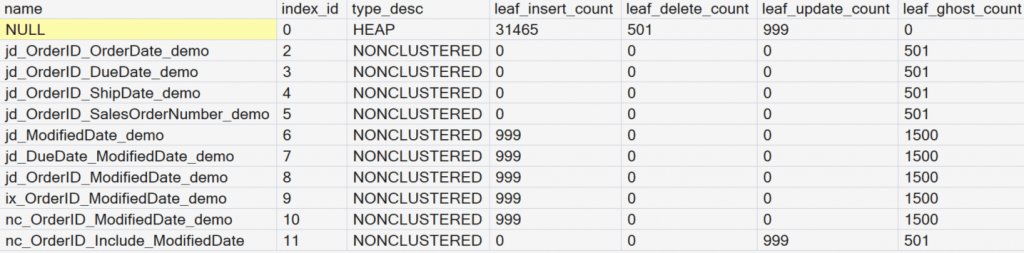
Notice the bottom six indexes in the results. Five of them have an index on the ModifiedDate column Three of the indexes are exactly the same, but with different names.
For all six indexes we updated 999 records and deleted 501 records. Notice for the five objects that were indexed on the ModifiedDate column that the UPDATE ended up being two operations, 999 inserts and 999 deletes. We can observe this as 501 deletes plus 999 updates = 1500 ghost records.
However, for index number 11, where we used an INCLUDE statement for the ModifiedDate column, the operation was more efficient as it only had to update the 999 records. It did not have to perform the delete and insert as the order of the ModifiedDate column did not have to be maintained.
Introduce a Clustered Index
Next, we add a primary key to the table. This will create a clustered index.
ALTER TABLE dbo.IndexOppTest
ADD CONSTRAINT pk_SalesOrderID PRIMARY KEY (SalesOrderID);
We will run the sys.dm_db_index_operational_stats query again to see the results.
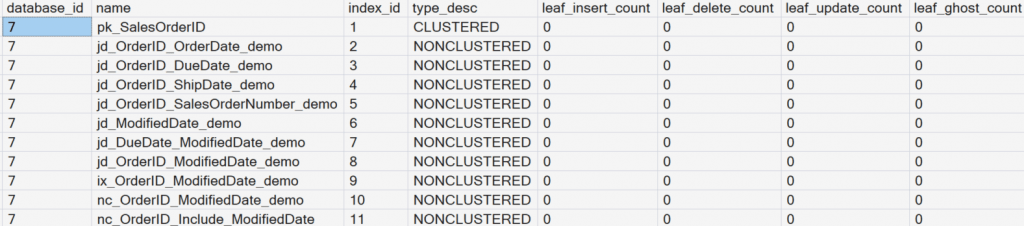
Key observation: All nonclustered indexes are rebuilt automatically. This is because the pointer values in the leaf level of the nonclustered indexes are now referencing a clustering key in the base table. Previously the pointer values referenced row identifiers (RIDs) when the base table was a heap.
Repeat DML with a Clustered Index
Now we will repeat similar UPDATE and DELETE operations. This allows a direct comparison between heap behavior and clustered table behavior.
UPDATE dbo.IndexOppTest
SET ModifiedDate = '2020-03-20'
WHERE SalesOrderID < 44658;

DELETE dbo.IndexOppTest
WHERE SalesOrderID BETWEEN 74623 AND 75123;
GO
Review Operational Stats Again
Examine how index maintenance changes after adding a clustered index. This will demonstrate a critical principle: A clustered index is not just about read performance; it could possibly improves write behavior. Compare the Heap results with the Clustered Index results.
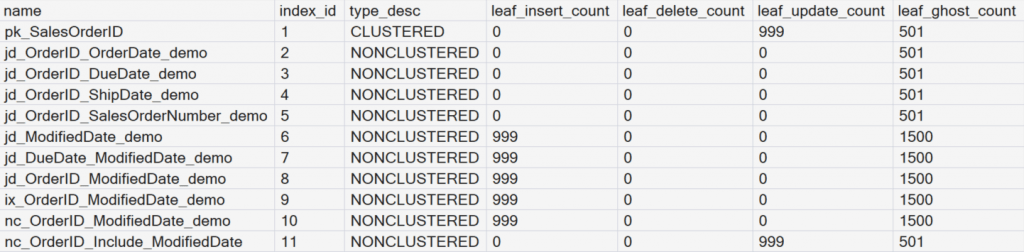
The key difference is that heaps physically remove rows when deletes occur, where clustered indexes mark deleted rows as ghost records. These ghost records are inexpensive to maintain, are cleaned up asynchronously by background processes, and help avoid immediate page reorganization during delete operations, making clustered indexes more efficient under delete-heavy workloads.

Read Patterns and Index Usage
Next, we run a few SELECT statements to see what really happens. Just because an index exists doesn’t mean SQL Server will use it, but it still has to keep that index up to date when data changes.
- Filter on ModifiedDate
- Filter on SalesOrderID
- Filter on SalesOrderNumber
- Compare covered vs. non-covered queries
SELECT * FROM dbo.IndexOppTest WHERE ModifiedDate = '2020-03-20';
SELECT * FROM dbo.IndexOppTest WHERE SalesOrderID = 43800;
SELECT * FROM dbo.IndexOppTest WHERE SalesOrderNumber = 'SO43800';

SELECT SalesOrderID, SalesOrderNumber
FROM dbo.IndexOppTest
WHERE SalesOrderNumber = 'SO43800';
GO
Review Index Usage Statistics
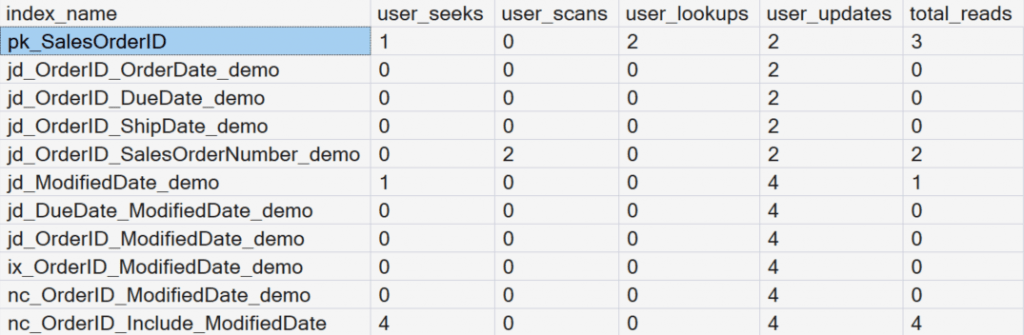
Try running each statement one at a time and review each individual execution plan to see how each operation is reflected in the sys.dm_db_index_usage_stats dynamic management view (DMV). This matters as usage alone does not tell the full story, you must compare usage against maintenance cost.
SELECT i.name AS index_name, user_seeks, user_scans,
	user_lookups, user_updates,
    user_seeks + user_scans + user_lookups AS total_reads
FROM sys.dm_db_index_usage_stats s
RIGHT JOIN sys.indexes i
	ON i.object_id = s.object_id
	AND i.index_id = s.index_id
WHERE i.object_id = OBJECT_ID('dbo.IndexOppTest');
GO
Key Columns in sys.dm_db_index_usage_stats
| ColumnName | What It Measures | Why It Matters |
| user_seeks | Number of times user queries performed index seeks using this index. A seek uses a predicate to efficiently locate a subset of rows. | High values indicate the index is well-designed and selective for query predicates. |
| user_scans | Number of times user queries scanned the entire index or a large portion of it, rather than using a seek predicate. | Frequent scans may indicate low selectivity, missing predicates, or that the index is not optimal for the workload. |
| user_lookups | Number of bookmark (key) lookups performed by user queries, typically when a nonclustered index is used but additional columns are retrieved from the clustered index or heap. | High values often suggest the index is missing INCLUDE columns and may benefit from being made covering. |
| user_updates | Number of insert, update, or delete operations performed by user queries that affected this index. This counts operations, not rows affected. | Helps identify indexes with high maintenance cost; high updates with low reads may indicate an index that is expensive and rarely used. |
Important notes:
- SQL Server resets these counters when it restarts or you detach the database.
- These values measure how often execution plans reference an index, not the number of rows.
- Always evaluate usage over time before dropping or modifying indexes.
Review of the Modified Date Indexes
Notice in the results that the indexes on the ModifiedDate column were modified four times when update and delete operations were run during this demonstration. But how many of them were actually read when we ran the SELECT statements.
Index number 11, where we had the INCLUDE statement for the ModifiedDate column, was the index that was used to read the data. The other five indexes on ModifiedDate are just there to waste space and to slow down operational tasks.
Index Usage Statistics Report
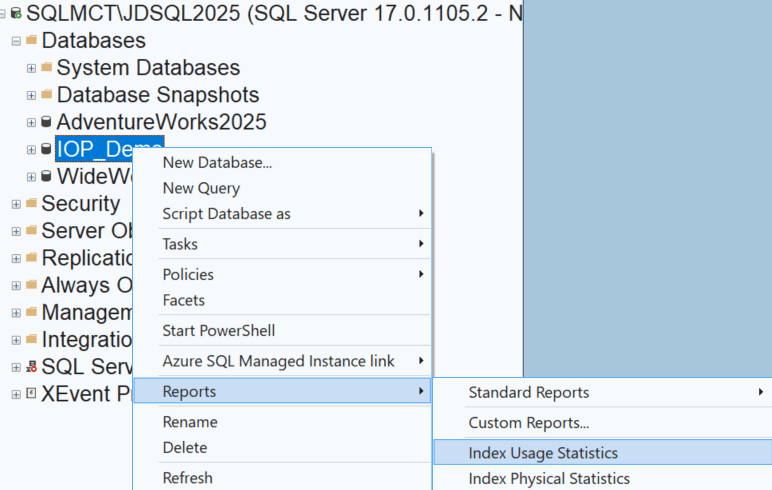
Another way of observing this information without using dynamic management views is to use the Index Usage Statistics Report in SQL Server Management Studio (SSMS).
The Key Insight: Usage ≠ Value
One of the most important lessons from this post: An index can have low or zero reads, but still incur high maintenance cost, especially during writes. If the workload rarely reads an index but constantly updates it, that index becomes a net drag on performance.




Be the first to comment on "The Operational Cost of Maintaining Indexes"