Non‑clustered indexes are some of the most powerful, misunderstood, and misused performance features in SQL Server. They can dramatically improve query performance when designed well, and just as easily cause overhead and confusion when they’re not.
This is part of a series that walks through how non‑clustered indexes work internally and how some best practices on creating them. The goal is not just how to create indexes, but why SQL Server behaves the way it does.
How SQL Server Stores Data
Before non‑clustered indexes make sense, it’s important to understand how SQL Server stores data in base tables. My previous post on Table Structures in SQL Server goes into more detail on this topic and also discusses using the DBCC IND and DBCC PAGE commands.
Heaps store date in unsorted order and are referenced by a Row-Identifier (RID). Clustered Indexes store data in sorted order by a clustering key. With both of these table structures, the leaf level is the data. This matters because non‑clustered indexes will ultimately point back to these data pages in the base table.
What Is a Non‑Clustered Index?
A non‑clustered index is a separate balanced tree (B‑tree) structure that is built on top of a base table. This base table could store date as either a heap or a clustered index.
A non-clustered index contains only a subset of the table’s columns. It uses a similar B‑tree structure as a clustered index. However, for a clustered index, the leaf level contains the actual data rows. While for a non-clustered index, the leaf level contains only the indexed columns and a pointer to the base table.
For clustered index tables, the pointer value would be the clustering key. For Heaps, the pointer value stored in the non-clustered index would be the ROW ID (RID). You also have the option to INCLUDE columns in your non-clustered index that is discussed here.
A good mental model is to think of a non‑clustered index as a skinny, highly optimized copy of part of your table, designed to be searched quickly. Because it has fewer columns, it usually has far fewer pages than the base table, making seeks and scans much cheaper.
Demonstration of Finding Alabama Addresses
The goal of the demonstration in this post is to find the records in the Person.Address table for people who live in Alabama. The StateProvinceID for Alabama has a value of 3.
-- Show IX_Address_StateProvince Index
SELECT AddressID, AddressLine1, City, StateProvinceID
FROM Person.Address
WHERE StateProvinceID = 3;
GO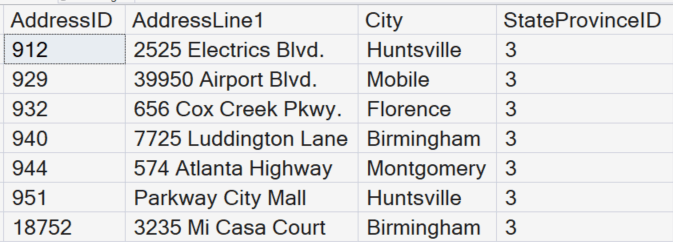
A Look Inside the Non-Clustered Index Pages
To see how SQL Server found those records, we first need to discover which indexes are available from the AdventureWorks database. We will use the sp_helpindex stored procedure on the Person.Address table to get this list.
USE AdventureWorks
GO

-- List the indexes
EXEC [sp_helpindex] 'Person.Address';
GO
The index that is the focus of this post will be the IX_Address_StateProvinceID index. Notice that the index key is on the StateProvinceID column.

Next, we will use the DBCC IND command to see a list of the pages that belong to the on the Person.Address table.
-- Find index pages for the table
DBCC IND(0,'Person.Address',-1)
Interesting Columns in the DBCC command
There are three columns we want to focus on for this post. PagePID, IndexID, and PageType. The PagePID will tell us the page number of the data or index page that is storing information.
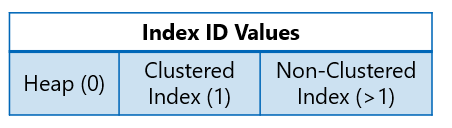
The IndexID tells us the index type of the page. If the index id value is a 0, then these pages belong to the base table that is storing data unsorted in a heap. If the index id value is a 1, then these pages belong to the base table that is storing data sorted in a clustered index. When the value is greater than 1, those pages are part of a non-clustered index.
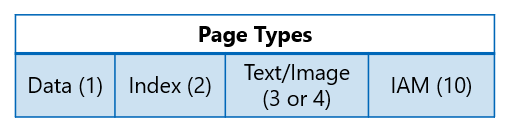
The PageType tells us what type of information is stored in the page. For a more detailed breakdown, read my previous post on Understanding SQL Server Page Types. For this post, we will focus on the index pages that have a page type of 2.
The IX_Address_StateProvinceID index for the Person.Address table has an index id of 4. This index was the fourth index created for this database. When we run the DBCC Page command above, we would have to scroll down several times to locate those index pages.
Using a Dynamic Management View (DMV) to Locate Pages
However, we also use the newer dynamic management view sys.dm_db_database_page_allocations to locate the pages for a specific index. (The DBCC commands do not allow WHERE clauses and are slowly being replaced with DMVs in SQL Server.)
-- New Dynamic Management view from SQL Server 2016
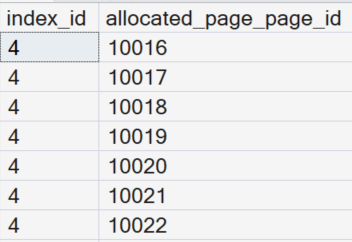
SELECT index_id, allocated_page_page_id
FROM sys.dm_db_database_page_allocations
(DB_ID(), object_ID('Person.Address'), NULL, NULL, 'LIMITED')
WHERE index_id = 4 and allocated_page_iam_file_id IS NOT NULL
GO
Notice this will list the index pages where the index_id is equal to 4.
Finding People Who Live in Alabama
Now look inside page 10016. This page is the most likely to have the StateProvinceID of 3 for Alabama. We need to enable trace flag 3604 to display the results for this DBCC statement.
-- Look inside the data and index pages
DBCC TRACEON(3604,-1)
DBCC PAGE(0, 1, 10016, 3) --Non-clustered Index Page
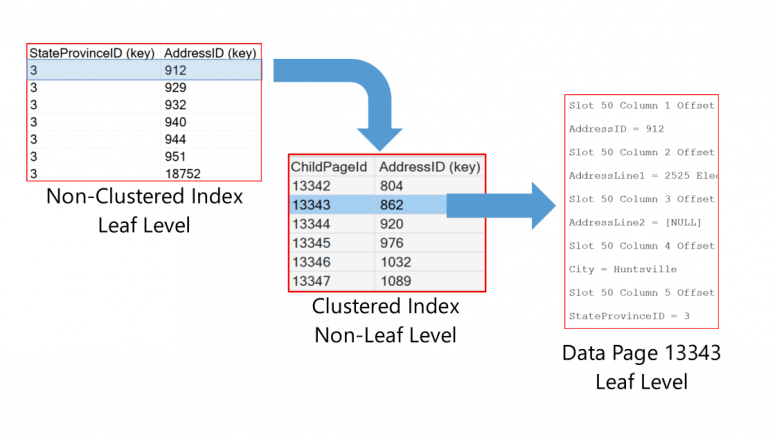
We will scroll down to where StateProvinceID (key) is the value of 3. Notice there are seven entries for the people who live in Alabama. The AddressID (key) column has the pointer record to the base table. Since the base table is a clustered index, this value is the clustering key for those records.
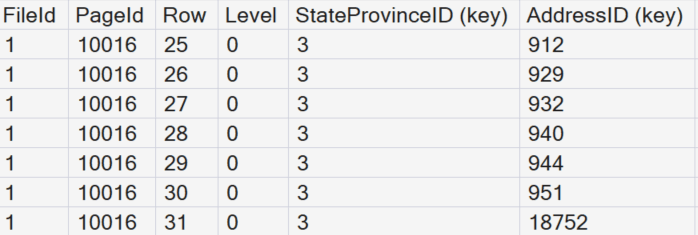
SQL Server would use this non-clustered index page to find the AddressID values. These values are the pointer records used to locate the data pages where the address records are stored. The first pointer value we will use is 912.
Searching the Clustered Index
Now search the clustered index page by using the DBCC IND command. Locate the record where the IndexID equals 1 and the PageType equals 2.
-- Find index pages for the table
DBCC IND(0,'Person.Address',-1);
We can see that the that the page for the clustered index is PagePID number 13512. We will use that value to look inside the clustered index page that will tell us where our data is stored.
-- Look inside the clustered index page
DBCC TRACEON(3604,-1)
DBCC PAGE(0, 1, 13512, 3); --Clustered Index Page
Remember above, the first value we want to locate was 912. This is the AddressID we retrieved from the non-clustered index of the people who live in Alabama. When we look in the clustered index page we see that all the AddressID values from 862 – 919 are on page 11343.
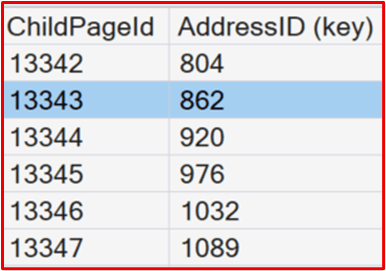
-- Look inside the Actual Data Page
DBCC TRACEON(3604,-1)
DBCC PAGE(0, 1, 13343, 3);
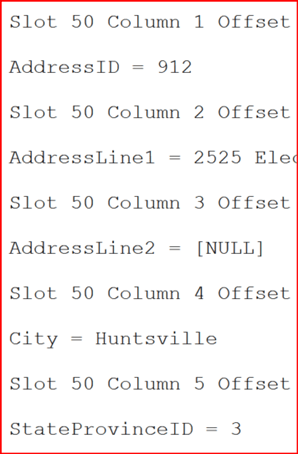
Once inside the data page, we may have to scroll down to find AddressID of 912. But it is located in slot 50 of the actual data page. Slots start counting at 0, so this would be row 51 in the base table.
Final Thoughts
Non‑clustered indexes are often introduced as a simple performance feature. But as this deep dive shows, their real value comes from understanding how SQL Server actually uses them. When you know what a non‑clustered index stores and how it navigates back to the base table, index design becomes a deliberate tuning decision instead of trial and error.
Used well, non‑clustered indexes give you targeted, efficient access paths that align with real query patterns, without unnecessary overhead. That foundation is essential for making smart choices about included columns, multi‑column keys, and lookup avoidance in real‑world SQL Server systems.




Be the first to comment on "A Deep Dive into Non‑Clustered Indexes"