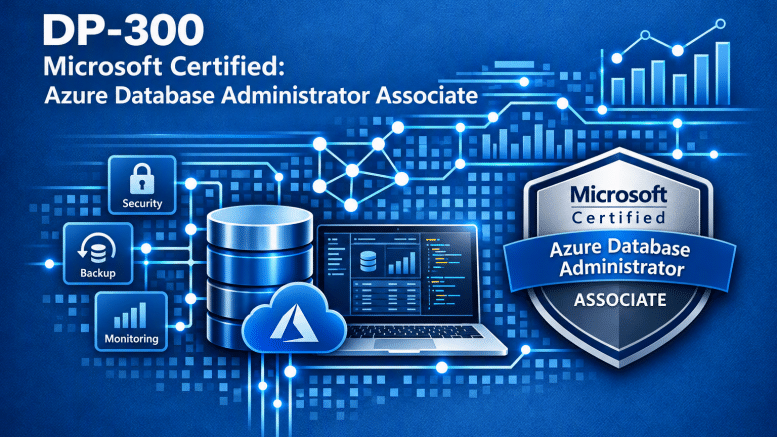
If you’ve spent any time working with SQL Server, you already know that database administration involves much more than backups, restores, and keeping the database engine running. Today’s database administrators need to understand security, performance, availability, automation, and increasingly, how to manage database workloads across both on-premises environments and Microsoft Azure.
That’s exactly what the Microsoft Certified: Azure Database Administrator Associate certification is designed to validate. The DP-300: Administering Microsoft Azure SQL Solutions exam focuses on the skills required to manage, secure, monitor, and optimize SQL Server and Azure SQL environments.
For experienced SQL Server DBAs, much of the material should look familiar. However, don’t underestimate the Azure-specific capabilities. Understanding how SQL Server works is important, but knowing how those concepts translate into Azure SQL Database, Azure SQL Managed Instance, and SQL Server on Azure Virtual Machines is where things get interesting.
Why This Certification Matters
SQL Server has been a cornerstone of enterprise database environments for decades. While traditional database administration remains important, organizations are increasingly adopting cloud-native and hybrid database architectures. The Azure Database Administrator Associate certification demonstrates that you understand how to administer SQL Server workloads across these environments.
This certification validates your ability to:
- Deploy and configure Azure SQL database solutions.
- Secure databases using modern authentication, encryption, and access controls.
- Monitor and optimize database performance.
- Automate administrative tasks and deployments.
- Implement high availability and disaster recovery solutions.
- Plan and execute database migrations to Azure.
One of the things I appreciate about this certification is that it doesn’t abandon traditional SQL Server administration. Instead, it builds on those skills and applies them to modern Azure environments. If you’re already an experienced DBA, you’re not starting over. You’re expanding what you already know.
Who Should Take the Azure Database Administrator Certification?
This certification is intended for database professionals responsible for managing SQL Server and Azure SQL environments. Microsoft identifies several areas of experience that candidates should understand.
This certification is particularly relevant for:
- SQL Server Database Administrators: Professionals managing SQL Server who want to expand their Azure expertise.
- Azure Database Administrators: Administrators responsible for Azure SQL Database or Azure SQL Managed Instance.
- Cloud Solution Architects: Professionals designing database architectures involving Azure SQL services.
- Database Engineers: Individuals responsible for database performance, availability, security, and automation.
- IT Professionals Moving to Azure: Experienced database professionals supporting cloud migration initiatives.
Candidates should have hands-on experience with:
- SQL Server on-premises
- Azure SQL Database
- Azure SQL Managed Instance
- SQL Server on Azure Virtual Machines
- Transact-SQL (T-SQL)
- Database security and performance troubleshooting
If you’ve worked with SQL Server for years, you’ll recognize many of the concepts. The challenge is understanding how Microsoft implements those capabilities across its different Azure SQL offerings.
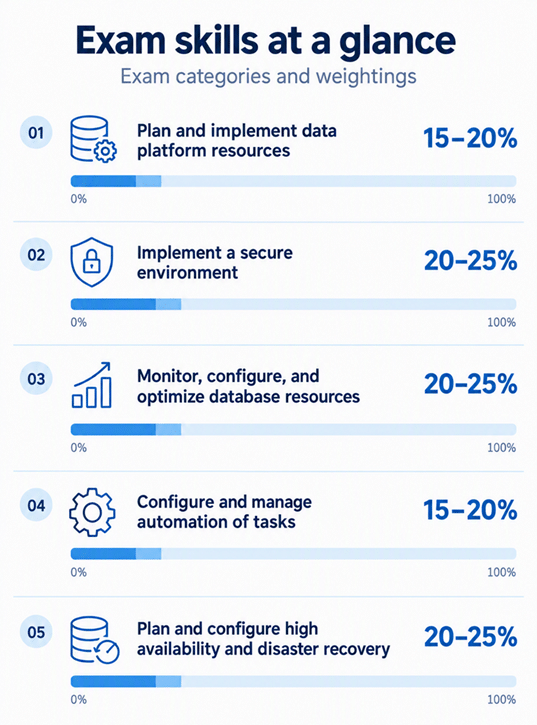
Skills Measured by Exam DP-300
To earn the certification, you must pass Exam DP-300: Administering Microsoft Azure SQL Solutions. Microsoft periodically updates certification exams to reflect changes in technology and industry requirements.
The following objectives reflect the Microsoft Learn study guide effective October 27, 2026.
1. Plan and Implement Data Platform Resources (15–20%)
This section focuses on selecting, deploying, configuring, and migrating database solutions. You should understand how to:
- Recommend appropriate Azure SQL offerings based on business and technical requirements.
- Deploy Azure SQL Database, Azure SQL Managed Instance, and SQL Server on Azure Virtual Machines.
- Configure database resources for scalability and performance.
- Implement table partitioning and data compression.
- Evaluate Azure Arc-enabled SQL services.
- Understand Azure SQL Database integration with Microsoft Fabric.
- Plan and execute online and offline database migrations.
- Troubleshoot database migration issues.
My recommendation: Spend time understanding the differences between Azure SQL Database, Azure SQL Managed Instance, and SQL Server on Azure VMs. Know when to recommend each option and understand the trade-offs involving management responsibility, compatibility, scalability, and cost.
2. Implement a Secure Environment (20–25%)
Security is a significant component of modern database administration. Candidates should understand how to:
- Configure Microsoft Entra ID authentication.
- Manage database users, roles, and permissions.
- Implement the principle of least privilege.
- Configure Transparent Data Encryption (TDE).
- Implement Always Encrypted and secure enclaves.
- Configure network security using firewalls and private endpoints.
- Implement auditing and data classification.
- Configure dynamic data masking and row-level security.
- Understand ledger capabilities in Azure SQL.
My recommendation: Don’t just memorize the names of security features. Understand what each feature protects, how it works, and when you would implement it. For example, know the differences between TDE, Always Encrypted, and dynamic data masking. These technologies solve different security problems.
3. Monitor, Configure, and Optimize Database Resources (20–25%)
This is one of the areas where experienced SQL Server DBAs should feel comfortable. Performance tuning remains a fundamental database administration skill, regardless of where SQL Server is running. Candidates should understand how to:
- Establish performance baselines.
- Monitor database resource utilization.
- Use Query Store to investigate query performance.
- Analyze execution plans.
- Identify blocking and performance bottlenecks.
- Use Dynamic Management Views (DMVs).
- Configure and maintain indexes and statistics.
- Implement automatic tuning.
- Use Extended Events and Database Watcher.
- Configure database resources for optimal performance.
- Understand intelligent query processing capabilities.
My recommendation: If you’re already comfortable troubleshooting SQL Server performance, build on that knowledge. Focus on how performance monitoring and tuning differ between traditional SQL Server and Azure SQL services. Also, spend time with Query Store. It’s an incredibly valuable tool for identifying performance regressions and understanding query behavior.
4. Configure and Manage Automation of Tasks (15–20%)
Database administration has always involved repetitive operational tasks. Automation helps reduce manual effort, improve consistency, and minimize configuration errors.
Candidates should understand how to:
- Create and manage SQL Server Agent jobs.
- Configure job schedules, alerts, and notifications.
- Troubleshoot failed automation tasks.
- Deploy database resources using Azure Resource Manager templates.
- Implement infrastructure as code using Bicep.
- Automate deployments using Azure PowerShell and Azure CLI.
- Configure elastic jobs for Azure SQL Database.
- Monitor automated database operations.
My recommendation: Don’t overlook automation simply because you’re comfortable administering databases manually. Understand the differences between SQL Server Agent, elastic jobs, and Azure-based deployment automation. The exam expects you to recognize which tools are appropriate for different environments and operational requirements.
5. Plan and Configure High Availability and Disaster Recovery (20–25%)
High availability and disaster recovery are essential responsibilities for database administrators. The goal is straightforward: keep business-critical data available and recoverable. Candidates should understand how to:
- Evaluate business requirements for availability and recovery.
- Recommend appropriate high availability and disaster recovery architectures.
- Configure Always On availability groups.
- Understand Azure SQL Database failover groups.
- Implement active geo-replication where appropriate.
- Configure backup and restore strategies.
- Understand recovery point objectives (RPO) and recovery time objectives (RTO).
- Evaluate availability options across different Azure SQL offerings.
- Perform and validate database recovery operations.
My recommendation: Understand the difference between high availability and disaster recovery. They are related, but they solve different problems. High availability focuses on minimizing service interruptions. Disaster recovery focuses on restoring operations following significant failures. Also, understand which capabilities Microsoft manages automatically in Azure SQL Database and which remain your responsibility.
SQL Server and Azure: Understanding the Differences
One of the most important aspects of preparing for DP-300 is understanding how traditional SQL Server administration translates into Azure. SQL Server on-premises gives administrators extensive control over the database engine, operating system, storage, and infrastructure. There are different levels of management responsibility with Azure SQL services.
Azure SQL Database
Azure SQL Database is a fully managed platform-as-a-service database offering. Microsoft handles many infrastructure responsibilities, including operating system maintenance, platform patching, and automated backups.
Database administrators focus more on:
- Database configuration
- Query performance
- Security
- Resource scaling
- Monitoring
- Application availability
Azure SQL Managed Instance
Azure SQL Managed Instance provides a managed SQL Server environment with broader instance-level compatibility than Azure SQL Database. It’s particularly useful for organizations migrating existing SQL Server applications that depend on instance-level functionality.
SQL Server on Azure Virtual Machines
SQL Server on Azure VMs provides the greatest level of control over the SQL Server environment. However, that flexibility also means administrators retain more responsibility for operating system maintenance, SQL Server configuration, patching, backups, and availability.
The important takeaway: Know the differences between these platforms. The best solution depends on application requirements, compatibility, operational responsibilities, and business objectives.
How I Would Prepare for the DP-300 Exam
After years of working with SQL Server and Taking Microsoft Certification Exams, I’ve learned that preparation is about understanding the technology rather than memorizing answers. Here are a few recommendations.
1. Start with the Official Study Guide
Microsoft publishes a detailed list of exam objectives. Review those objectives before spending time on training materials.Identify the areas where you’re already comfortable and the areas that require additional study. Don’t spend hours reviewing something you already know while ignoring technologies you’ve never used.
2. Get Hands-On Experience with Azure SQL
Reading documentation is useful, but actually deploying and configuring Azure SQL resources makes a significant difference. Understanding how a feature works is much easier when you’ve actually configured it. If possible, practice:
- Deploying Azure SQL Database.
- Configuring Microsoft Entra authentication.
- Implementing firewall rules and private endpoints.
- Reviewing Query Store.
- Configuring auditing.
- Testing database scaling.
- Exploring backup and recovery options.
3. Understand the Differences Between Azure SQL Offerings
I can’t emphasize this enough. Know when to use:
- Azure SQL Database
- Azure SQL Managed Instance
- SQL Server on Azure Virtual Machines
Pay attention to compatibility, administration, availability, and security.
4. Review Security and High Availability
These are two areas where understanding implementation details matters. Be comfortable explaining why you would recommend one technology over another. Understanding these concepts will help you evaluate scenario-based questions. For example:
- When should you use Always Encrypted instead of TDE?
- What is the difference between a failover group and an availability group?
- When should you use private endpoints?
- How do RPO and RTO influence disaster recovery design?
5. Take the Microsoft Practice Assessment
Microsoft provides a practice assessment to help identify knowledge gaps. Use it as a learning tool rather than simply trying to memorize the answers. When you miss a question, review the underlying technology and understand why the correct answer is appropriate.
6. Don’t Overthink the Questions
One thing I’ve learned from taking Microsoft exams is that it’s easy to make questions more complicated than they need to be.
- Read the question carefully.
- Identify what Microsoft is actually asking.
- Pay attention to requirements, constraints, and keywords.
- If you’re unsure, mark the question for review and move on.
Sometimes another question will help you remember something you couldn’t immediately recall. And remember, failing an exam isn’t the end of the world. It’s another opportunity to learn.
Why DP-300 Still Matters
With all the attention surrounding AI, Microsoft Fabric, and modern data platforms, it’s easy to overlook the importance of traditional database administration skills. But databases still need to be secured, monitored, optimized, backed up, and recovered. Applications still depend on reliable database infrastructure. Organizations still need professionals who understand how to keep their data platforms running efficiently. The technologies continue to evolve, but the fundamental responsibilities of database administration remain. DP-300 validates those skills while demonstrating your ability to apply them across modern Azure SQL environments.
Study Resources
- Certification Page: Microsoft Certified: Azure Database Administrator Associate
- Practice Assessment: DP-300 Practice Assessment
- Official Study Guide: Microsoft Learn DP-300 Study Guide
- Exam Tips: Taking Microsoft Certification Exams
- Overview & Tips: Data Exposed – DP-300 Exam Overview
- Video Series: Exam Readiness Zone DP-300 (5 Videos)



Be the first to comment on "Azure Database Administrator Study Guide"