SQL Server migrations just got a lot simpler. SQL Server Management Studio (SSMS) 22.5 introduces a new “Migrate SQL Server” experience. This unified, guided, end-to-end flow brings assessment, migration, and modernization together in one place. Instead of jumping between tools and portals, SSMS now acts as the single-entry point for moving SQL Server workloads to Azure SQL, whether you’re working in a hybrid environment or fully on-premises.
This is a meaningful shift. Migration is no longer a collection of disconnected steps; it’s a guided journey that starts where DBAs already live: SQL Server Management Studio.
One Flow, Multiple Migration Paths
At a high level, the new experience allows you to:
- Run readiness and compatibility assessments
- Get recommended Azure SQL targets
- Launch the right migration method for your scenario
- Seamlessly transition to the Azure portal when needed
Right-click on your SQL Server instance in Object Explorer and select Migrate SQL Server.
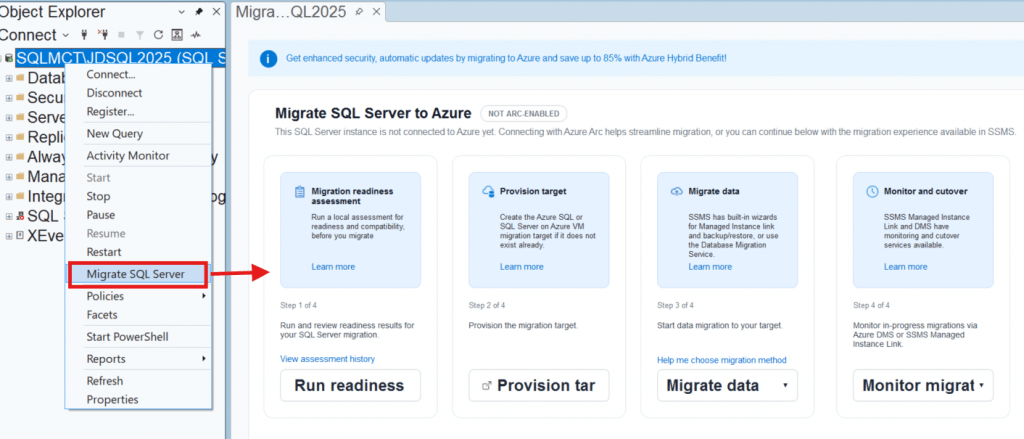
The experience automatically adapts based on whether your SQL Server is Azure Arc–enabled or not.
SQL Migration Assessment Report
The SQL Migration Assessment Report provides a clear, at-a-glance view of your environment and immediately helps guide smarter migration decisions. From a single report, you can see key source details, such as SQL Server version, edition, CPU cores, memory configuration, and number of databases assessed, alongside target-specific readiness results.
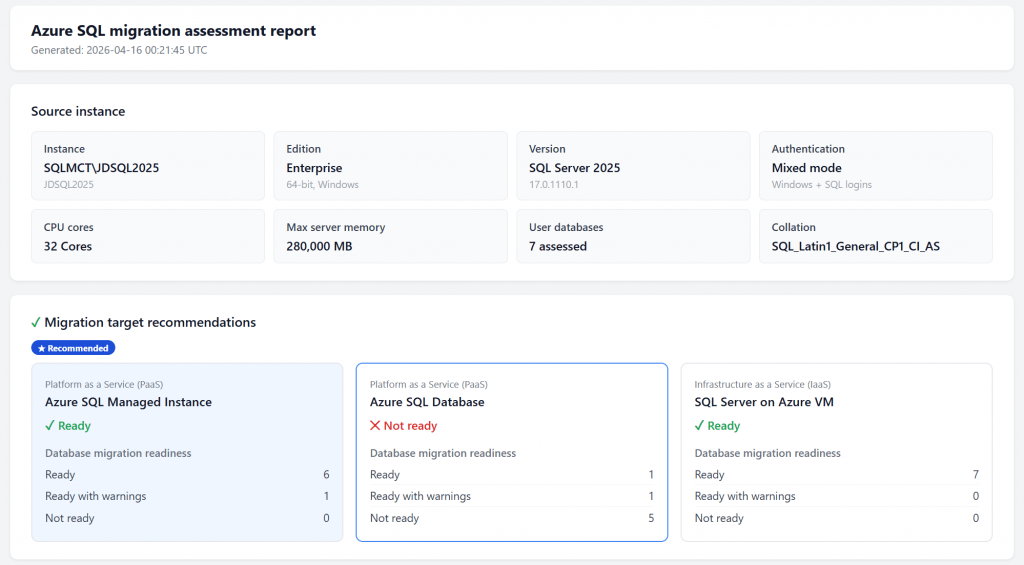
In this example, the report highlights Azure SQL Managed Instance as the recommended target, showing most databases ready with minimal warnings, while clearly flagging Azure SQL Database as not yet suitable for several workloads. By visually comparing readiness across Azure SQL Managed Instance, Azure SQL Database, and SQL Server on Azure VMs, the report removes guesswork and enables data-driven conversations around migration strategy, effort, and risk before any actual move begins.
Migrating SQL Server (Without Azure Arc)
For traditional on‑premises or standalone SQL Server instances, SSMS now handles the entire starting point locally. You can run a local metadata-based assessment directly in SSMS to evaluate database readiness and identify potential blockers. From there, SSMS recommends supported Azure targets and guides you to Azure SQL Hub to provision the destination.
Supported Migration Options
SSMS integrates with existing, proven migration technologies and presents them through a guided flow:
- Managed Instance Link for Azure SQL Managed Instance
Near-zero downtime migrations for business-critical workloads - Backup & Restore to Azure SQL Virtual Machines
A straightforward “lift-and-shift” approach - Azure Database Migration Service (DMS)
Supported for all Azure SQL targets, including Azure SQL Database, Managed Instance, and SQL on Azure VMs
The key improvement here is decision guidance, SSMS helps you choose the right migration method instead of leaving you to figure it out on your own.
Migrating Azure Arc–Enabled SQL Server
If your SQL Server is already enabled by Azure Arc, the flow shifts from local to cloud managed. When you initiate migration from SSMS, the tool detects the Arc connection and seamlessly redirects you to the Azure portal, where you can take advantage of centralized, cloud-driven migration workflows and monitoring. This model is ideal for organizations already using Azure Arc for inventory, governance, and hybrid management.
Upgrade Assessment in SSMS
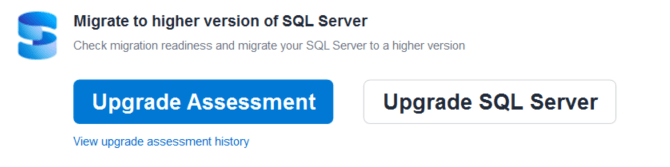
Migration isn’t always about moving to Azure. For customers planning upgrades or modernization, SSMS also includes an Upgrade Assessment tool. This feature helps identify compatibility issues and potential breaking changes when upgrading to newer SQL Server versions or modernizing workloads, reducing surprise issues later in the process.
Why This Matters
With the retirement of the Data Migration Assistant (DMA) on July 16, 2025, and the retirement of Azure Data Studio in February 2026, the tools and options for the Migration to Azure SQL were limited and may not have been completely user friendly. But now SSMS is clearly positioned as the front door for SQL Server migration and modernization. The new migration page in SSMS 22.5 consolidates assessment, target selection, migration execution, and monitoring into a single, evolving experience.
For DBAs and architects, this means:
- Fewer tools to manage
- More guidance up front
- Cleaner handoffs between on-premises and Azure
- Less guesswork during migration planning
Get Started
- Install SSMS 22.5:
Install SQL Server Management Studio - Documentation:
Migrate SQL Server to Azure SQL - Official Blog:
Azure SQL Migration Starts in SSMS—All in One Flow

Be the first to comment on "Simplify SQL Server Migration with SSMS 22.5"