
One of the most exciting additions in SQL Server 2025 is native Vector Search & Vector Index support. Although you could use cloud-based models like Azure OpenAI; local AI models like Ollama allow SQL Server to perform semantic searches without sending data to external services. The following demonstration is using the scripts provided by Microsoft.
In a separate post, we walked through installing a SQL Server 2025 Practice Environment including installing SSMS 22 and the AdventureWorks database. We also walked through the steps in Setting Up Ollama for SQL Server 2025. This will allow everything to run locally, making it a great option for organizations with strict privacy, compliance, or cost requirements.
You can learn more about building AI-powered solutions using SQL Server 2025 or start working on the new SQL AI Developer Associate Certification.
Why Vector Search?
Traditional SQL searches rely on exact matches, patterns, or full-text indexes. While effective, they often struggle when users describe what they’re looking for without using the exact words contained in the data. For example, consider the query:
“I want a gliding, pillow-y feel on battered streets, zero buzz through the hands.”
Traditional search may not find relevant products because none of those exact phrases exist in the product descriptions. Vector search converts both product descriptions and search prompts into numerical representations called embeddings. SQL Server can then compare the meaning of the text instead of matching keywords.
Enable REST API Support
To begin, we will enable REST endpoints as SQL Server uses them to communicate with Ollama and other AI models.
USE master;
GO
sp_configure 'external rest endpoint enabled', 1;
GO
RECONFIGURE WITH OVERRIDE;
GO
-- Grant permission (database-scoped)
GRANT EXECUTE ANY EXTERNAL ENDPOINT TO [SQLVM\SQLMCT];
Create a Full-Text Search Baseline
Before diving into vector search, create a traditional full-text index for comparison. This will allow us to see the difference between normal text searching and vector searching. First, ensure Full-Text Search is installed.
IF 1 = ISNULL(CONVERT(int, FULLTEXTSERVICEPROPERTY('IsFullTextInstalled')), 0)
BEGIN
    PRINT 'Full-Text Search feature is installed.';
END
ELSE
BEGIN
    RAISERROR('Full-Text Search feature is not installed on this instance.', 16, 1);
    RETURN;
END
GO
Create a traditional full-text catalog if it is not present.
IF NOT EXISTS (SELECT 1 FROM sys.fulltext_catalogs WHERE name = N'FTC_AdventureWorks')
BEGIN
    PRINT 'Creating full-text catalog [FTC_AdventureWorks]...';
    CREATE FULLTEXT CATALOG [FTC_AdventureWorks];
END
ELSE
BEGIN
    PRINT 'Full-text catalog [FTC_AdventureWorks] already exists.';
END
GO
Create the traditional full-text index on the Description column in the Production.ProductDescription table.
IF NOT EXISTS (SELECT 1
    FROM sys.fulltext_indexes
    WHERE object_id = OBJECT_ID(N'Production.ProductDescription')
)
BEGIN
    PRINT 'Creating full-text index on Production.ProductDescription(Description)...';
    CREATE FULLTEXT INDEX ON [Production].[ProductDescription]
    ([Description] LANGUAGE 1033  -- English)
    KEY INDEX [PK_ProductDescription_ProductDescriptionID]  -- existing PK
    ON ([FTC_AdventureWorks])
    WITH (CHANGE_TRACKING = AUTO, STOPLIST = SYSTEM);
END
ELSE
BEGIN
    PRINT 'Full-text index on Production.ProductDescription already exists.';
END
GO
Verify that the Full-Text index definition exists.
SELECT
    t.name AS TableName,
    i.name AS KeyIndex,
    fc.name AS CatalogName,
    fi.is_enabled,
    fic.column_id,
    c.name AS ColumnName,
    fic.language_id
FROM sys.fulltext_indexes AS fi
JOIN sys.objects AS t ON fi.object_id = t.object_id
JOIN sys.indexes AS i ON fi.unique_index_id = i.index_id AND i.object_id = t.object_id
JOIN sys.fulltext_catalogs AS fc ON fi.fulltext_catalog_id = fc.fulltext_catalog_id
JOIN sys.fulltext_index_columns AS fic ON fi.object_id = fic.object_id
JOIN sys.columns AS c ON fic.object_id = c.object_id AND fic.column_id = c.column_id
WHERE t.object_id = OBJECT_ID(N'Production.ProductDescription');
GO
This allows us to compare keyword-based search against semantic search results.
Enable Preview Features
Vector indexes currently require SQL Server 2025 preview functionality.
USE AdventureWorks2025;
GO
ALTER DATABASE SCOPED CONFIGURATION
SET PREVIEW_FEATURES = ON;
GO
This enables vector-related functionality within the database.
Traditional Search Examples
Let’s see how full-text search behaves.
USE AdventureWorks2025;
GO
SELECT * FROM Production.ProductDescription
WHERE Description LIKE '%pillow-y%'
GO
SELECT * FROM Production.ProductDescription
WHERE CONTAINS (Description, '"zero buzz"');
GO
SELECT * FROM Production.ProductDescription
WHERE FREETEXT (Description, 'I want a gliding, pillow‑y feel on battered streets, zero buzz through the hands');
GO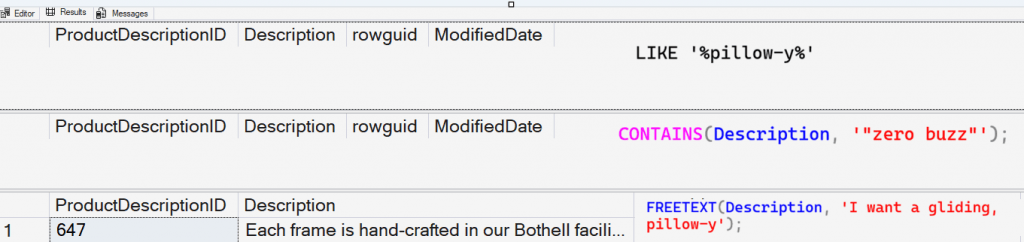
While full-text search is powerful, it still relies on matching words and phrases rather than understanding intent.
Create an External AI Model
The next step is creating an External Model to connect SQL Server to Ollama.
USE [AdventureWorks2025];
GO

IF EXISTS (SELECT * FROM sys.external_models WHERE name = 'MyOllamaEmbeddingModel')
DROP EXTERNAL MODEL MyOllamaEmbeddingModel;
GO

-- Create the EXTERNAL MODEL
CREATE EXTERNAL MODEL MyOllamaEmbeddingModel
WITH (
      LOCATION = 'https://localhost/api/embed',
      API_FORMAT = 'Ollama',
      MODEL_TYPE = EMBEDDINGS,
      MODEL = 'mxbai-embed-large',
      PARAMETERS = '{ "sql_rest_options": { "retry_count": 10 } }'
      );
GO
Test that the External Model was Created
Verify that the external model was created.
SELECT * FROM sys.external_models;
GO
Test the External Model using AI_GENERATE_EMBEDDINGS
This will verify that we can connect to the Ollama model that was set up previously in a separate post. We are using AI_GENERATE_EMBEDDINGS to generate a vector embedding from the text "Hello from SQL".
SELECT AI_GENERATE_EMBEDDINGS (N'Hello from SQL' USE MODEL MyOllamaEmbeddingModel);
GO
Create a Table to Store Embeddings
Now we create a table to store vector embeddings.
USE AdventureWorks2025;
GO
-- Create a new table to store embeddings
--
DROP TABLE IF EXISTS Production.ProductDescriptionEmbeddings;
GO
CREATE TABLE Production.ProductDescriptionEmbeddings
(
  Embedding vector(1024), -- Floating point 32 = 4KB per row
  ProductDescEmbeddingID INT IDENTITY NOT NULL PRIMARY KEY CLUSTERED,
  ProductID INT NOT NULL,
  ProductDescriptionID INT NOT NULL,
  ProductModelID INT NOT NULL
 );
GO
Generate Product Embeddings
We will now generate embeddings for each product description and store them inside SQL Server. This will take a few minutes depending on the size of the table.
INSERT INTO Production.ProductDescriptionEmbeddings
SELECT AI_GENERATE_EMBEDDINGS(pd.Description USE MODEL MyOllamaEmbeddingModel), p.ProductID, pmpdc.ProductDescriptionID, pmpdc.ProductModelID--, --pmpdc.CultureID,
FROM Production.ProductModelProductDescriptionCulture pmpdc
JOIN Production.Product p
ON pmpdc.ProductModelID = p.ProductModelID
AND pmpdc.CultureID IN ('en', 'fr')
JOIN Production.ProductDescription pd
ON pd.ProductDescriptionID = pmpdc.ProductDescriptionID
GO
This is where semantic meaning becomes searchable data.
Explore the Embeddings
Next, we will review the embeddings that were created.
SELECT p.ProductID, p.Name, pd.Description, pde.Embedding
FROM Production.ProductDescriptionEmbeddings pde
JOIN Production.Product p
ON pde.ProductID = p.ProductID
JOIN Production.ProductDescription pd
ON pd.ProductDescriptionID = pde.ProductDescriptionID
GO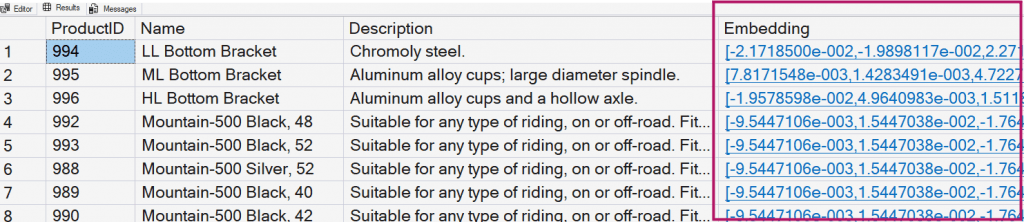
Create a Vector Index
SQL Server 2025 introduces DiskANN indexing for vector workloads.
USE [AdventureWorks2025];
GO
CREATE VECTOR INDEX product_vector_index
ON Production.ProductDescriptionEmbeddings (Embedding)
WITH (METRIC = 'cosine', TYPE = 'diskann', MAXDOP = 8);
GO
DiskANN indexes enable fast approximate nearest-neighbor searching across large embedding datasets.
Build a Semantic Search Procedure
Next, create a stored procedure that accepts natural language prompts. The procedure:
- Generates an embedding from the user prompt
- Uses VECTOR_SEARCH
- Returns the most similar products
- Filter results based on stock levels
USE [AdventureWorks2025];
GO

CREATE OR ALTER procedure [find_relevant_products_vector_search]
@prompt nvarchar(max), -- NL prompt
@stock smallint = 500, -- Only show product with stock level of >= 500. User can override
@top int = 10, -- Only show top 10. User can override
@min_similarity decimal(19,16) = 0.3 -- Similarity level that user can change but recommend to leave default
AS
IF (@prompt is null) RETURN;

DECLARE @retval int, @vector vector(1024);

SELECT @vector = AI_GENERATE_EMBEDDINGS(@prompt USE MODEL MyOllamaEmbeddingModel);

IF (@retval != 0) RETURN;

SELECT p.Name as ProductName, pd.Description as ProductDescription, p.SafetyStockLevel as StockLevel
FROM vector_search(table = Production.ProductDescriptionEmbeddings as t,
	column = Embedding,
	similar_to = @vector,
	metric = 'cosine',
	top_n = @top
	) as s
JOIN Production.ProductDescriptionEmbeddings pe
ON t.ProductDescEmbeddingID = pe.ProductDescEmbeddingID
JOIN Production.Product p
ON pe.ProductID = p.ProductID
JOIN Production.ProductDescription pd
ON pd.ProductDescriptionID = pe.ProductDescriptionID
WHERE (1-s.distance) > @min_similarity
AND p.SafetyStockLevel >= @stock
ORDER by s.distance;
GO
This stored procedure leverages the VECTOR_SEARCH function to locate similar vectors using cosine distance. You could also use the VECTOR_DISTANCE function.
Execute Semantic Searches
Now for the fun part. Let’s use the procedure to locate the products that are gliding and pillowy.
USE [AdventureWorks2025];
GO

-- Give it a spin
EXEC find_relevant_products_vector_search
@prompt = N'I want a gliding, pillow‑y feel on battered streets, zero buzz through the hands.',
@stock = 100,
@top = 10
GO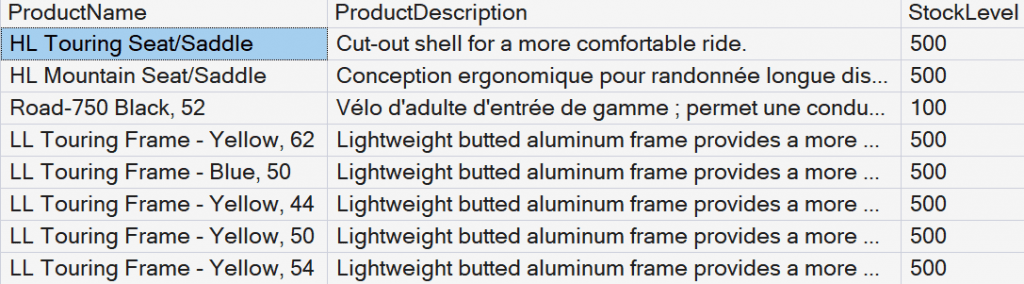
You can even search in another language:
EXEC find_relevant_products_vector_search
@prompt = N'Je veux une impression de douceur et de confort, même quand la route est pourrie, sans que ça vibre dans les mains',
@stock = 100,
@top = 10
GO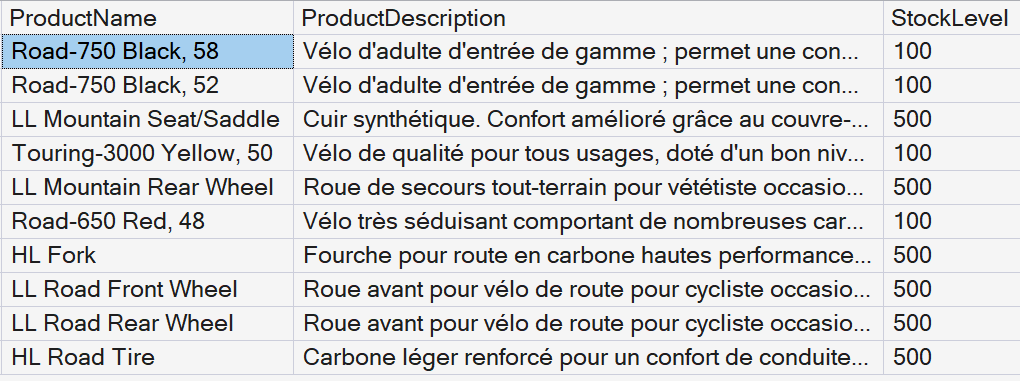
Because embeddings encode meaning rather than exact words, SQL Server can identify relevant products regardless of the language used in the query.
Key Takeaways
SQL Server 2025 makes it possible to build AI-powered semantic search capabilities directly inside the database engine. Combined with Ollama, organizations can deploy powerful vector search solutions that remain entirely on-premises.
What makes this particularly exciting is that database professionals can now implement modern AI search patterns using familiar T-SQL skills while keeping their data within their own environment.
As vector databases and retrieval-augmented generation (RAG) architectures become more common, native vector functionality in SQL Server 2025 provides a compelling platform for building enterprise AI solutions without introducing another data platform into the architecture.
August 2026 update: Find out What’s new in vector indexing for Microsoft SQL Server this week on Data Exposed!



Be the first to comment on "Vector Search in SQL Server 2025"