Data rarely arrives in perfect condition. Typos, regional spelling differences, and inconsistent formats make exact matching unreliable in real-world scenarios. That’s where similarity matching comes in; and SQL Server 2025 introduces powerful built-in functions to handle it directly in T-SQL. In this post, we’ll walk through a practical example using UK vs. US spelling variations and explore how to use:
EDIT_DISTANCEEDIT_DISTANCE_SIMILARITYJARO_WINKLER_DISTANCEJARO_WINKLER_SIMILARITY
Why Similarity Matching Matters
Exact string comparisons (= or JOIN) fail in cases like:
- “Colour” vs “Color”
- “Organise” vs “Organize”
- “Centre” vs “Center”
In data migration, cleansing, or AI-driven workloads, these differences matter. Instead of missing matches, we can assign similarity scores and determine whether two values are “close enough.”
Check Database Compatibility Level
First, let’s check the compatibility level of our database and make sure Preview Features are enabled.
-- Switch to your database context
USE AdventureWorks2025;
GO

-- Check the SQL Server version to ensure it supports the required functions
SELECT @@VERSION;
GO

--If needed, set the compatibility level to 170 to access the latest features
ALTER DATABASE AdventureWorks2025 SET COMPATIBILITY_LEVEL = 170;

-- Enable the preview features if necessary (requires appropriate permissions)
ALTER DATABASE SCOPED CONFIGURATION
SET PREVIEW_FEATURES = ON;
GO
Create a Sample Dataset
We’ll build a simple table to compare UK and US spellings:
 -- Step 1: Create the table
CREATE TABLE WordPairs (
    WordID INT IDENTITY(1,1) PRIMARY KEY, -- Auto-incrementing ID
    WordUK NVARCHAR(50), -- UK English word
    WordUS NVARCHAR(50) -- US English word);
Insert Sample Data
-- Step 2: Insert the data
INSERT INTO WordPairs (WordUK, WordUS) VALUES
('Colour', 'Color'),
('Flavour', 'Flavor'),
('Centre', 'Center'),
('Theatre', 'Theater'),
('Organise', 'Organize'),
('Analyse', 'Analyze'),
('Catalogue', 'Catalog'),
('Programme', 'Program'),
('Metre', 'Meter'),
('Honour', 'Honor'),
('Neighbour', 'Neighbor'),
('Travelling', 'Traveling'),
('Grey', 'Gray'),
('Defence', 'Defense'),
('Practise', 'Practice'), -- Verb form in UK
('Practice', 'Practice'), -- Noun form in both
('Aluminium', 'Aluminum'),
('Cheque', 'Check'); -- Bank cheque vs. check
What is Levenshtein Distance?
Levenshtein (more precisely, Levenshtein distance) is a concept from computer science used to measure how different two strings (words or sequences of characters) are. It is the minimum number of single-character edits needed to turn one string into another.
The term Levenshtein distance is named after Vladimir I. Levenshtein, a Soviet/Russian mathematician who introduced the concept in 1965 as part of his work in information theory and error‑correcting codes.
Allowed edits are:
- Insertion (add a character)
- Deletion (remove a character)
- Substitution (replace one character with another)
Example
- Compare:
"kitten"to"sitting"- Insert g
- Replace e with i
- Replace k with s
Total edits = 3, so the Levenshtein distance is 3.
Using the Edit_Distance (Levenshtein) Function
This measures how many single-character changes are required to transform one string into another.
-- EDIT DISTANCE
SELECT WordUK, WordUS, EDIT_DISTANCE(WordUK, WordUS) AS Distance
FROM WordPairs
WHERE EDIT_DISTANCE(WordUK, WordUS) <= 2
ORDER BY Distance ASC;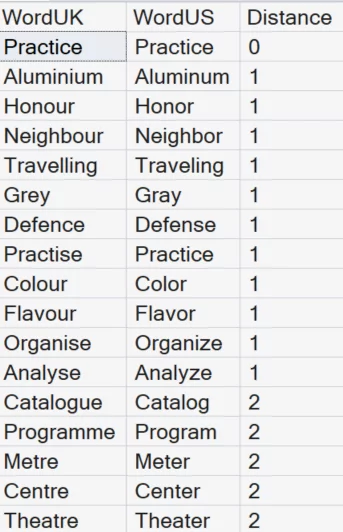
How to interpret:
- 0 = exact match
- 1-2 = very similar
- Higher values = less similar
Use this when:
- You want strict similarity thresholds
- You’re cleaning data or validating near matches
Using the Edit_Distance_Similarity Function
Instead of raw distance, this gives a percentage-based similarity score.
--EDIT_DISTANCE_SIMILARITY
SELECT WordUK, WordUS, EDIT_DISTANCE_SIMILARITY(WordUK, WordUS) AS Similarity
FROM WordPairs
WHERE EDIT_DISTANCE_SIMILARITY(WordUK, WordUS) >=75
ORDER BY Similarity DESC;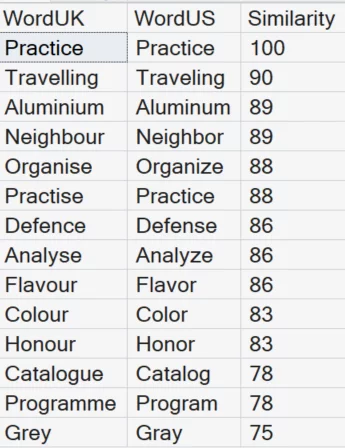
Why this is useful:
- Easier to explain to stakeholders
- Works well for scoring models and ranking matches
Use this when:
- You want human-readable scoring (0–100)
- You’re ranking possible matches
What is Jaro‑Winkler Distance?
Jaro‑Winkler distance (or similarity) is another string‑matching technique, similar to Levenshtein, but optimized for comparing short strings like names.
The name “Jaro‑Winkler” comes from two researchers: Matthew A. Jaro, who developed the original Jaro similarity metric in 1989, and William E. Winkler, who extended that work in 1990 by adding a prefix‑weighting enhancement that improves matching accuracy for strings that share the same beginning. In essence, “Jaro” refers to the base similarity method, while “Winkler” represents the refinement that boosts scores when prefixes match.
Simple definition
Jaro‑Winkler measures how similar two strings are by:
- Comparing matching characters
- Accounting for transpositions (letters out of order)
- Boosting matches at the beginning of the string (prefix)
That last part (prefix boost) is what makes it different from Levenshtein.
How the scoring works
Typically expressed as a similarity score from 0 to 1: 0 means no similarity and 1.0 equals identical strings. Sometimes you’ll see it expressed as distance = 1 − similarity.
Using the Jaro-Winkler Distance Function
Jaro-Winkler is optimized for short strings and name matching.
--JARO_WINKLER_DISTANCE
SELECT WordUK, WordUS, JARO_WINKLER_DISTANCE(WordUK, WordUS) AS Distance
FROM WordPairs
WHERE JARO_WINKLER_DISTANCE(WordUK, WordUS) <= .05
ORDER BY Distance ASC;
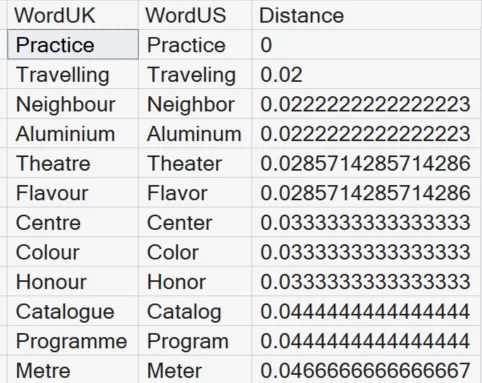
Key characteristics:
- Focuses on matching characters and position
- Penalizes transpositions less harshly than edit distance
Using the Jaro_Winkler_Similarity Function
This version returns a similarity score between 0 and 1:
-- JARO_WINKLER_SIMILARITY
SELECT WordUK, WordUS, JARO_WINKLER_SIMILARITY(WordUK, WordUS) AS Similarity
FROM WordPairs
WHERE JARO_WINKLER_SIMILARITY(WordUK, WordUS) > .90
ORDER BY Similarity DESC;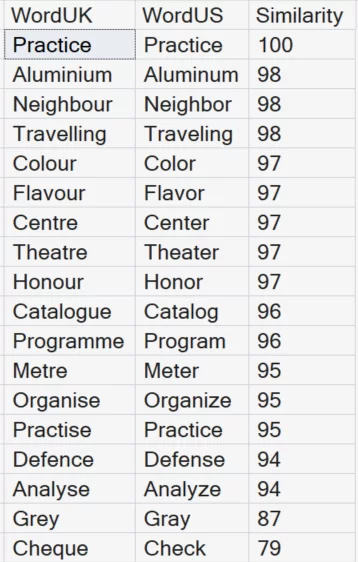
Why it matters:
- Provides a normalized similarity score
- Excellent for ranking and threshold-based filtering
Choosing the Right Algorithm
| Scenario | Recommended Function |
|---|---|
| Data cleansing with strict thresholds | EDIT_DISTANCE |
| Scoring and ranking matches | EDIT_DISTANCE_SIMILARITY |
| Matching names or short text | JARO_WINKLER_DISTANCE |
| High-confidence similarity filtering | JARO_WINKLER_SIMILARITY |
Real-World Use Cases
These functions unlock several practical scenarios:
- Data Migration Validation:
- Identify mismatches between source and target systems.
- Customer Data Deduplication:
- Match “Jon Smith” vs “John Smith” with confidence scores.
- AI and Semantic Workloads:
- Pre-process text before sending to embedding or vector search pipelines.
- Global Application Support:
- Handle regional spelling differences automatically.
Key Takeaways
- SQL Server 2025 brings native similarity matching to T-SQL.
- You no longer need CLR functions or external libraries.
- Different algorithms serve different use cases, so choose wisely.
- Similarity scores enable smarter, more flexible matching logic.
Similarity matching isn’t just a “nice-to-have”; it’s essential for modern data platforms. With these new built-in functions, SQL Server is closing the gap between traditional relational processing and intelligent data matching scenarios. And the best part? You can implement it using pure T-SQL in just a few lines.

Be the first to comment on "Similarity Matching in SQL Server 2025"