
When troubleshooting SQL Server performance, I often run into the same pattern: applications generating dynamic SQL strings that look nearly identical but aren’t. At first glance, everything works. Queries return results quickly. But under the covers? SQL Server is doing far more work than it should.
In this post, I’ll walk through a simple AdventureWorks2025 demo that shows:
- Why ad-hoc dynamic SQL can hurt performance
- How
sp_executesqlimproves plan reuse - And the tradeoff you need to understand, parameter sniffing
- Improvements in SQL Server 2025 with
OPTIMIZED_SP_EXECUTESQL
Ad-Hoc Dynamic SQL (Plan Cache Bloat)
Let’s start with a common anti-pattern:
USE AdventureWorks2025;
GO

DECLARE @sql NVARCHAR(MAX);

SET @sql = N'
SELECT SalesOrderID, CustomerID, TotalDue
FROM Sales.SalesOrderHeader
WHERE CustomerID = 11000';
EXEC(@sql);

SET @sql = N'
SELECT SalesOrderID, CustomerID, TotalDue
FROM Sales.SalesOrderHeader
WHERE CustomerID = 29825';
EXEC(@sql);

SET @sql = N'
SELECT SalesOrderID, CustomerID, TotalDue
FROM Sales.SalesOrderHeader
WHERE CustomerID = 11000';
EXEC(@sql);
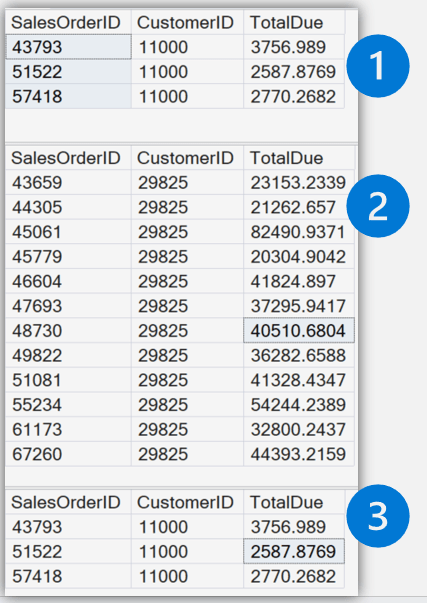
See the results of the dynamic queries
What’s happening?
We get three separate results based on the parameter values. However, even though the queries are logically identical, the query text is different. SQL Server treats each one as a separate query.
Inspect the Plan Cache
SELECT cp.usecounts, st.text
FROM sys.dm_exec_cached_plans cp
CROSS APPLY sys.dm_exec_sql_text(cp.plan_handle) st
WHERE st.text LIKE '%SalesOrderHeader%'
ORDER BY cp.usecounts DESC;
Key observation:
- Multiple cached plans
- Low reuse
- Increased memory and CPU usage
This is classic ad-hoc workload inefficiency.
Improve Plan Reuse with sp_executesql
Now let’s parameterize the query using sp_executesql
DECLARE @sql NVARCHAR(MAX);
DECLARE @CustomerID INT;

SET @sql = N'
SELECT SalesOrderID, CustomerID, TotalDue
FROM Sales.SalesOrderHeader
WHERE CustomerID = @CustomerID';

SET @CustomerID = 11000;
EXEC sp_executesql @sql, N'@CustomerID INT', @CustomerID;

SET @CustomerID = 29825;
EXEC sp_executesql @sql, N'@CustomerID INT', @CustomerID;

SET @CustomerID = 11000;
EXEC sp_executesql @sql, N'@CustomerID INT', @CustomerID;
Check the Plan Cache Again
--See how many plans are in cache and their use counts
SELECT cp.usecounts, st.text
FROM sys.dm_exec_cached_plans cp
CROSS APPLY sys.dm_exec_sql_text(cp.plan_handle) st
WHERE st.text LIKE '%SalesOrderHeader%'
ORDER BY cp.usecounts DESC;
What changes?
- One query text
- One cached plan
- Higher
usecounts
SQL Server can now reuse the plan efficiently.
Why This Matters
Using sp_executesql gives you:
- Plan Reuse
- One plan serves many executions
- Lower CPU Usage
- Fewer compilations
- Reduced Memory Pressure
- Smaller plan cache footprint
- Better Throughput
- Especially under concurrent workloads
The Tradeoff is Parameter Sniffing
Let’s take it a step further.
DBCC FREEPROCCACHE;
GO

DECLARE @sql NVARCHAR(MAX) = N'
SELECT SalesOrderID, CustomerID, TotalDue
FROM Sales.SalesOrderHeader
WHERE CustomerID = @CustomerID';

-- First execution (likely fewer rows)
EXEC sp_executesql
    @sql,
    N'@CustomerID INT',
    @CustomerID = 29825;

-- Second execution (likely more rows)
EXEC sp_executesql
    @sql,
    N'@CustomerID INT',
    @CustomerID = 11000;
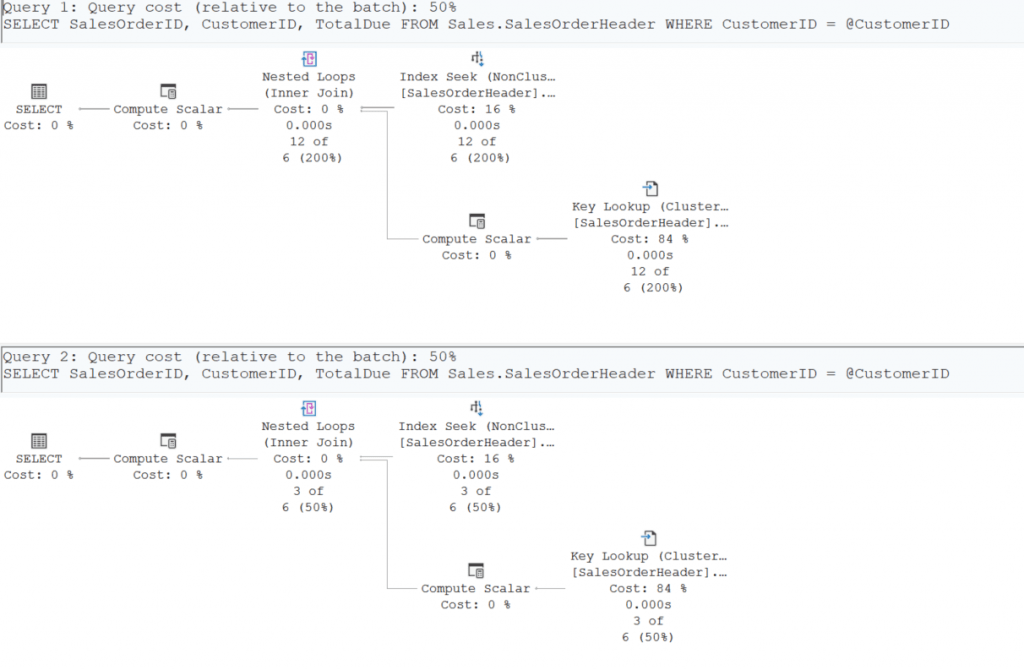
Look at the execution plan
Look at the XML of the plan

What just happened?
- The first execution determines the plan
- The second execution reuses it
If row counts differ significantly, the reused plan may not be optimal. This is known as parameter sniffing, where SQL Server bases optimization on the initial parameter value and reuses that plan for subsequent executions.
| Approach | Behavior |
|---|---|
| Ad-hoc SQL | Many plans (cache bloat) |
| sp_executesql | One reusable plan |
| Parameter sniffing | Plan may not fit all inputs |
OPTIMIZED_SP_EXECUTESQL in SQL Server 2025
Even when using sp_executesql correctly, SQL Server can still struggle under pressure. SQL Server 2025 introduces a major improvement: OPTIMIZED_SP_EXECUTESQL.
- Lots of parameterized dynamic SQL
- Heavy concurrency
- CPU spikes during compilation
The Hidden Problem: Compilation Storms
To simulate stress, you would run the following code concurrently in multiple sessions. Warning: May cause headaches, blurry vision, and your SQL Server Management Studio to crash.
DECLARE @i INT = 0;
WHILE @i < 1000
BEGIN
    EXEC sp_executesql
        N'
        SELECT SalesOrderID, CustomerID, TotalDue
        FROM Sales.SalesOrderHeader
        WHERE CustomerID = @CustomerID',
        N'@CustomerID INT',
        @CustomerID = 11000;

    SET @i += 1;
END
This is what SQL Server calls a compilation storm
- Multiple compilations may occur simultaneously
- CPU usage increases
- Throughput drops
Enable OPTIMIZED_SP_EXECUTESQL
ALTER DATABASE SCOPED CONFIGURATION
SET OPTIMIZED_SP_EXECUTESQL = ON;
GO
If we run the same workload again with OPTIMIZED_SP_EXECUTESQL = ON; SQL Server now treats sp_executesql batches more like stored procedures from a compilation perspective
- Serialized Compilation
- Only one compilation occurs at a time
- Reduced Contention
- Other sessions wait instead of compiling duplicate plans
- Lower CPU Usage
- Fewer redundant compilations
- Improved Throughput
- More efficient under concurrency
Summarization (TL;DR)
| Feature | Problem Solved |
|---|---|
| sp_executesql | Plan cache bloating |
| OPTIMIZED_SP_EXECUTESQL | Compilation storms |
| Parameter Sensitive Plan Optimization | Parameter sensitive plans |
.




Be the first to comment on "OPTIMIZED_SP_EXECUTESQL in SQL Server 2025"