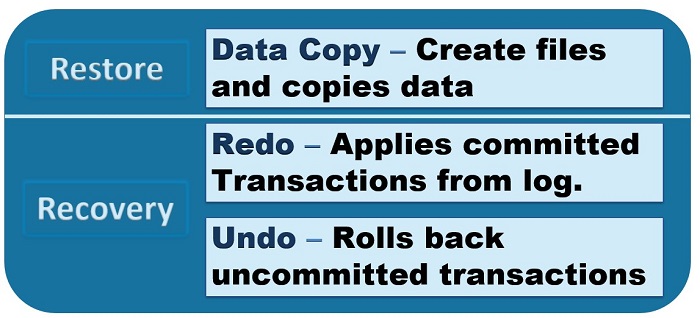
The restoration process of a SQL Server database passes through two phases. These phases are Restore and Recovery. The Restore phase performs a Data Copy of the database. The Recovery process is comprised of performing both Redo and Undo actions. These actions roll forward or roll back transactions from the transaction log.
Data Copy
The longest phase of database restoration is when the data files need to be recovered from the backups. SQL Server will recreate the data and log files. Then rewrite the data from the full database backup. Data pages are retrieved from the backup in order and written to the data files.
A differential backup adds and extra step. SQL Server will overwrite the extents restored from the full backup with the extents from the differential backup.
Redo
The Redo phase occurs when the database is in full or bulk-logged recovery model. Committed transactions that are found in the transaction log will be rolled forward during the recovery phase. They will be rolled forward up to the recovery point objective (RPO).
This is different if the database is in simple recovery model. Committed transactions would only be recovered from either the full database backup or the differential backup.
Undo
You typically recover your database to the chosen recovery time objective (RTO), which is normally the time of your database failure. The transaction log will include details of transactions that had not yet been committed. These uncommitted transactions will be rolled back by SQL Server during the undo phase.
The Restore Process
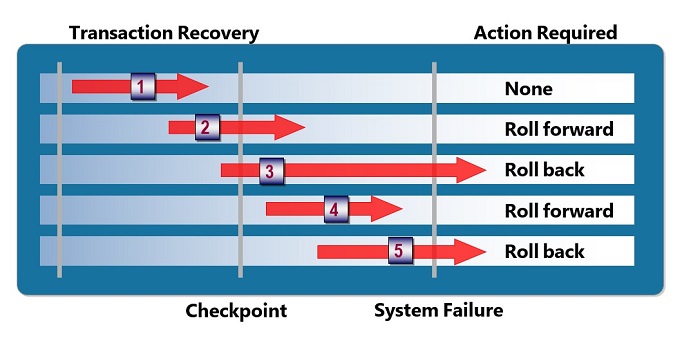
In the picture above, the database performed a checkpoint at noon, and a backup had been taken at that time. The restore process will capture all the transactions up until the point the database had been backed up.
The Recovery Process
After the database has been restored, the recovery process will roll forward transactions 2 and 4 because they had been committed to the transaction log before the point of failure. Since transactions 3 and 5 did not commit before the time of system failure, the undo process will roll back the transactions to keep the data in a consistent state.
Demonstration of a Restore Operation
To see this in code, below is an example of restoring the JDmusic database from the music.bak file. A Full Backup, Differential Backup, and a Log Backup had previously been completed and backed up to the music.bak file. Within that file, each backup that was made will be assigned a file number in order of when they were added to the file. In this case the Full backup is file 1, the Differential backup is file 2, and the Log backup is file 3.
Recovery vs NoRecovery
When restoring the Full or Differential backup there is not much difference other than selecting the correct file number. Since neither of these backups are the final item, when we are restoring, we use the NoRecovery statement so that only the Data Copy phase of the restore is completed.
When we get to the final log that we want to restore, we use the Recovery statement to tell SQL Server that the backup can now do the Redo and Undo phases of the restore process.
RESTORE DATABASE JDmusic
FROM DISK = 'D:\music.bak'
WITH FILE = 1, NORECOVERY;

RESTORE DATABASE JDmusic
FROM DISK = 'D:\music.bak'
WITH FILE = 2, NORECOVERY;

RESTORE DATABASE JDmusic
FROM DISK = 'D:\music.bak'
WITH FILE = 4, RECOVERY;


Be the first to comment on "Restore and Recovery"