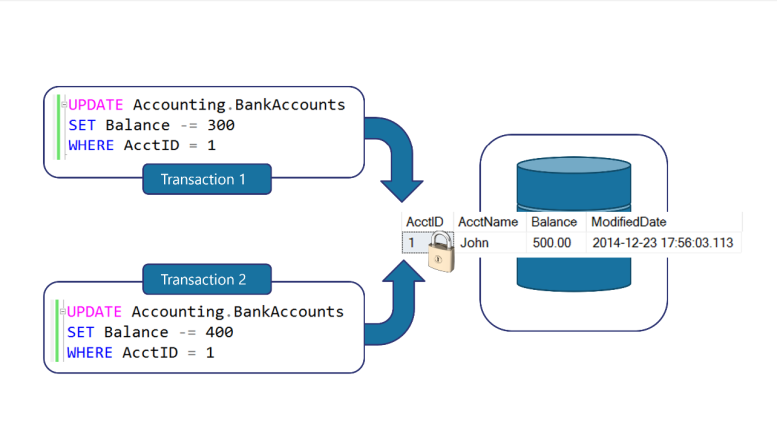
Locks are used in SQL Server for transaction isolation. This ensures that transactions do not interfere with each other. Let’s look at the example above. What would happen if both Transaction 1 and Transaction 2 were to operate on the same record at the same time? They would both be operating on the initial balance of $500.00.
Transaction 1 would subtract $300 and leave $200 in the account. Transaction 2 would subtract $400 and leave $100 in the account. Since the two transactions were not isolated. They would not know what the other transaction was updating. This would lead to inconsistent data.
The bank would think they had two transactions that subtracted $700 from a $500 balance. Since the second transaction was not aware of the first update, the balance would actually be $100. (This specific example is considered a Lost Update.)
To make sure this does not happen in a database, when Transaction 1 initially runs it will place a Lock on the record forcing Transaction 2 to wait until the first Transaction has finished.
After Transaction 1 has been completed, the second Transaction would then read that only $200 is actually left in the account. This would then allow the ability to either have the second Transaction print a message that there are insufficient funds and rollback the transaction or continue to process the Transaction which would leave -200 in the account.
You can set different locking settings by changing the Transaction Isolation Levels which is set to READ COMMITTED by default.


Be the first to comment on "What are Locks?"