
One of the most common reasons a well‑indexed SQL Server database still performs poorly is non‑SARGable expressions. Even experienced developers accidentally write queries that prevent SQL Server from using indexes efficiently; resulting in scans instead of seeks, excessive logical reads, and unnecessary CPU usage.
We’ll break down what SARGability is, why it matters, and how to rewrite common non‑SARGable patterns into efficient, index-friendly T‑SQL. To follow along with this post, you will need a copy of SQL Server, SQL Server Management Studio, and the AdventureWorks database. Find how to set up a SQL Server 2025 Practice Environment.
What Is SARGability?
A search condition is considered SARGable (Search ARGument ABLE) when SQL Server can use an index to efficiently locate rows. In practical terms: A SARGable expression allows SQL Server to perform an index seek instead of an index or table scan.
When predicates are not SARGable, SQL Server is forced to evaluate the expression row by agonizing row (RBAR), even when a suitable index exists. This can dramatically slow down query performance; especially on large tables.
Why Non‑SARGable Expressions Hurt Performance
Non‑SARGable expressions often introduce:
- Index scans instead of seeks
- Increased logical reads
- Higher CPU usage
- Poor cardinality estimates
- Slower query execution overall
Let’s look at the most frequent offenders.
Leading Wildcards in a LIKE Statement
Using a leading wildcard prevents SQL Server from using an index because it cannot determine where to start the search. Let’s look at two examples. The first statement is a search that is not using a leading wildcard when looking for the last name of Adams. The second is using the leading wildcard % and is searching for anyone with Adams in their last name. Find out more on filtering records by character data.
SARGable
SELECT LastName FROM Person.Person
WHERE LastName LIKE 'Adams%'
Non‑SARGable
SELECT LastName FROM Person.Person
WHERE LastName LIKE '%Adams%'
Why it matters:
The SARGable version can seek directly into the index. The non‑SARGable version must scan the entire index or table, resulting in significantly more logical reads.
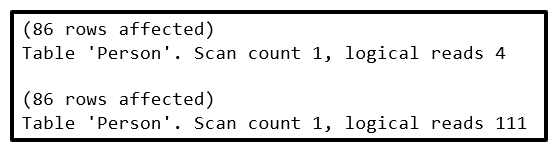
Let’s use SET STATISTICS IO for both queries that will tell us the amount of logical IO reads generated by the T-SQL statements. In both queries, 86 rows were returned. However, with the query that did not have a leading wild card we only need to read 4 data pages to seek out the records. The query with the leading wildcard ended up scanning 111 data pages to return the same information.
SET STATISTICS IO Results
Now let’s look at the execution plans for both queries. In the top query, the statement without the leading wildcard, the estimated operator cost was .0033792 compared to .103029 for the query with the leading wildcard in the statement.
Actual Execution Plan Results
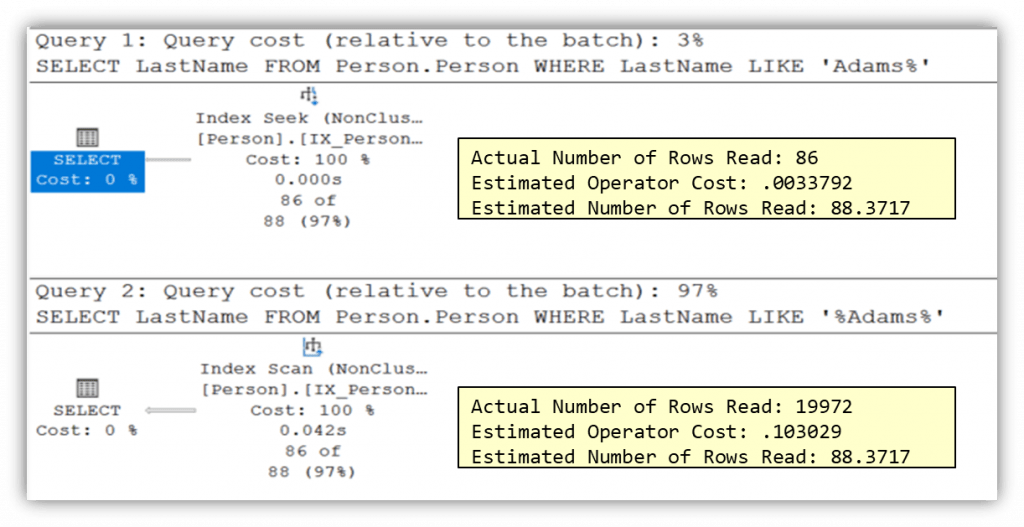
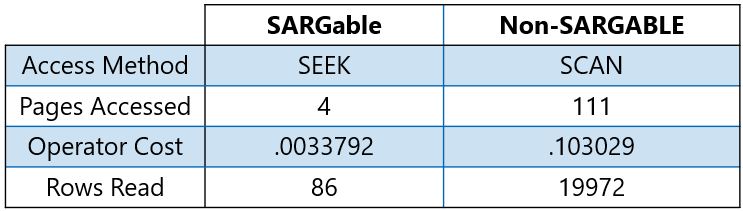
Also notice the first query performed an index seek and only needed to read 86 rows, while the second needed to perform an index scan and actually read 19972 rows. Again, showing the benefit of providing a proper search argument.
Expression Comparison Table
Scalar Functions on Character Columns
When a scalar function is applied to a column, SQL Server can no longer directly use the column’s index to locate matching rows. Instead of seeking out the appropriate values, the optimizer must scan the index or table and evaluate the function for each row to determine whether it satisfies the search criteria.
SARGable
SELECT LastName FROM Person.Person
WHERE LastName = 'Adams'
Non‑SARGable
SELECT LastName FROM Person.Person
WHERE UPPER(LastName) = 'ADAMS'
Why it matters:
Let’s check the number logical IO reads generated by the T-SQL statements. In both queries, 86 rows were returned again. And staying consistent, the query that did not have a scalar function only needed to read 4 data pages to seek out the records. The query with the scalar function ended up scanning 111 data pages to return the same information.
SET STATISTICS IO Results
Now let’s look at the execution plans for both queries. In the top query, the statement without the scalar function, the estimated operator cost was .0034032 compared to .103029 for the query with the scalar function in the statement.
Actual Execution Plan Results
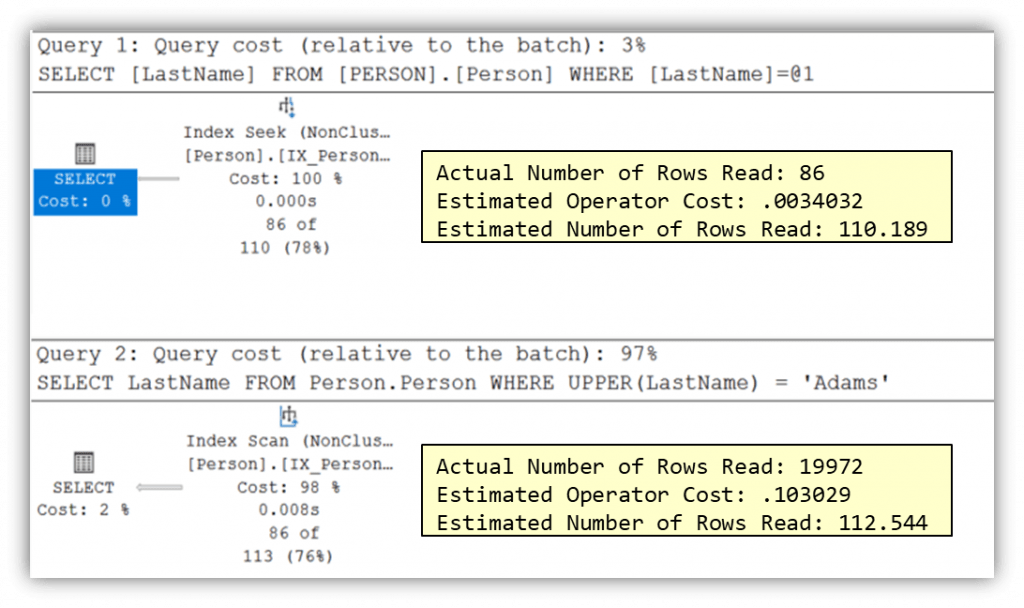
Again, just as with the leading wildcard example, the first query performed an index seek and only needed to read 86 rows, while the second need to perform an index scan and actually read 19972 rows. Again, showing the benefit of providing a proper search argument.
Scalar Functions on Numeric Columns
Mathematical functions in predicates force per‑row evaluation and can prevent efficient index usage, just like character functions. We are selecting from the Sales.SalesOrderDetail table this time. Find out more on filtering records by numbers.
SARGable
SELECT LineTotal FROM Sales.SalesOrderDetail
WHERE LineTotal > 23000
Non‑SARGable
SELECT LineTotal FROM Sales.SalesOrderDetail
WHERE ABS(LineTotal) > 23000
Why this fails:
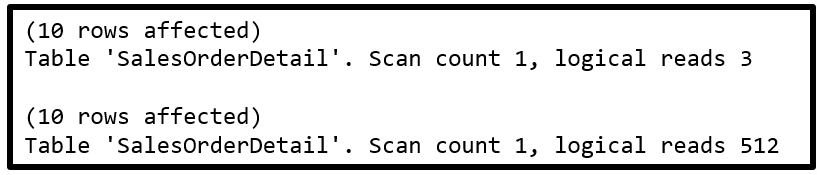
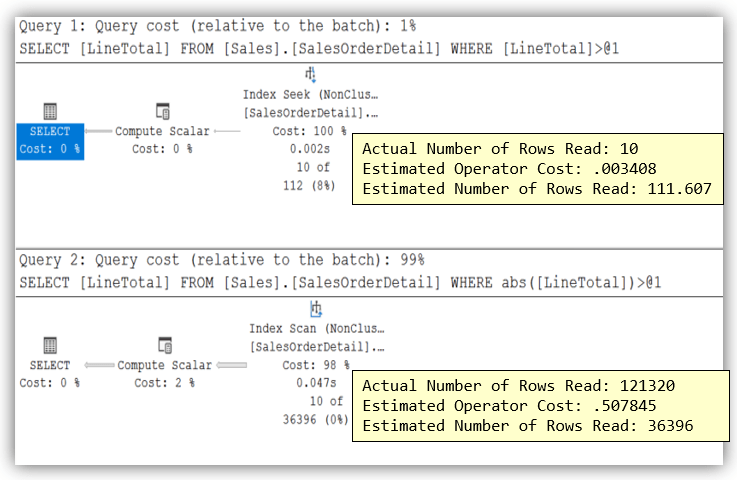
SQL Server cannot use an index on LineTotal because the value must be calculated for each row before comparison. Let’s look at both the SET STATISTICS IO and the execution plan for both queries.
SET STATISTICS IO Results
Actual Execution Plan Results
Expression Comparison
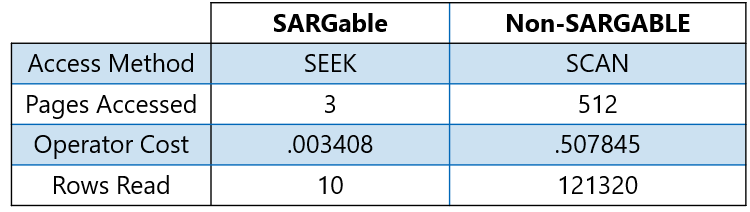
As you can see in the table the SARGable expression wins in every category. We have a seek instead of a scan and only 3 pages were accessed as opposed to 512 pages for the non-SARGable statement. The operator cost for the expression without the scalar function was .003408 as compared to .507845 with the scalar function. Finally, the first query only needed to read 10 rows, while the second needed to actually read 121320 rows. Again, showing the benefit of providing a proper search argument.
Scalar Functions on Date Columns
Date filtering is a frequent performance pitfall, as applying functions to date columns commonly breaks SARGability. To keep date predicates SARGable, the indexed date column must appear unmodified on the left side of the comparison operator. Find out more about filtering records by dates and time
SARGable
SELECT OrderDate FROM Sales.SalesOrderHeader
WHERE OrderDate BETWEEN '2014-01-01' AND '2014-12-31'
Non‑SARGable
SELECT OrderDate FROM Sales.SalesOrderHeader
WHERE YEAR(OrderDate) = 2014
Why this fails:
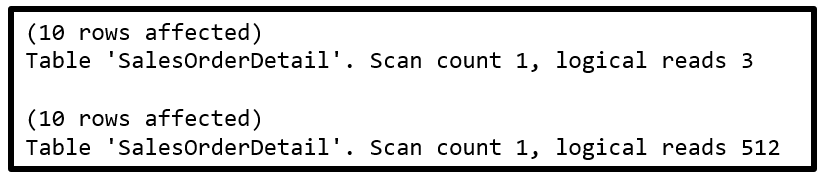
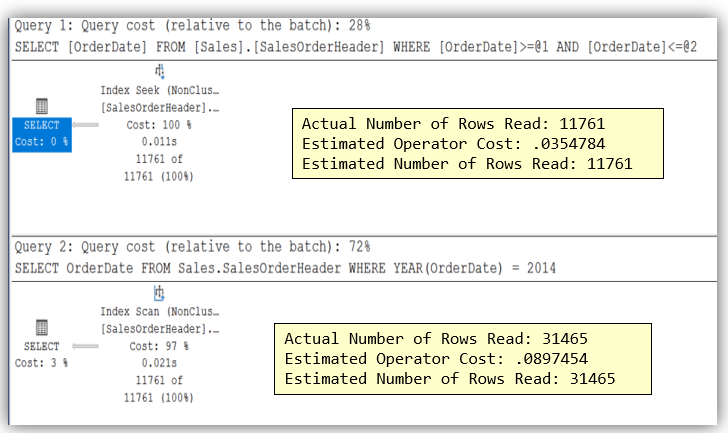
SQL Server can only perform an index seek when it can compare the stored column values directly to a search argument. Applying scalar functions to date columns breaks that relationship and forces scans instead of seeks. Let’s look at both the SET STATISTICS IO and the execution plan for both queries.
SET STATISTICS IO Results
Actual Execution Plan Results
Expression Comparison
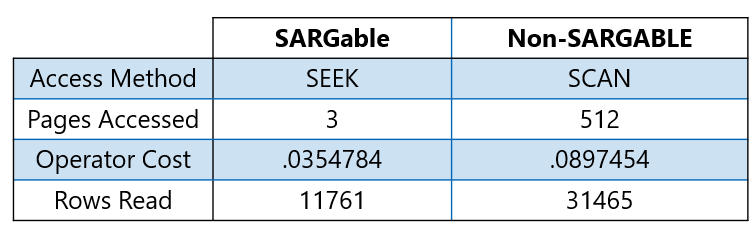
Key Takeaway:
As you can see in the table the SARGable expression wins again in every category. Avoid extracting parts of a date column on the left side of the WHERE clause. Filter using ranges to the right of the comparison operator instead.
Date Comparisons and Expressions
Even when using date functions, where you apply them matters. As mentioned in the previous example, filter to the right of the comparison operator. here is another example.
SARGable
SELECT OrderDate FROM Sales.SalesOrderHeader
WHERE OrderDate < DATEADD (YEAR, -1, '2014-01-01')
Non‑SARGable
SELECT OrderDate FROM Sales.SalesOrderHeader
WHERE DATEADD (YEAR, 1, OrderDate) < '2014-01-01'
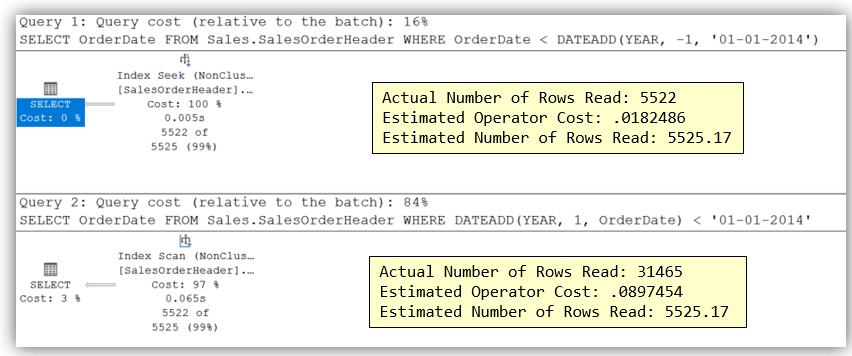
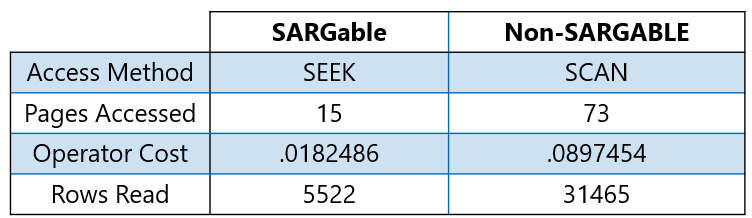
Let’s look at both the SET STATISTICS IO and the execution plan for both queries. Use the expression comparison table to draw your own conclusions. Rule of thumb: Apply functions to constants, not to columns.
SET STATISTICS IO Results

Actual Execution Plan Results
Expression Comparison
Practical Rules for Writing SARGable T‑SQL
When you’re writing WHERE clauses, a few simple habits can go a long way for performance. Think of it as making life easier for the optimizer:
- Compare columns to constant values when possible
- Use range predicates when filtering on dates
- Transform the search values, not the column itself
- Steer clear of functions on indexed columns
- Avoid doing calculations on the left side of comparisons
- And try not to use leading wildcards with
LIKEstatements
Follow these patterns, and you’ll give SQL Server the best chance to use indexes efficiently instead of falling back to scans.
Final Thoughts
SARGability is one of the highest return on investment performance skills a SQL developer can learn. Small changes to predicates can turn expensive scans into efficient seeks; often without adding or changing indexes. If a query feels slow and should be fast, start by inspecting the WHERE clause. Chances are, a non‑SARGable expression is hiding in plain sight. And remember Friends don’t let Friends SELECT *.




Be the first to comment on "Writing SARGable Expressions in T‑SQL"