
Modern SQL Server workloads demand high concurrency without sacrificing consistency. Traditionally, we relied on locking to enforce correctness, but that came with blocking and performance challenges. To resolve some of these issues, row versioning was used to reduce some of that contention overhead. But now with optimized locking in SQL Server 2025, we have a more efficient and scalable concurrency model.
In this post, we’ll walk through:
- Transaction locking vs row versioning
- How traditional locking generally behaves
- How row versioning changes read behavior
- How optimized locking reshapes write behavior
Ensuring Data Integrity and Concurrency in SQL Server
The Database Engine uses two primary mechanisms to maintain transaction integrity and data consistency when multiple users access the same data simultaneously:
Locking
- Transactions request locks on resources such as rows, pages, or tables.
- Read more: Lock Granularity.
- These locks prevent other transactions from making conflicting changes.
- Read more: Lock Compatibility.
- Locks are held only as long as needed and released once the transaction is no longer needed.
- The majority of locks are released at the end of a transaction with the exception of Shared Locks on Read Committed Isolation Level, which releases locks after reading.
Row Versioning
- Instead of relying solely on locks, row versioning keeps previous versions of modified data.
- Read more: Row Versioning Guide.
- Transactions can read a consistent snapshot of data as it existed at the start of the transaction.
- This significantly reduces blocking between read and write operations.
- Row versioning is used with either the READ COMMITTED or SNAPSHOT isolation levels.
Key Takeaway
- Locking protects data by restricting access during modifications.
- Row versioning improves concurrency by allowing reads without blocking writes.
Together, these mechanisms balance data correctness with concurrency in multi-user environments.
The Foundation: Traditional Locking
Before we get to Optimized Locking, we will discuss how SQL Server uses locks to enforce the ACID properties of a transaction. When a statement updates data:
- It acquires locks at a granular level.
- Those locks are typically held until the transaction completes
- This can lead to blocking and lock escalation
Demo: Baseline Locking Behavior
To start let’s make sure Optimized Locking is disabled:
USE MASTER;
GO
ALTER DATABASE [AdventureWorks2025]
SET OPTIMIZED_LOCKING = OFF
WITH ROLLBACK IMMEDIATE;
GO
Enable ADR (required later):
USE [master];
GO
ALTER DATABASE [AdventureWorks2025]
SET ACCELERATED_DATABASE_RECOVERY = ON
WITH ROLLBACK IMMEDIATE;
GO
Now run a transaction that updates the Sales.SalesOrderHeader table by 2,500 rows:
USE AdventureWorks2025;
GO
-- Run this batch first to update 2500 rows
DECLARE @minsalesorderid INT;
SELECT @minsalesorderid = MIN(SalesOrderID) FROM Sales.SalesOrderHeader;
BEGIN TRAN
UPDATE Sales.SalesOrderHeader
SET Freight = Freight * .10
WHERE SalesOrderID <= @minsalesorderid + 2500;
GO
Inspect the locks using the sys.dm_tran_locks dynamic management view:
USE AdventureWorks2025

SELECT resource_type, resource_database_id, request_mode,
    request_session_id, COUNT(*) AS lock_count
FROM sys.dm_tran_locks
WHERE resource_type != 'DATABASE'
GROUP BY resource_type, resource_database_id,
    request_mode, request_session_id
GO
What You’ll Observe:
- Thousands of KEY (X) locks
- Multiple PAGE locks
- Locks held for the duration of the transaction
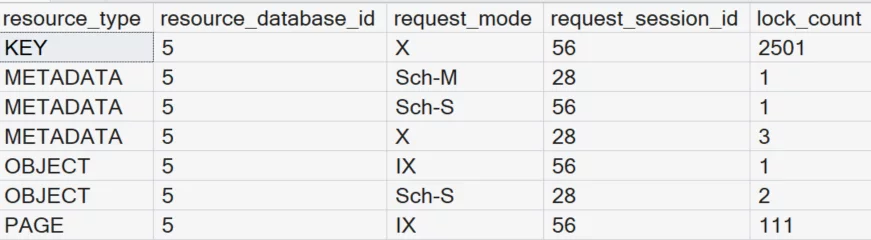
Return to the query that was updating 2,500 rows and commit the transaction to release the locks.
COMMIT TRANSACTION
GO
If you scale the script to update 10,000 rows, you’ll often see lock escalation, increasing contention:
USE AdventureWorks2025;
GO
-- Run this batch first to update 10000 rows
DECLARE @minsalesorderid INT;
SELECT @minsalesorderid = MIN(SalesOrderID) FROM Sales.SalesOrderHeader;
BEGIN TRAN
UPDATE Sales.SalesOrderHeader
SET Freight = Freight * .10
WHERE SalesOrderID <= @minsalesorderid + 10000;
GO
Inspect the locks again using the sys.dm_tran_locks dynamic management view:
USE AdventureWorks2025

SELECT resource_type, resource_database_id, request_mode,
    request_session_id, COUNT(*) AS lock_count
FROM sys.dm_tran_locks
WHERE resource_type != 'DATABASE'
GROUP BY resource_type, resource_database_id,
    request_mode, request_session_id
GO
You’ll often see lock escalation to the table level, thus increasing contention.

Return to the query that was updating 10,000 rows and commit the transaction.
COMMIT TRANSACTION
GO
Enter Row Versioning
Row versioning improves read concurrency by allowing readers to access the previous version of a row. This removes the need for shared locks during reads. Read more: Row Versioning in SQL Server. You enable row versioning by enabling one of the following features:
- READ COMMITTED SNAPSHOT (RCSI)
- SNAPSHOT isolation
- Accelerated Database Recovery (ADR) (required for optimized locking)
Row versioning helps readers avoid blocking writers, but it does NOT eliminate write locks. Writers still block writers, which is where optimized locking can be used in SQL Server 2025.
The Breakthrough: Optimized Locking
Optimized locking fundamentally changes write behavior. Instead of holding a lock for the duration of a transaction, SQL Server acquires locks to qualify rows. It then releases them immediately after modification while retaining only a lightweight transaction (XACT) lock.
Demo: Optimized Locking in Action
Enable optimized locking:
USE MASTER;
GO
ALTER DATABASE [AdventureWorks2025]
SET OPTIMIZED_LOCKING = ON
WITH ROLLBACK IMMEDIATE;
GO
Re-run the transaction that updates the SalesOrderHeader table by 2,500 rows:
USE AdventureWorks2025;
GO
-- Run this batch first to update 2500 rows
DECLARE @minsalesorderid INT;
SELECT @minsalesorderid = MIN(SalesOrderID) FROM Sales.SalesOrderHeader;
BEGIN TRAN
UPDATE Sales.SalesOrderHeader
SET Freight = Freight * .10
WHERE SalesOrderID <= @minsalesorderid + 2500;
GO
Inspect the locks using the sys.dm_tran_locks dynamic management view:
USE AdventureWorks2025

SELECT resource_type, resource_database_id, request_mode,
    request_session_id, COUNT(*) AS lock_count
FROM sys.dm_tran_locks
WHERE resource_type != 'DATABASE'
GROUP BY resource_type, resource_database_id,
    request_mode, request_session_id
GO
Notice What Changes?

Instead of thousands of KEY locks and numerous PAGE locks, you will see two locks
- one intent exclusive (IX) lock on the table (OBJECT).
- one exclusive (X) lock on the transaction (XACT).
Why This Matters
- Blocking is significantly reduced
- Transactions no longer hold row locks unnecessarily
- No Lock Escalation
- Better Throughput Under Load
Bringing It All Together
| Feature | Purpose | Impact |
| Traditional Locking | Ensures consistency | Can cause blocking and escalation |
| Row Versioning | Improves read concurrency | Eliminates reader-writer blocking |
| Optimized Locking | Improves write concurrency | Reduces lock duration and escalation |
The Big Picture
- Locking is still essential for correctness
- Row versioning removes read contention
- Optimized locking removes much of the write contention
Together, they form a modern concurrency model. For years, database tuning meant carefully managing lock contention. With SQL Server 2025, the engine itself is doing much of that work for you. Optimized locking plus row versioning equals a major leap forward in concurrency.




Be the first to comment on "Understanding Optimized Locking in SQL Server 2025 "