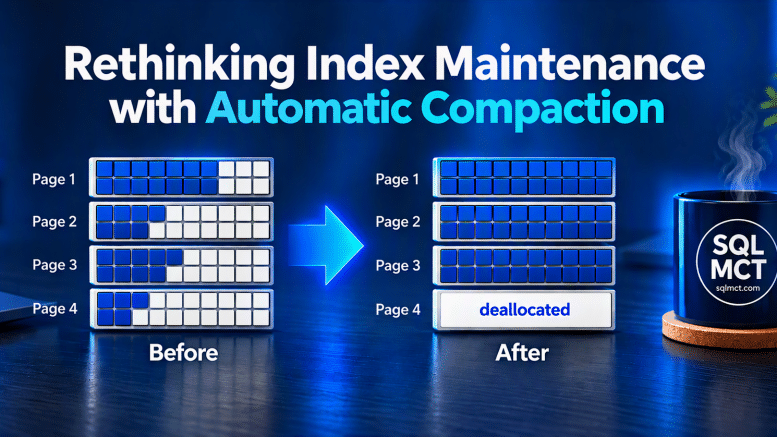
Rethinking Index Maintenance with Automatic Index Compaction starts with questioning one of the most familiar routines in SQL Server administration. For years, we checked avg_fragmentation_in_percent, reorganized indexes when fragmentation crossed one threshold, rebuilt them when it crossed another, and then ran the same process again the following week.
Anyone who has managed SQL Server for a while probably recognizes the traditional 5% reorganize or 30% rebuild approach. But those Index Fragmentation Thresholds were completely made up. Primarily as they were simple values to baseline that made it easy to automate. But today we need to ask whether fragmentation percentage is really the best measurement for deciding when an index needs maintenance.
As storage has changed, Microsoft guidance around index maintenance has changed. The question should no longer be; How fragmented is my index? A better question is: How efficiently are the pages being used, and how much work is needed to access my data?
That distinction is becoming even more important with Automatic Index Compaction in Azure SQL Database. Rather than periodically rebuilding entire indexes simply because a fragmentation percentage crossed an arbitrary threshold, Azure SQL can continuously consolidate recently modified index pages and improve page density. This represents more than another database feature. It represents a different way of thinking about index maintenance.
We’ve Been Watching the Wrong Number
For years, DBAs have focused heavily on avg_fragmentation_in_percent from the sys.dm_db_index_physical_stats dynamic management view (DMV). That value measures logical fragmentation, essentially how out-of-order the index pages are.
Those numbers became deeply embedded in index maintenance practices. But they shouldn’t automatically determine whether an index needs maintenance. A second measurement deserves much more attention; avg_page_space_used_in_percent. This represents page density. It tells us how efficiently SQL Server is using the space inside its 8-KB data pages.
Consider two indexes:
Index A
Fragmentation: 55%
Page Density: 96%
Index B
Fragmentation: 18%
Page Density: 62%
Traditional maintenance logic probably targets Index A first. But Index B may be the more interesting performance problem because SQL Server potentially needs substantially more pages to store and access its rows. A densely packed index can sometimes perform well despite reporting significant logical fragmentation. A poorly packed index means more pages.
And more pages can mean:
- More logical reads
- More physical I/O
- More buffer pool usage
- More CPU
- More storage consumption
This is why page density belongs beside fragmentation whenever we evaluate an index.
Enter Automatic Index Compaction
Automatic Index Compaction (Currently in Azure SQL) takes this page-density concept and moves part of it into the database engine. As rows are inserted, updated, and deleted, pages can develop unused space. Traditionally we might eventually run an index REBUILD or REORGANIZE. Automatic Index Compaction takes a different approach. As part of background processing associated with the Persistent Version Store cleaner, Azure SQL examines recently modified eligible pages. When possible, rows can be consolidated:
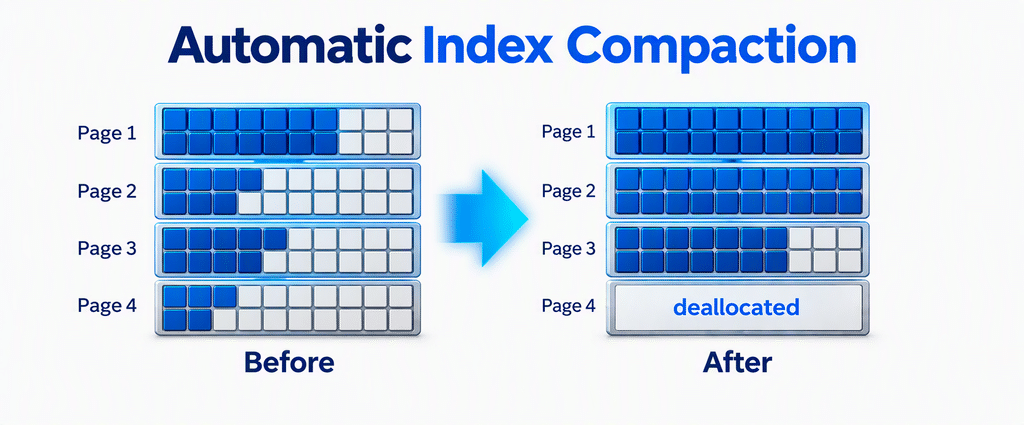
Same useful data. Fewer pages. Higher page density. Less space for the database engine to process. And this occurs continuously rather than waiting for the next maintenance window.
READ MORE:
- The End of Index Maintenance? | Data Exposed
- Automatic Index Compaction – SQL Server | Microsoft Learn
- Stop defragmenting and start living | Microsoft Community Hub
- Rethinking Index Maintenance – Tim Radney
- The Operational Cost of Maintaining Indexes – John Deardurff
AdventureWorksLT Demonstration
Let’s demonstrate these concepts using AdventureWorksLT in Azure SQL Database. The experiment is intentionally designed around measurement rather than simply trying to create a high fragmentation percentage.
- Create a test table.
- Create an index baseline.
- Measure fragmentation and page density.
- Generate internal free space.
- Compare the metrics.
- Enable Automatic Index Compaction.
- Generate more page activity.
- Monitor compaction.
Step 1: Create the Lab Table
Don’t modify the AdventureWorksLT tables directly. Instead, create a disposable demonstration table.
DROP TABLE IF EXISTS dbo.ProductCompactionDemo;
GO

SELECT p.ProductID, p.Name, p.ProductNumber, p.Color,
    p.StandardCost, p.ListPrice, p.Size, p.Weight, p.SellStartDate,
    REPLICATE (CAST (LEFT (COALESCE (p.Name, 'Product') + '-' +
        COALESCE(p.ProductNumber,'Unknown'),
        100) AS varchar (100)), 5) AS DemoData
INTO dbo.ProductCompactionDemo
FROM SalesLT.Product AS p;
GO
Make sure the Automatic Index Compaction is off.
ALTER DATABASE CURRENT
SET AUTOMATIC_INDEX_COMPACTION = OFF;
GO
AdventureWorksLT is small, so let’s increase the amount of data. This will take about two minutes and will add 301,785 records for a total of 302,080 total records.
DECLARE @Counter int = 0;

SET IDENTITY_INSERT dbo.ProductCompactionDemo ON
WHILE @Counter < 10
BEGIN
    INSERT dbo.ProductCompactionDemo
    (ProductID, Name, ProductNumber, Color, StandardCost,
        ListPrice, Size, Weight, SellStartDate, DemoData)
    SELECT ProductID, Name, ProductNumber, Color, StandardCost,
        ListPrice, Size, Weight, SellStartDate, DemoData
    FROM dbo.ProductCompactionDemo;

    SET @Counter += 1;
END;
SET IDENTITY_INSERT dbo.ProductCompactionDemo OFF
GO
Now create our clustered index. This should take just over 2 minutes.
CREATE CLUSTERED INDEX CX_ProductCompactionDemo
ON dbo.ProductCompactionDemo(ProductID);
GO
Step 2: Establish a Clean Baseline
For this demonstration, we will rebuild to give us a useful starting point before we deliberately create empty space inside the index. This again will take about two minutes.
ALTER INDEX CX_ProductCompactionDemo
ON dbo.ProductCompactionDemo
REBUILD;
GO
Step 3: Don’t Just Measure Fragmentation
Let’s collect three measurements together: Fragmentation, Page density, and Page count.
SELECT
    OBJECT_SCHEMA_NAME(ips.object_id) AS SchemaName,
    OBJECT_NAME(ips.object_id) AS TableName,
    i.name AS IndexName,
    ips.page_count AS PageCount,
    CAST(ips.avg_page_space_used_in_percent
        AS decimal(6,2)) AS PageDensityPercent,
    CAST(ips.avg_fragmentation_in_percent
        AS decimal(6,2)) AS FragmentationPercent
FROM sys.dm_db_index_physical_stats
( DB_ID(), OBJECT_ID('dbo.ProductCompactionDemo'),
    NULL, NULL,'DETAILED') AS ips
INNER JOIN sys.indexes AS i
    ON ips.object_id = i.object_id
    AND ips.index_id = i.index_id
WHERE ips.index_level = 0;
GO
This is already better than a fragmentation-only maintenance report as we are not only asking how fragmented the index is, but also how full are the pages and how many pages are involved?

Now our baseline includes Page Count, Page Density, and Fragmentation. This gives us something far more useful than fragmentation percentage alone.
Step 4: Create Internal Free Space
Delete alternating rows. This should take another minute.
DELETE dbo.ProductCompactionDemo
WHERE ProductID % 2 = 0;
GO
This deliberately leaves empty space throughout the index rather than simply removing one continuous range. Now rerun our physical-statistics query.
Step 5: Compare Metrics
SELECT
    OBJECT_SCHEMA_NAME(ips.object_id) AS SchemaName,
    OBJECT_NAME(ips.object_id) AS TableName,
    i.name AS IndexName,
    ips.page_count AS PageCount,
    CAST(ips.avg_page_space_used_in_percent
        AS decimal(6,2)) AS PageDensityPercent,
    CAST(ips.avg_fragmentation_in_percent
        AS decimal(6,2)) AS FragmentationPercent
FROM sys.dm_db_index_physical_stats
( DB_ID(), OBJECT_ID('dbo.ProductCompactionDemo'),
    NULL, NULL,'DETAILED') AS ips
INNER JOIN sys.indexes AS i
    ON ips.object_id = i.object_id
    AND ips.index_id = i.index_id
WHERE ips.index_level = 0;
GO
Page Count goes from 11049 to 8181, Page Density Percent goes from 98.11% to 80.69%, and Fragmentation is now 3.47

Step 6: Enable Automatic Index Compaction
Enable the database feature:
ALTER DATABASE CURRENT
SET AUTOMATIC_INDEX_COMPACTION = ON;
GO
Confirm the configuration:
SELECT name, is_automatic_index_compaction_on
FROM sys.databases
WHERE database_id = DB_ID();
GO
Automatic compaction runs asynchronously. We aren’t expecting an immediate rebuild-like transformation.
Step 7: Generate More Modification Activity
Automatic Index Compaction works with recently modified eligible pages, so let’s generate additional modification activity.
UPDATE dbo.ProductCompactionDemo
SET DemoData =
    CASE
        WHEN RIGHT(DemoData,1) = 'X'
            THEN LEFT (DemoData, LEN(DemoData)-1)
        ELSE DemoData + 'X'
    END
WHERE ProductID % 5 = 1;
GO
Step 8: Measure Again
Now return to the same measurements we established earlier.
SELECT
    OBJECT_SCHEMA_NAME (ips.object_id) AS SchemaName,
    OBJECT_NAME (ips.object_id) AS TableName,
    i.name AS IndexName,
    ips.page_count AS PageCount,
    CAST (ips.avg_page_space_used_in_percent
        AS decimal (6,2)) AS PageDensityPercent,
    CAST (ips.avg_fragmentation_in_percent
        AS decimal (6,2)) AS FragmentationPercent
FROM sys.dm_db_index_physical_stats
(DB_ID (), OBJECT_ID('dbo.ProductCompactionDemo'),
    NULL, NULL,'DETAILED') AS ips
INNER JOIN sys.indexes AS i
    ON ips.object_id = i.object_id
    AND ips.index_id = i.index_id
WHERE ips.index_level = 0;
GO
Wait a minute to allow automatic index compaction to take place and measure again. Notice the change.

Our priorities are Page Density and Page Count. While fragmentation remains useful contextual information, it is no longer the score we’re trying to optimize.
Don’t Forget Statistics
Automatic Index Compaction does not update index statistics.
- An index REBUILD does.
- An index REORGANIZE does not.
- Automatic Index Compaction does not.
If your existing rebuild process was indirectly keeping statistics current, eliminating those rebuilds without considering statistics could create an unintended consequence. Statistics deserve their own maintenance and monitoring strategy. For example, you can investigate statistics using:
SELECT OBJECT_SCHEMA_NAME(s.object_id) AS SchemaName, OBJECT_NAME(s.object_id) AS TableName,
    s.name AS StatisticsName, sp.last_updated, sp.rows, sp.rows_sampled, sp.modification_counter
FROM sys.stats AS s
CROSS APPLY
    sys.dm_db_stats_properties
    (s.object_id, s.stats_id) AS sp
WHERE OBJECTPROPERTY(s.object_id,'IsUserTable') = 1
ORDER BY sp.modification_counter DESC;
GO
This gives us another important change in mindset. Don’t rebuild an index merely because you want fresh statistics. Manage statistics because statistics need attention. Manage index page density because page density needs attention. Those are related operations, but they aren’t the same problem.
Should We Stop Using Fragmentation Thresholds?
I would stop treating them as automatic commands. A fragmented index is not necessarily a slow index. A compact index is not necessarily a perfectly ordered index. And neither measurement tells you by itself whether your application has a performance problem. Instead, use fragmentation as one signal among several. Look at page density, page count, logical reads, CPU. I/O, statistics freshness, 1uery performance, and workload characteristics. Then determine whether maintenance provides measurable value.
REBUILD vs. REORGANIZE vs. AUTOMATIC COMPACTION
| Characteristic | REBUILD | REORGANIZE | Auto Compaction |
|---|---|---|---|
| Processes entire index | Yes | Yes | No |
| Runs continuously | No | No | Yes |
| Improves page density | Yes | Yes | Yes |
| Reduces logical fragmentation | Yes | Yes | Not the objective |
| Updates statistics | Yes | No | No |
| Requires scheduled maintenance | Usually | Usually | No |
| Focuses on recently modified pages | No | No | Yes |

Be the first to comment on "Rethinking Index Maintenance with Index Compaction"